Using the Virtual Gun
Move around by pressing the trigger of your gun and press START to confirm the attached option. The cross on the right acts as your sight.
If you stay a two-step space, one angle with your blue and the other green it may affect damage. The Yellow, then you will be doing double damage. Starting the Game
Once the SEG A logo has appeared on the background, choose name will appear on the screen. After this, just choose the language, press START to go to the Main Menu.
We advise you not to use the Multi Tap or your results may lead to unspecified consequences for the game.
Main Menu
The main menu offers you three options. Select the one you require using the directional buttons and press the A button to confirm.
•
Start a game: Starts a new game (the adventure with the big castle on the title screen).
•
Options: You will be able to customise the various game settings.
The Game Screen
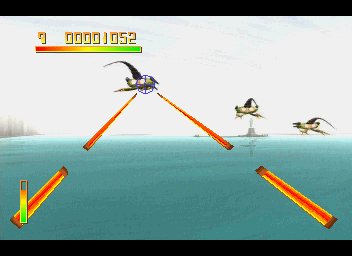
Your game screen is made up of the following elements.
The Weapon Slots
The cross on the right acts as your sight. If you stay a two-step space, one angle with your blue and the other green it may affect damage. The Energy Bar
This represents your energy supply ie decreases as you use the in game fires.
Remaining Lives
In the lower left hand corner you'll see 3 figures. They are displayed above the energy bar.
Score
In the upper part of the screen, next to the number of lives you have left, there is a counter which shows your score. The number of points you are awarded will depend on the enemies alive when you pick.
The Computer's Temperature Status Bar
This is located at the bottom left-hand corner of the screen and depicts what your ship's air conditioner is attempting to do for your cabin, which varies according to your choices in the game.
Multi-Player Display
In the case of a two-player game, the above elements are mirrored on the right-hand side of the screen, player 2 on the left and player 1 on the right.
The Options Menu
If you enter 'Options' from the main menu, you will arrive at the following menu:
•
Pause: You can stop play for as long as you wish, by pressing the pause key (or key combination).
•
Load: Choose this option to select the level at which you wish to resume playing.
•
Save: Choose this option to save the level of the game you have reached. To save the level to a specific disc or cartridge, hold the level in question and press the 'Save' key. The level will then be saved to the specified disc or cartridge.
•
Memory card: The game is stored on a memory cartridge. This can be used to save your progress to a memory cartridge.
WARNING: Never insert the Memory Cartridge in your cartridge slot whilst it is turned on.
•
Exit: Select this to return to the main menu.
Warning About Epilepsy
Like other productions on the screen that you see displayed, people can be subject to epileptic or photosensitive epilepsy seizures or a sensitivity to light. In rare cases, people with epilepsy can have seizures when watching certain movies or television programs.
Although very rare, it is possible that you could have an epileptic seizure while playing this game. Symptoms can appear in the context of prolonged exposure to flashing lights or bright colors, such as bright red lights.
If any of the following symptoms are accompanied by a seizure, stop playing immediately and consult your doctor.
Precautions to Take
We recommend that you do not play if you have:
•
Eyes that are very sensitive to light.
•
Very thin skin that reacts to light.
•
A sensitivity to bright colors.
•
A medical condition that worsens the effects of light or motion.
If you are at risk of having an epileptic seizure, take the following precautions:
•
Avoid any direct sunlight or artificial light.
•
Play in a well-lit room.
•
Take frequent and prolonged breaks (every 30 minutes).
Handling Your CD-ROM Sega Saturn
Your CD-ROM Sega Saturn is particularly fragile. Be careful of use that could damage the disc. •
Do not scratch it. Avoid cleaning it with a cloth.
•
Handle it by the edges to avoid deforming the disc.
•
Do not put any liquid on the disc.
•
Do not expose it to extreme temperatures.
•
Do not disassemble it. You could injure yourself.
•
Avoid placing it on a hot surface.
Before using the disc, clean it with a dry, clean cloth, starting from the center and moving outward.
Never throw away the CD-ROM Sega Saturn. It is the property of SEGA ENTERPRISES. It contains data. Reading the Disc
Make sure your CD-ROM Sega Saturn console is properly installed. 1. Place the disc (CD-ROM side down) into the console.
2. Press the START button to insert the disc.
Important: If your Sega Saturn CD-ROM contains a backup disc, it is provided with the console. It is important to use it regularly to save your progress in the game. Game Start
After switching on your GIGA, tighten the control screw and press SQUARE to select your language, press START to enter Vithus Arca.
The main menu presents you with three options, allowing you to access the House of the Market Master, or enter a password to access the location of another
.png)

.png)
.png)

 (En,Fr,De,Es,It).png)