SETTING UP
1. Set up your Sega Saturn system and plug the Control Pad into CONTROL PORT #1. 2. With the power switch OFF, insert the Black Dawn™ disc into the disc tray.
3. Turn on your TV or monitor and then turn on the Sega Saturn system. 4. Follow on-screen instructions.
If nothing happens on screen when you start up, turn the power switch to OFF. Check your Sega Saturn system and make sure the disc is properly inserted in the console. Turn the power switch ON again. Always turn the power switch OFF when you are inserting or removing the disc.
INTRODUCTION
1998. Terrorist activity is at an all-time high. Small, yet technologically advanced, groups are beginning to grow strong and powerful. Efforts toward regional stability and peace are failing, compromised by assassination, genocide and racial strife.
Separatism, nationalism, religious fervor and overpopulation are fueling the fires of conflict. Israel. Ireland. New York. Around the globe and in our own backyard, terrorist and gang activity has grasped a permanent foothold of fear in the lives of all. There is no end in sight.
A top secret Black Operations military group funded by the U.S. Government has been assembled. Being part of Black Operations means you ask few questions and trust no one outside of your unit. Your mission: to save innocent civilians and take out terrorist militia at any cost.
You will attack, destroy, escort, rescue, defend, insert and survive at any cost. Your mission will unfold on a need-to-know basis.
GAME SCREEN FEATURES
Name Enter Screen
Use the X Button to enter individual letters. Use the A Button to accept when finished.
•
CENTER NAME PLAYER 1C, letters
Insertion Point Screen
You will be given missions one at a time. Once you beat the mission, you will be given another. You may replay a previous mission, but you cannot open a new one until the previous mission is successfully completed.
Mission Briefing Screen
This screen will introduce the first objective of each mission.
Gunner Mode
The Gunner Mode is for the player who likes to maneuver and fire simultaneously.
POWER-UPS
Power-Ups will appear after select items have been destroyed. You can pick up power and weapons by maneuvering your craft through the spinning Power-Up icons. For weapons, there are three upgrades to your default gun: single fire (default), double fire and triple fire. Missiles and rockets can also be upgraded.
Power-Ups are coded by color to indicate their strength/value:
•
Blue - lowest power/lowest value
•
Orange - medium power/medium value
•
Gold - strongest power/strongest value
Remember: Power-Ups will disappear if you wait too long. Here are the key Power-Ups to keep an eye out for:
•
Machine Gun Power-Up (upgrades default weapon)
AIRCRAFT FEATURES
Overview
The AH-69 Mohawk's advanced fly-by-wire system is designed to simplify the operation of the aircraft and allows you to concentrate on the mission at hand. Features include:
•
Fly mode toggle for 2 different flight models (selected from Pause menu).
•
Automatic landing toggle (selected from Pause menu).
•
Automatic terrain-avoidance (always active in flight).
•
Smart throttle control (different in forward/backward flight).
•
Three different game modes, also known as control configurations (selected in shell).
Fly Mode Toggle
The fly mode toggle allows you to choose between two flight models.
If fly mode is set on NO, the Mohawk handles like an elevator. It maintains any desired altitude, regardless of orientation and airspeed. This allows you to aim the weapons at will without affecting the aircraft's altitude - useful for long attack runs against multiple ground targets.
If fly mode is set on YES, the Mohawk will fly more like a plane. In forward flight, the aircraft will descend if the nose is pointed down, and rise if the nose is pointed up. If the nose is pointing at a target, flying forward will cause the aircraft to close in on that target. Flying backward reverses these effects.
In both modes, the Automatic Terrain Avoidance system will prevent the aircraft from crashing into the ground.
Automatic Terrain Avoidance
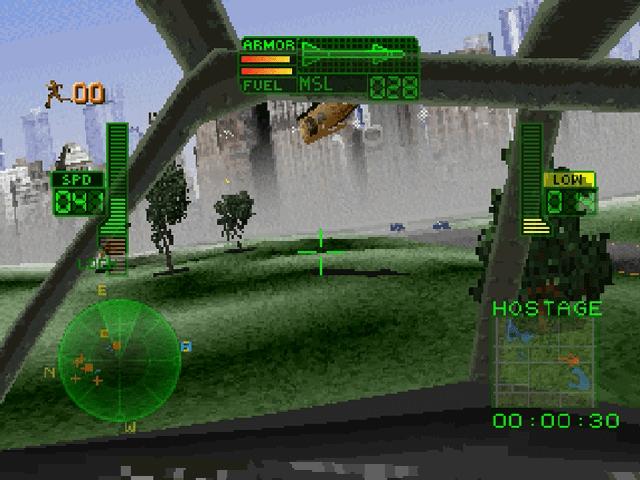
Terrain avoidance is always active while the helicopter is at speeds above 18 knots. The helicopter WILL NOT LAND unless it is in hover mode (flying at 18 knots or slower), to prevent structural damage. The Airspeed Indicator on the left side of the HUD indicates what mode is currently active.
The Terrain Avoidance system WILL NOT prevent collisions with trees, structures or vehicles.
Smart Throttle Control
Simply put, the helicopter will stay at whatever forward speed you set. If you put the helicopter into backward flight, it will slow to a hover as soon as the throttle is released.
Automatic Landing Toggle
Setting this feature to YES will cause the helicopter to gently land if it is in hover mode above a landing pad or in close proximity to a hostage. Auto-landing is aborted if you adjust the throttle or the collective.
Collective refers to raising and lowering the altitude of the helicopter. This is done by holding down the Z Button while pressing D-Pad up