Starting Up
Set up your Sega Saturn system as described in its instruction manual. Plug in Control Pad 1. Note that Dragonheart is for one player. Place the Dragonheart disc, label side up, in the well of the CD tray and close the lid. Turn on the TV or monitor and the Sega Saturn. The Sega Saturn logo appears on screen. If nothing happens, turn the system off and make sure it is set up correctly before turning it on again. Your Sega Saturn CD contains a security code that allows the disc to be read. Be sure to keep the disc clean and handle it carefully. If your Sega Saturn system has trouble reading the disc, remove the disc and wipe it carefully, starting from the center of the disc and wiping straight out toward the edge. Game Modes
•
NEW GAME: Begin a new game.
•
PRACTICE: Allows you to regain your combat mastery.
•
LOAD GAME: Allows you to play a previously saved game from either the internal memory or a Memory Cartridge. Highlight the desired game slot and press the START BUTTON to do so.
•
PASSWORD: Throughout the game, you will receive passwords when certain tasks are accomplished or areas are mastered. This password allows you to resume gameplay at the next level, so you may wish to write down passwords in the note section at the end of this instruction booklet. To input a password, simply move the cursor to the desired character and press the START BUTTON. Continue until you have assembled a correct password. Then highlight "OK" and press the START BUTTON.
Options
To set an option, highlight it by moving the Directional Button UP or DOWN, then press the START BUTTON to toggle settings.
•
CONTROLS: Select this to redefine control settings to your liking. To do so, scroll to an action and press the button you wish to perform that action. Select USE to save these settings, or CANCEL to stay at the default settings, then press START. •
AUDIO TEST: Choose Sound Test or Music Test to sample the sound effects or music in the game. Use the D-PAD to select a track, then press the START BUTTON to play it.
•
AUDIO SETUP: Choose audio setup to adjust sound and music settings. Use the D-PAD to increase or decrease volumes.
•
CREDITS: View Dragonheart game credits. Press START at any time to exit credits and return to the options screen.
Game Features
•
ENDURANCE METER: Shows Bowen's energy levels.
•
HEALTH METER: Shows Bowen's current health.
•
LIVES REMAINING: Indicates the number of lives left.
•
RING COUNTER: Tracks collected gold rings.
•
SWORD STRENGTH: Displays current weapon power.
•
ARMOR STRENGTH: Displays current armor defense.
Lives
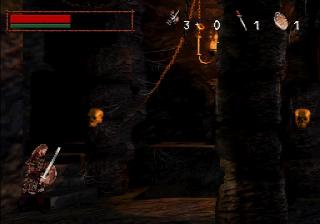
Bowen begins the game with just three lives in which to conquer Eion. His number of lives remaining is shown by a Bowen icon with a counter at the top center of the screen. Extra lives can be gained by collecting this pickup or by purchasing them with gold in the shoppe at the end of a level.
Health
Bowen's health is measured by a meter at the upper left of the screen. The meter decreases when Bowen is hurt; when it is empty, he loses a life. Health is replenished at the beginning of each new adventure. Health can also be increased by collecting these pickups:
•
Collect a golden goblet to partially increase your health.
•
Collect a silver goblet to maximize Bowen's potential health.
•
Collect a copper goblet to gain temporary invulnerability.
Enemy Health
The health of the last enemy struck is measured in a meter at the lower right corner. When the meter is empty, your foe is defeated.
Endurance
As Bowen exerts himself or rests, his endurance meter (the green bar below the Health Meter) dwindles or renews. Certain special moves require substantial energy. If you attempt a move requiring more Endurance than your meter shows you possess, you'll be forced to rest, and so be vulnerable.
Inventory
At any time during gameplay, you can press the Y BUTTON to access your inventory. There, you can see the items you've collected, select different weapons and view your game statistics. To select a different arrow from inventory, move the cursor to an arrow and press the START BUTTON. To return to the game without selecting a different weapon, move the cursor to Continue and press the START BUTTON. To exit the game, highlight QUIT and press the START BUTTON.
Level's End
At the end of each completed level, you will have a chance to save your game progress, and to use your accumulated gold in the Shoppe to purchase extra lives, dragon calls and other items. Use your wealth wisely.
Dragon Attacks
When you've become friendly with Draco, you may call on him to perform different types of attacks. To do so, you must have a Dragon Call. You can collect these, or even purchase them with gold rings. When the icon appears in the upper left of the screen, attacks are possible. Press Left Shift to summon Draco to perform an attack.
Slaying Dragons
You must learn how to slay each dragon, as there are different ways for each!
•
*This blade defends the helpless.*
•
*The downtrodden shall have their day! Or have you forgotten the oath you once swore, Bowen? Will your sense of honor and purpose be reawakened? You may have to kneel before great knights to earn increased advantages.*
•
*His might upholds the weak.*




 (En,Fr,De,Es,It).png)








.png)






.png)
