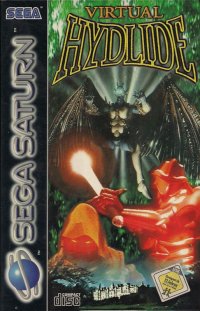
Unique Features of Virtual Hydlide
Virtual Hydlide is a perfect 3-D reproduction of the original hit title. It features realistic lighting, player viewpoints, and sounds that bring the monsters and worlds back to life.
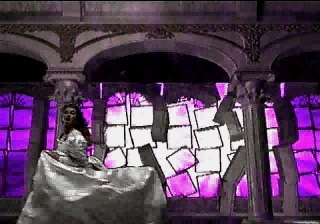
The game combines real images with computer graphics to create realistic worlds. Geographical features, texture mapping, and monsters are rendered using real-time calculations. The main character uses images of a real person to ensure realistic movements.
A “World Create” function allows players to experience a new world every time they start. There are over 40 billion combinations, making it nearly impossible to play the same game twice. Players can enter a specific code to reproduce a world or share one with friends using an identical code.
A scoring system is in place to enhance enjoyment. Scores depend on time taken, gold collected, stages cleared, difficulty level, and the game ending. You can challenge friends to see who can make the High Score Hall of Fame.
Starting the Game
To begin, insert the Virtual Hydlide CD into your Sega Saturn and turn on the power. Press the START Button when [PRESS START BUTTON] appears on the opening logo. The Start Up Window will then be displayed. Select one of the following options from the Start Up Window:
•
Create New World: Starts a fresh adventure.
•
Resume Game: Returns to a game interrupted during play. Note that this erases data from the interruption point onward.
•
Load Game Data: Continues from a saved point, retaining your time and score.
•
Copy Game Data: Copies saved data to an open position.
•
Delete Game Data: Erases unwanted saved data.
•
View Rankings: Displays top 10 scores and world codes.
•
Options: Adjusts settings such as degree of difficulty and sound tests.
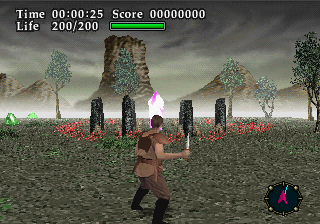
To create a new world, select [Create New World] and then [Create World Randomly]. Your character will appear in the middle of an open plain.
Navigation and Exploration
Use the compass in the lower right corner to guide you. The red arrow shows your current facing direction, while the blue line indicates the direction of the next area. Head toward the first area using this guide.
To check your surroundings in detail, press the Y Button to display the map. You can also change your facing direction while the map is displayed.
Follow the compass to reach your destination. For example, you might arrive at a cemetery where zombies await. Fight them off and search the perimeter to find hidden items, such as a strange tombstone.
To investigate objects, stand in front of them and press the X Button. This may reveal important items, such as a tombstone that crashes down to reveal its contents.
Battle Action
Encounter monsters by running into them. You may choose to fight or escape.
To attack, press the C Button for a fast but weak strike. This is useful for rapid firing or striking first, though it takes a moment to stand ready.
For a more powerful blow, press the B Button. This attack has a wider range but includes a slight delay, giving enemies a chance to counter.
Press both the B and C Buttons simultaneously for a Special Attack. The effect depends on your equipped items and may require specific techniques.
Resting and Recovery
If your HP is low, find a safe spot and stand still to recover. Your character will stand with arms folded while healing.
Before resting, ensure you are not in a fighting stance by pressing X. If you move, HP recovery will stop. You must stand absolutely still to heal.
Game Mechanics and Inventory
Items have weight, and all items except gold pieces contribute to this total. Your character's carrying capacity depends on physical strength. Exceeding the weight limit dramatically affects speed. Discard useless items to maintain mobility.
When equipping weapons, armor, and shields, ensure the total weight does not exceed your limit. Select equipment carefully to maximize effects without hindering movement.
Unknown items initially show only their general classification and weight. Use the item to reveal its proper classification and name for future reference.
Saving and Loading
Save your game frequently to prevent losing achievements. Saving also allows you to return to specific areas rather than starting over.
•
Save: Requires an open block of 288 bytes to store data.
•
Load: Restores previously saved data, retaining time and score.
•
Game Quit: Exits the current session. Use [Resume Game] to return to the point of quitting, though this does not save exact progress like loading data does.
Game Over and Scoring
When your HP reaches zero, the game is over. If you have a high ranking score, a REGISTER NAME screen will appear.
Name length limits depend on letter width. Wide letters like "W" allow a maximum of 6 letters, while narrow letters like "I" or "." allow up to 20.
You can choose to continue the game after a Game Over. Selecting [Continue] restarts the game at the entrance of the last area. Your character will be fully recovered from status effects like poison or paralysis, but your score will reset to zero.
To achieve the highest score, follow these guidelines:
•
Finish in the shortest time possible.
•
Collect as many gold pieces as possible.
•
Acquire all crucial items and increase your level.
•
Set the game to a higher degree of difficulty.
•
Clear the game with no misses.
Balance speed with caution to ensure you obtain crucial items early on, avoiding potential bottlenecks later in the game.
.png)


.png)
.png)

 (En,Fr,De,Es,It).png)