Starting the Game
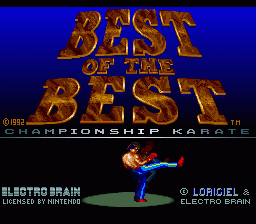
Insert your "Best of the Best Championship Karate" game pak into your Super Nintendo Entertainment System and turn the power on. As the title screen appears, you will see yourself practicing for your upcoming matches. Press the Start-button when you are ready to enter the ring and face your first challenge.
Navigating the Menu Screen
The menu screen allows you to orient yourself with the game's many options. To move between options, push the control pad in the direction of the option you want and press the B-button to enter.
The available menu options are:
Option #2: Pad-vs-SNES
This option defines the configuration of the commands for your game. Move the selection to the "Pad-vs-SNES" block and press the Select-button to cycle through the following choices:
•
Pad-vs-SNES: You select the left kickboxer and play against the SNES.
•
SNES-vs-Pad: You select the right kickboxer and play against the SNES.
•
Pad-vs-Pad: Activates two-player mode. Player one is the boxer on the left, and player two is the boxer on the right.
Option #3: Select Hits
There are 55 different hits available in the game, and you are able to select 13 of them for your moveset. This limitation to 13 blows allows immediate access to your desired techniques, resulting in faster striking and higher precision.
Use the following color-coded button inputs on this screen:
•
L-Button or R-Button: Go to the next or previous "Select Hits" page.
•
Y-Button: Visualize the current selection you just made.
•
X-Button: Quit the screen without validating your shots.
Option #5: Options
This mode opens an entirely new menu screen to customize your game. All changes made here apply to player one (and player two only if you are playing a two-player simultaneous game).
•
Change Boxer Name: Move the control pad to "Change Name", press the B-button, select the left or right boxer, and press the B-button again to input the change.
•
Reset Boxer: Return a boxer's name to default. Move to "Reset Boxer", press the B-button, select the boxer, and press the B-button again.
•
Change Nationality: Move to "Change Nationality" and press the B-button. Select your boxer, press the B-button, and use Left or Right on the control pad to cycle through the flags. Press the B-button to confirm.
Option #6: Alter Look
This option allows you to alter the appearance of your kickboxer. Move to the "Alter Look" block and press the B-button to cycle through the choices.
Once satisfied, move the control pad in any direction to exit the block. Changing your look will also change your attributes.
Option #7: Preview
This option allows you to preview the fighting styles of both you and your opponent. Study your opponent's moves here so you can select the most effective counter-moves in the "Select Hits" mode. Press the Select-button to escape this mode. Option #8: Match
Press the B-button on this option to begin the fight and enter the ring.
Option #9: Next Boxer
This option lets you cycle through the opponents you will face in the ring. Move to the "Next Boxer" block and press the B-button to cycle through the contenders.
If you have already defeated an opponent, advance to the next contender. You cannot fight top-notch kickboxers immediately; if your ranking is too low, you must keep training and winning matches to face them.
Button Controls
•
Y-Button: Visualizes your current selection in "Select Hits" mode. Also controls movement #28 in "Select Hits" mode.
•
X-Button: Quits "Select Hits" mode without validating shots. Also controls movement #33 in "Select Hits" mode.
•
A-Button: Quits "Select Hits" mode without validating shots. Also controls movement #26 in "Select Hits" mode.
•
B-Button: The main fire button. Use this button in coordination with the control pad to execute your moves.
Entering the Match
To start the fight, highlight "Match" on the menu and press the B-button. If there is too much of a difference between the two boxers' levels, the fight will be refused.
Before the fight and between rounds, a Pom Pom girl will display the round number. Press the B-button to clear her from the screen.
The Information Board
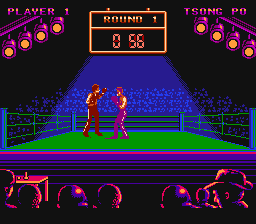
The information board is located above the ring and features a chronometer and two rows of footlights. Each round lasts for one minute, tracked by the chronometer.
The footlight strands are located above each boxer's corner. The brighter strand indicates which boxer is currently leading the match. The brightness varies based on landed blows.
Each footlight strand has four projectors, which display three different lighting intensities to reflect physical shape:
•
YELLOW: Maximum lighting (maximum physical shape).
•
ORANGE: Medium lighting (medium physical shape).
•
BLACK: Null lighting (null physical shape).
When all four projectors above a boxer's corner turn black, that boxer is knocked out and loses
.png)


.png)