Starting the Game
•
Turn OFF the power switch on your Super Nintendo Entertainment System. Never insert or remove a Game Pak when the power is on. •
Make sure your Controller is plugged into the left hand port on the Super Nintendo Entertainment System. •
Insert the Game Pak into the slot on the Super Nintendo Entertainment System. To lock the Game Pak in place, press firmly. •
Turn ON the power switch.
Get on the Case Fast!
•
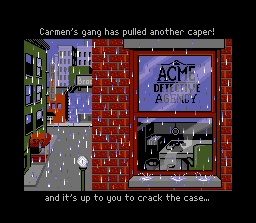
Load Where in the World is Carmen Sandiego?® The title sequence can be interrupted by pressing START, A, B, X or Y. •
On all screens, use the Control Pad to highlight your selection, then press A, B, X or Y to select.
•
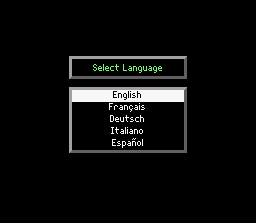
First choose a language, then press A, B, X or Y to access the Acme Comlink Computer.
When asked to log in, use the following steps to enter your information:
•
To enter your name, use the Control Pad up/down/left/right to select the first letter of your name, then press A, B, X or Y to select. When you have entered your full name, press START.
•
Choose your sex, then press A, B, X or Y to select.
•
Press START to begin a new game or press the Control Pad up/down/left/right to enter your three-letter password and press START to restore your rank.
Choosing a Language
You can work on the case in any of five languages.
•
To choose a language, Press the Control Pad up/down to move the green highlight over the language of your choice, then press A, B, X or Y.
Signing In
The investigation begins at the Acme Detective Agency, your home base. You must enter your name into the Acme Comlink™ crime computer before security clears you.
•
To enter your name into the crime computer, press the Control Pad up/down/left/right to move the red box over the first letter in your name, then press A, B, X or Y.
•
Repeat the procedure for each letter in your name, then press START.
•
If you make a mistake, move the red box over RUB and press A, B, X or Y. The last letter you entered will be rubbed out.
•
To enter your sex, press the Control Pad up/down to move the red box over your gender, then press any button.
If you're not restoring a saved rank, press START to begin your assignment.
Restoring Your Rank
•
To restore your rank, press the Control Pad up/down/left/right to move the red box over the first letter of your password, then press A, B, X or Y.
•
When all three letters of your password have been entered, press START.
The Assignment
The thief is heading for a hideout in one of 30 locations. To win the game and advance your career, you must accomplish two tasks before your deadline:
•
Track the criminal's movements to his or her final destination by using clues found in each location.
•
Identify the criminal and get a warrant for his or her arrest by interviewing witnesses.
Promotions are based on the number of cases you solve. You start as a Rookie and move up the ranks.
•
5 Cases Solved: Private Eye
•
12 Cases Solved: Investigator
•
20 Cases Solved: Ace Detective
•
30 Cases Solved: Retirement
Warrants are issued based on information you've entered in the Database. Clues can lead you to a particular city or to the country in which the city is located.
Clues to the identity of the thief will be given to you as you pursue the villain from city to city. You'll log these clues into the crime computer. When the identity of the suspect has been established, the computer will issue an arrest warrant.
Obtaining a warrant is very important. If you don't have one, you won't be able to arrest the thief once you catch up with him or her.
There are 10 possible suspects, any one of whom could be the thief. Carmen Sandiego® is the most elusive of the lot. During your search, the Dossiers menu allows you to select the individual crime file for any of the suspects to see who you're up against. The Acme Comlink™ Crime Computer
With the state-of-the-art Acme Comlink™, you can travel, gather and process clues, and review dossiers. The left screen displays your location, date and time so you can keep track of your progress.
The keys on the lower right panel of the screen control the crime computer. They are Options, Travel, Search and Data keys.
•
To select an option, press the Control Pad left/right to move the yellow box over the key of your choice and press A, B, X or Y.
•
When you select the Options, Search and Data keys, you are presented with a list of secondary options.
•
To select a secondary option, press the Control Pad up/down to move the cursor to the option of your choice, then press any button.
•
To return to the main screen, highlight EXIT MENU, then press A, B, X or Y.
Options Key
The Options feature lets you review and, in some cases, change the game setup. You can read the credit screen, view your password and the current case brief, change the language, or quit the
 (En,Fr,De,Es,It).png)



 (En,Fr,De,Es,It).png)







.png)
.png)

.png)
.png)


.png)

.png)