Main Menu Navigation
Navigate the screen using the up and down Directional Buttons. Highlight your selection and press the X button to confirm.
One Player
Two Player
Two Players is greyed out unless a controller is plugged into Controller Port 2.
World Tour
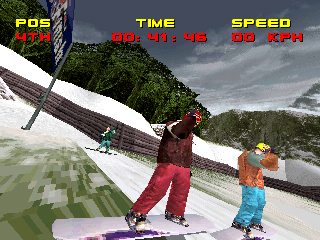
World Tour consists of Freeride and Boardercross races through six countries: USA, Switzerland, Japan, Scotland, Germany, and France.
World Tour - Easy Mode
As a beginner, you race in USA, Switzerland, and Japan. The first race you must win is USA.
Between each race is a randomly chosen trick event: Big Air or Halfpipe. Score 1000 bonus points to advance to the next World Tour Race.
If you win all three races, you will face a boss rider on the Japan course. Beat him to unlock the Scotland course and Medium difficulty mode. You will then have the opportunity to save your game.
World Tour - Medium Mode
During your second World Tour in Medium difficulty, you advance similarly. In each trick round, you must score 2000 points to advance.
Once you beat the boss rider in Scotland, you will unlock Hard difficulty mode and the Germany track. Save your game at this point to make all unlocked tracks available.
World Tour - Hard Mode
Race all six tracks of World Tour in Hard difficulty. Make 3000 bonus points in each trick event to advance to the next race.
Face down the final boss rider in the ultimate test of skill. Upon winning, the France track will be unlocked.
Training
Need some practice on an easy, straight course with some radical jumps? Pick your rider, clothes, and board, then hit the slope to perfect your technique.
Game Type Navigation
Navigate the screen using the up and down Directional Buttons. Highlight what you want, and press the X button to get it. If you don't like any of the choices, press the button to go back a screen.
Game Type Descriptions
•
FREERIDE: RACE - Race against an opponent for best time. No points are awarded for tricks performed.
•
FREERIDE: TRICK - Competition points are awarded based on race time remaining and tricks performed.
•
HALFPIPE - A trick-based competition held on a U-shaped man-made course. Come down each side of the course to keep momentum while performing tricks. Points are awarded based on the difficulty.
•
BIG AIR - Points are awarded based on a rider's successful tricks - the more difficult the better. The track is a big, straight downhill with one amazing jump.
•
BOARDERCROSS - This is a race against multiple riders on a course containing jumps, bumps, and obstacles.
Game Type Customization
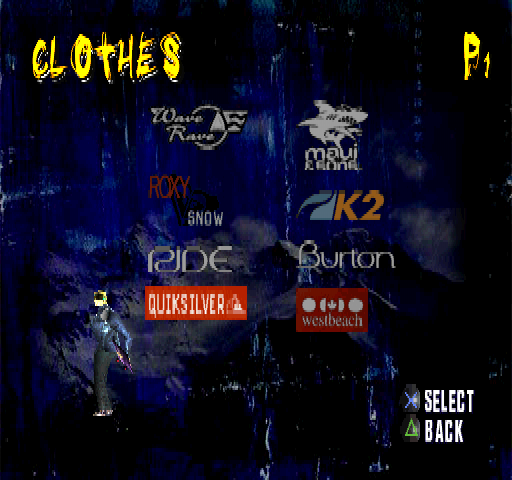
When you choose your Game Type, before you race, you can pick a rider, clothes for the rider to wear, and a board for the rider to use.
•
Choose a rider by scrolling through your choices using the right/left Directional Buttons and press the X button to choose.
•
Choose a brand and use the right/left Directional Buttons to pick clothes (up/down will toggle between jacket and pants).
•
Choose a board manufacturer and scroll through your choices using the Directional Buttons. Rotate each board with the button or the button.
Options Menu Navigation
Navigate the screen using the up and down Directional Buttons. Highlight what you want, and press the X button to get it. If you don't like any of the choices, press the button to go back a screen.
Options
Game Options
The sub-menu allows you to set various parameters for gameplay. Toggle the options using the right/left Directional Buttons.
•
DIFFICULTY: Three settings: Easy, Medium, and Hard. Choosing a harder difficulty setting will make the opponents more aggressive, and tricks more difficult to accomplish. This option is not available in World Tour.
•
SPEED MODE: Change between MPH/KPH.
Screen Options
•
SCREEN: Use the Directional Buttons to center the game screen.
Sound Options
Modify the settings for game sound.
•
SOUND FX VOL: This sets the default sound effects volume when you race.
•
MUSIC VOL: This sets the default music volume.
•
MUSIC TRACK: Listen to alternate music tracks.
Controller Options
Alter the controller settings from the game defaults.
•
CONTROLLER: Choose one of four controller settings.
•
ANALOG: Calibrate Analog Controller or reconfigure the sensitivity.
•
ANALOG (DUAL SHOCK): Adjust Controller sensitivity, and vibration on/off.
•
DEADZONE: Set Deadzone to a low number if you want a small amount of motion off-center to cause a response. Set Deadzone to a high number if you want a larger amount of motion off-center to cause a response.
•
SENSITIVITY: Set Sensitivity to a low number if you want a large stick motion to turn the rider on the screen; a high number if you want a small stick motion to turn the rider on the screen.
Memory Card
Select this option from the Main Menu to access your Memory Cards that are plugged into the PlayStation® game console. Use the Directional Buttons to select an option and then press the X button. Press the ▲ button to go back one menu. .png)

.png)
