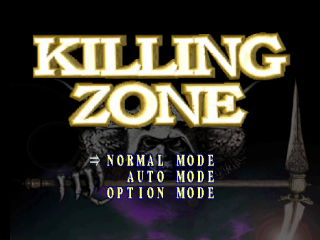
AUTO MODE
This is a simulation format mode where you develop your character as it competes against the computer. In this mode, you do not directly control the character.
OPTION
Set game settings to suit your style. To set an option, press UP or DOWN on the Directional Button to highlight an option, and press LEFT or RIGHT to select a setting. When you are through, press the START BUTTON to return to the title screen and begin game play.
•
LIFE: Set your life force to Minimum, Normal or Maximum.
•
TIMER: The round timer can be set to 60, 5, 30 or 99 seconds.
•
REPLAY: After each round victory, the deciding attack will be replayed (ON) or not (OFF).
•
SET: Choose how many rounds make a match: 2, 1, 3 or 5.
•
LEVEL: Choose from Easy, Normal, Hard and Hardest skill levels.
About the screens
See the enemy and yourself in this macabre world!
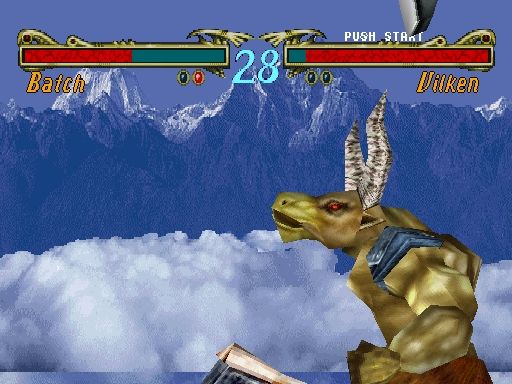
Basic game screens and operation of the control pad are as follows. When you fight against the computer, the 2P character will be the computer.
•
L2 BUTTON: moves sideways. (counterclockwise direction)
•
L1, R1 BUTTONS: protection. When combined with the down directional button, you can guard the lower section.
•
R2 BUTTON: moves sideways. (clockwise direction)
•
DIRECTIONAL BUTTON: move and jump your character.
•
When you tap the up arrow key, the jump will be small.
•
When you press the forward directional button, twice, quickly, the character will dash forward.
•
When you press the backward directional button, twice, quickly, the character will step backwards.
•
The character can move forward or backwards while in a squatting position.
•
SELECT BUTTON: is not used.
•
START BUTTON: is used for starting and/or pausing the game.
NORMAL MODE
The curtain of battle is now being raised. Is it glorious victory or humiliating defeat which awaits you?
In normal mode, your objective is to successfully control one of the seven available characters to ultimate victory in the tournament. When you are playing a two player game, your objective is to defeat the other player's character.
Each character possesses unique deathblows which are perfected by combining directional button and other buttons. In order to be a successful combatant, you must use deathblows skillfully.
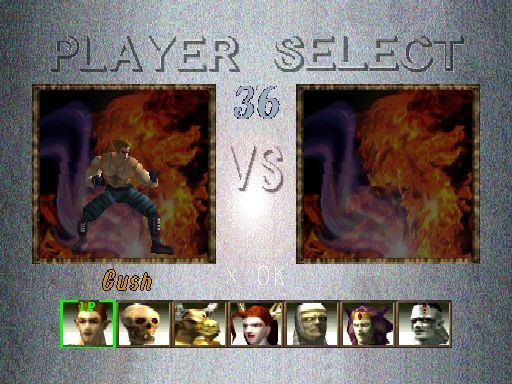
To select a character, press LEFT or RIGHT on the DIRECTIONAL BUTTON to highlight a character, then press the X BUTTON. If the X BUTTON is not pushed before the timer runs out, the character currently highlighted will automatically be selected.
Game Rule
A Normal Mode contest features best two out of three round matches, with the winner advancing to the next match. The combatant who is able to reduce his/her opponent's life meter to zero (nothing) within the prescribed time period is the winner of the game/round. You can also win by knocking your opponent out of the ring (a ring out).
If neither character's life meter reaches zero before time expires, the combatant having the higher life meter reading wins the game/round. If both characters have the same life meter reading remaining at the end of a given round, the round is declared a draw, and a fourth round decides who wins the game/round. However, if the fourth round ends deadlocked, the game is officially declared over.
AUTO MODE
Precise calculations, exacting strategy; You need both in order to achieve victory....
"Auto mode," is a truly unique mode in which you can build up your own character based upon "Killing Zone's" existing seven monsters.
In this mode, you do not directly control the fighting character, but instead "suggest" actions, much like a corner man in a boxing match. You, as a player, will direct the character during the fight with the goal of progressively developing the character. As the character develops, its own unique character traits take shape, with its physical appearance changing as well. First, select a character from the available default characters (which are comprised of seven distinct species). To select a character, scroll through them using the LEFT or RIGHT DIRECTIONAL BUTTON, then press the X BUTTON to confirm.
You will come to the parameters screen. To set your character's parameters move the highlight around the various portraits until the desired parameter combination is displayed. Press the X BUTTON to confirm your selection.
Then, you must name your character. To do so, press any direction on the DIRECTIONAL BUTTON to highlight a letter, and the X BUTTON to confirm. Continue until the name is complete, then highlight END and press the X BUTTON.
Parameters
There are six parameters enumerated below. Lacking in any parameter will make it difficult for you to develop a competitive character.
•
OFFENSIVE SKILLS (ATK): This measures the decline in opponent's strength caused by your character's attack(s). You can improve this skill by allowing your character to fight an offensive battle.
•
DEFENSIVE SKILLS (DEF): This measures how much stamina your character is able to preserve while defending against an opponent's attacks.
•
STAMINA (VIT): Stamina begins at a prescribed level. Your character acquires additional stamina by turning away an opponent's attacks.
•
SPEED (SPD): This measures how fast your character
.png)