Top View
Getting Started
1. Set up your PlayStation game console according to the instructions in its Instruction Manual.
2. Insert the Machinehead disc and close the CD cover.
3. Insert a game controller and turn the PlayStation game console on.
Follow the on-screen instructions to start a game.
Front View
Start Game
Upon starting a new game, you will be presented with your first MISSION BRIEFING.
After the required number of missions, you will be beamed through into a new domain. The story will unfold through FMV sequences and you will be presented with the MISSION BRIEFING pertaining to that domain.
Note on Orville
The closest Orville has ever been to normal social interaction is being helped out of a swimming pool whilst drowning. But listen carefully to his inane banter, for tips and strategies emerge as jewels from a dung heap.
Options Menu
•
Difficulty: Toggle through how tough you are
•
Animation Sequences: Turn on / off in-game FMV
•
Sound Volume / CD Volume: Alter in-game sound levels
•
CD Test: Select audio tracks to test
•
Control Configuration: Select to bring up this Menu screen
•
Adjust Display Position: Use the Directional buttons to center the image and color bars to adjust screen levels until satisfactory
•
Exit: Return to Main Menu
Control Configuration Menu
Choose your desired control set-up from a Pandora's Box of pre-defined choices. Using the Left and Right Directional buttons will scroll through the options.
Quitting the Game
Press the Start button, select Quit and press Start button again. Hit Start once more to confirm.
Target Lock
The game will lock on to any target entering the full circle. "Locked" enemies will display a highlighted triangle, in much the same fashion as a "kick me" sticker stuck on their foreheads.
Energy Readout
You are strapped unceremoniously to a cruise missile. Cruise missiles are developed to detonate upon impact, rendering large habitable areas uninhabitable, with a sideline in glow in the dark corpses.
Obviously, diligence should be of the utmost to avoid unwanted thermonuclear antics. Avoid enemy projectiles, avoid large drops. If your energy drops below 20% you will activate the...
Bomb Timer
Upon the Bomb Timer activating, the only way to prevent being vaporized before countdown reaches zero is to supplement your Power Bar.
Enemies contain energy, as do specific map areas. The clock will stop upon energy restoration, and will slowly increase to full time.
Unreality Keys
In an attempt to hinder your progress through the infested areas the Machinehead has trapped important segments of the landscape in an "Unreality zone". To access and repair these features Unreality Keys can be used at corresponding numbered terminals (left) to pull these trapped landscape segments back through into their rightful place in reality.
For example, if a broken bridge blocks your progress through the latter stages of a level the correct Unreality Key may pull the missing segment back from unreality into reality, hence repairing the bridge and allowing you access to the new area. Depending on your position, landscape changes may be visible as you access the terminals.
Pause Menu / Full Screen Map
Pressing START in game will freeze the action and present you with the opportunity to Continue or Quit. Selecting Quit will return you the Title Screen, Continue will return you to the game.
Machinehead Mission I Walk-Through
You have a number of tasks to perform in order to complete the mission successfully. The first thing you need to do is pick up unreality key #1. It's a big, flashing green #1 symbol in front of you...you can't miss it! After picking up the 1st unreality key maneuver straight into unreality terminal #1 (which will be activated when you approach it) to alter the landscape around you.
The 'trick' to progressing through MACHINEHEAD is collecting reality keys (usually to open doors) and unreality keys (to alter landscapes when used with the corresponding unreality terminal).
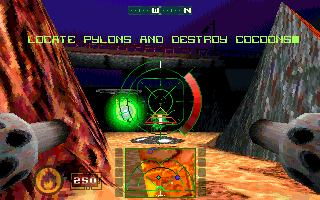
Consult your overhead map and look for your objectives (in this case cocoons). The mission objectives are represented on the map as blinking, rainbow colored circles. Destroy the cocoons as you maneuver towards the next unreality key (depicted as a flashing green dot on your overhead map). On the way to the 2nd unreality key, you'll run into a locked gate (with a big #1 on the gate). You'll need reality key #1 to enter this area....luckily reality key #1 is right in the vicinity (a big, flashing red #1 symbol). Pick up reality key #1, go through the gate, and obtain unreality key #2. Look on your overhead map and find the unreality terminal that corresponds to this key (it's depicted as a flashing blue dot). Go to the terminal and alter the landscape. This will allow you to obtain unreality key #3.
You get the idea!
When you've collected all of the unreality keys (and used them with the corresponding unreality terminals!) and destroyed all of the cocoons, power will be restored. Go activate the generator (by bumping into it) and release the train. The train will then drive into the next mission area.
Tips
•
Consult your overhead map often. It shows you where the unreality
.png)


.png)



.png)


_1.png)

.png)