Gameplay Notes
When starting a new game or completing a mission, Army Men 3D will search for a Memory Card in slot 1. If a card with an open block is found, the game will automatically save. If no Memory Card is detected, the game will halt and ask you to Rescan or Continue without Saving. If the Memory Card is full, you will be prompted to Delete a block.
Pressing the START button during gameplay brings up the Pause Menu. From here, you can review the Mission Briefing, change audio options, or quit the current game. If you select Quit, you will be given a Yes/No choice.
To return to the title screen, hold down the SELECT button and then hold down the START button for two seconds.
The strategic map (accessed with the SELECT button) provides a global overview of the mission and your relative position. The items listed on this map are informational, not objectives.
Occasionally, you will find troops needing command, and the Order Squad icon will appear in your inventory. Using this item brings up a pop-up menu.
•
Choose Follow Me or Defend using the directional buttons Up/Down and the X button.
Bootcamp is highly recommended for new players. It allows you to become comfortable with Sarge's abilities and test drive all the vehicles.
Menu System
•
Use the directional buttons Up/Down to highlight selections.
•
Use the X button to select.
•
Press the A button to return to the previous screen.
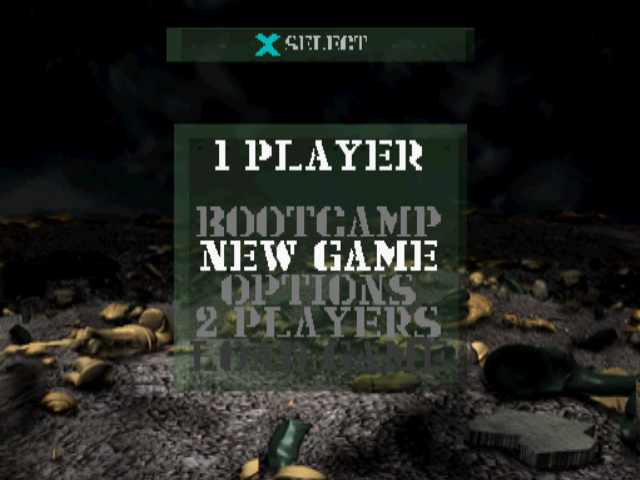
Main Menu
•
BOOTCAMP: Training mission to familiarize yourself with controls and game elements. Highly recommended for new players.
•
NEW GAME: Starts a new campaign game.
•
OPTIONS: Takes you to the Options Menu to change game details.
•
2 PLAYERS: Begins a 2-player game.
•
LOAD GAME: Load a saved game from a Memory Card.
Options Menu
•
AUDIO: Change sound and music volume, and stereo or mono mode. Make changes by highlighting a selection and using the directional buttons Left/Right.
•
DIFFICULTY: Select Easy, Normal, or Hard.
•
CREDITS: Find out who worked on this great game!
•
CONTROLLER 1: Change configuration, calibration*, and vibration options for the Controller plugged into Controller port 1. A Controller must be plugged into Controller port 1!
•
CONTROLLER 2: Change configuration, calibration, and vibration options for the Controller plugged into Controller port 2 (if any).
•
* -Analog Controller only.
2 Player Game Menu
•
NEW GAME: Begins a new game of Capture the Flag, Green army vs. Tan army. The object is to infiltrate the enemy's base, take their flag (by simply running into their flagpole), and return their flag to your own flagpole.
•
CHOOSE MAP: Select the type of terrain you wish to play on.
•
PLACE UNITS: Each player places his or her units on the map.
•
LOAD GAME: Loads a saved game from a Memory Card.
The map named "Santa Plastico" is a Quickstart map. There will be no setup screen; you will be taken directly to the game itself.
Placing Units in a 2 Player Game
A list of available units will appear on the left side of the screen, and an orange bounding box will appear in the center. Select the unit type you'd like to place using the ▲ and ✕ buttons.
Move around the map using the directional buttons. When placing a unit, decide whether it will attack or defend.
•
To place a unit on defense, press the □ button.
•
To place a unit on attack, press the ◯ button.
Defense units will stay put. Attack units will chase the enemy when spotted. Units cannot be placed in red areas. The game starts automatically when all units have been placed.
Battlefield Strategy
Watch the entire mission briefing at the beginning of each scenario to fully understand Sarge's orders.
Use the strategic map. It shows Sarge's current position and visual information about his objectives.
Army Men 3D is about strategy with brief periods of intense battle. Remember that death comes easily and can lie around the next corner. Learn to use cover to optimize Sarge's chances for success. Use the Combat Cam function to survey the terrain in a slightly magnified view.
Rolling lets Sarge pop into and out of cover and snipe enemies easily without being too exposed. Learn how to do a running dive into a prone position to further enhance Sarge's ability to use cover effectively.
Mission briefings, maps, and recons are the successful soldier's friend.
If all else fails, shoot something. It may not help, but you'll feel better.
.png)


 (En,Fr,De).png)



.png)




.png)
.png)

_1.png)

.png)

.png)
.png)
.png)