Console Top View
Console Front View
Set up your PlayStation® game console according to the instructions in its Instruction Manual. Make sure the power is off before inserting or removing a compact disc. Insert the NFL GameDay 2000 disc and close the disk cover. Insert game controllers and turn on the PlayStation® game console. Follow on-screen instructions to start a game. Pregame Setup
Menu Navigation
From each menu, use the directional arrow pad (D-Pad) Up/Down to highlight menu options and Left/Right to cycle through available options. Press Ⓧ to bring up the next menu and Ⓞ to cancel and return to a previous menu.
Notice the on-screen Help that runs across the setup screens to help guide you through the setup process. From a pop-up menu that may not have this type of Help, press Ⓧ to activate Help.
Mode
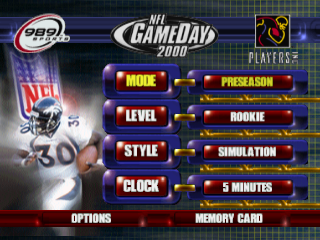
Before selecting a mode for your game, which will move you to the next setup screen, customize your game and the play on the field by altering the following game options.
To move to the Team Select screen for a mode, highlight the mode selection and press Ⓧ.
Level
Four different player levels give you the opportunity to play a game at your skill level. To prepare yourself for the challenge of playing at the All-Pro or Hall of Fame levels, first master the Rookie and Veteran levels.
Style
Set up the style of your game by choosing Simulation for ultra-realistic game play or Arcade for faster game play with exaggerated special moves. Simulation is highly recommended for beginners.
Advanced game controls can be used in Simulation and Arcade mode.
Clock
Set the length of the game by choosing the number of minutes to play per quarter. There are four quarters played during regulation plus an Overtime period if necessary.
Options
Use the following options to control the game attributes.
Music
Adjust the front-end and game music volume.
Announcer
Adjust the play-by-play and color-commentary announcer volume.
Penalties
Adjust the frequency of penalties called during the game.
Injuries
Adjust the number of injuries that occur during the game.
Controller
Set the configuration of the controller to any of four settings for offense and defense. Changing configurations will rotate the control commands of the Ⓧ, Ⓞ, and △ buttons.
Vibration
To activate your DUAL SHOCK™ analog controller, choose Use Vibration to feel the collision of a big hit.
Analog Calibration
Use this option to calibrate your Analog Controller.
Schedule
View the schedule of your NFL Season and that of each NFL team. Games can be simulated, but remember that simulating a game further down in the schedule will simulate all games prior to it as well.
Easter Eggs
Use Easter Eggs to add a unique dimension to your game. Easter Eggs are revealed to you after you defeat the CPU in any of the Season formats.
•
From Add Entry, press Ⓧ to activate the alphanumeric chart.
•
Use the D-Pad to choose a character or option and press Ⓧ to enter it. To delete a character or space, D-Pad to DEL and press Ⓧ.
•
To complete your name, D-Pad to END and press Ⓧ to lock it in and deactivate the chart.
989 Sports' Tip
Hold L2 after selecting a controller config to view controller functions for Total Control mode.
Memory Card
The MEMORY CARD screen allows you to manage the files on your MEMORY CARD. See Memory Card/Saving Data on page 3 for more information.
Make sure the MEMORY CARD is in the correct slot. To change to a different slot, D-Pad Up/Down to Card Slot then Left/Right to select a different slot.
To save a file:
•
D-Pad Up/Down to the Save option.
•
D-Pad Left/Right to select the type of information to save and press Ⓧ.
To load a file:
•
D-Pad Up/Down to the Load option.
•
D-Pad Left/Right to select the type of information to load.
•
Press Ⓧ to view the available files to load.
•
D-Pad Up/Down to select a file and press Ⓧ to load it.
To delete a file:
•
D-Pad Up/Down to the Delete option and press Ⓧ to view the available files.
•
D-Pad Up/Down to select a file and press Ⓞ to delete it.
To rename a file:
•
D-Pad Up/Down to the Rename option and press Ⓧ to view the available files.
•
D-Pad Up/Down to select a file and press Ⓞ to activate the alphanumeric chart.
•
D-Pad Left/Right or Up/Down to highlight a character or option and press Ⓧ to select it. To delete a letter, space or number, highlight DEL and press Ⓧ.
•
Spell out a name, highlight END, and press Ⓧ to lock it in and deactivate the chart.
Practice
Use Practice games to fine-tune your team and


.png)
.png)
