Loading
1. Set up your PlayStation® game console according to its Instruction Manual. 2. Make sure the power is OFF before inserting or removing a compact disc.
3. Insert the POWER SHOVEL™ disc and close the disc cover.
4. If you wish to save your game, insert a memory card (sold separately) into MEMORY CARD slot 1.
5. Insert game controllers and turn on the PlayStation® game console. 6. Follow on-screen instructions to start a game.
Note: POWER SHOVEL is for up to 2 players.
Console Diagram
Options
Before playing, set your options. Press ↑ or ↓ on the directional buttons to highlight an option and the ✕ button to confirm.
On some items (including sub menus), press ↑ or ↓ on the directional buttons to highlight an option and ← or → to toggle settings.
Controller Setting
Once selected, you will go to the Controller sub menu. View or change the current control settings.
The default setting is the "ISO/JIS" pattern, or select from A, B or C pre-set control patterns.
Accelerate
Choose to have L1 and R1 buttons as forward acceleration controls (default) or use L2 and R2 buttons.
Vibration
Choose to play with the vibration effect feature of your DUALSHOCK™ analog controller ON or OFF.
Difficulty Set
Choose from Very Easy, Easy, Normal (default), Hard and Hardest skill settings. Your income will increase at the higher difficulty settings.
The game ending and credits aren't seen at the easiest levels.
Sound Setting
Select Mono or Stereo sound output.
Adjust Screen
At the sub menu, press the directional buttons to center your display.
Go Back To Initial Setting
Reset options to default settings.
Drive the Power Shovel!
"You're in the construction site from here! Be prepared!"
Whether you want to experience the construction site, earn a daily wage working part time, get a license, or make a game course, this is the place to ride the power shovel!
Arcade King
You can really find out how to ride the power shovel at the site while sometimes performing a silly task. You can play 2 modes here.
Perfect the power shovel in the "Just Do It" or "Vs. Mode."
License Mode
Study the basic commands. When you pass this mode a temporary license is given.
Level Editor
You can create and play your own time attack course. Create a course and get a password! Use the password to play on courses of other players.
Menu During Pause
If the START button is pressed during the game, the Pause Menu is displayed.
Return to Game
Returns to the game.
Vibration On/Off
Switch between ON/OFF using Right/Left on the directional button. Default is Vibration ON.
Reset Position
This is only displayed when playing the Site King. The machinery will return to the initial position of the stage.
However, the timer isn't reset.
Screen Position
The position of the screen can be adjusted.
Exit
End the stage being played, and return to the Title Screen.
Arcade King
Once you enter Arcade King, you have two modes you can select: Just Do It and Vs. Mode. Let's begin with Just Do It. Just Do It
Once you select Just Do It, you will have your choice of three fun games:
•
BEGINNER MODE: Lets you learn the basic controls, starting with Beginner's Mode and working on up through Practice Mode (practice what you know to get better) and Hard Job (things get tougher).
•
PART-TIMER MODE: Lets you earn money with your new skills at any of nine goofy jobs.
•
TECHNICIAN MODE: Finish the four tasks as quickly as you can.
Beginner Mode
On a realistic construction site, you face serious simulations ranging from basic controls to difficult tasks.
Rules
The Beginner Mode is a mode for one player. Tasks of varying levels of difficulty are given in each course. Clear a task to go on to the next task.
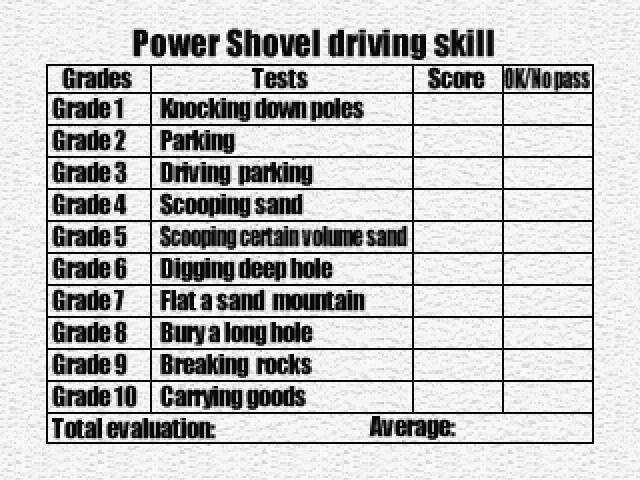
If you cannot clear a task, you can re-challenge it, but only three times! If you clear the final graduation exam, you get a daily wage (salary). Once your driving is evaluated, enter your name in the ranking list.
Beginner Mode Game Progression
•
First learn and memorize the basic controls.
•
Duplicate the guide and move 4 scoops of sand into the truck
•
2 READ THE RULES CAREFULLY.
•
4 TASK #1 ACCOMPLISHED! GO TO THE NEXT TASK!
•
Move and load the truck with 400kg of sand. Be careful!
•
5 CHALLENGE THE GRADUATION EXAMINATION.
•
DRIVING EVALUATION. WERE YOU ABLE TO CONTROL IT WELL?
•
Can you control arm well
•
Don't dig different place.
Just Do It: Part-Timer Mode
The construction
.png)




.png)




.png)
.png)
.png)

.png)