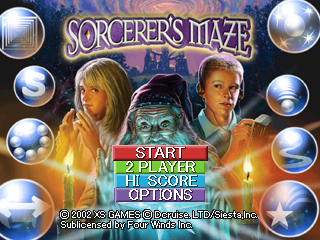
Insert the Sorcerer's Maze CD into the PlayStation® game console and turn on the power. The title screen will appear. Main Menu
Press the directional button up or down to scroll through the menu and press the button to select.
•
START: Starts the game from the Beginning.
•
2 PLAYER: 2 Player battle mode.
•
HIGH SCORE: View the point rankings.
•
OPTION: Listen to game music or sound effects.
Options
•
S.E. (Sound Effects): Listen to the game's sound effects. Enter different numbers and press the button to listen. Select Exit and press the button to return to the options screen.
•
BGM (Background Music): Listen to background music.
•
Level: Select the difficulty of the game.
•
Movement: Adjust the speed of the character's movement using the directional buttons. A higher number means faster movement.
Playing the Game
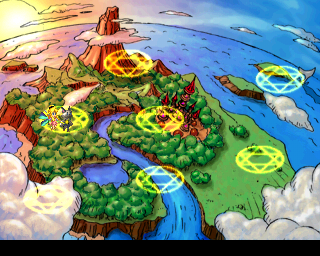
There are 10 WORLDS in SORCERER'S MAZE. Each world is a maze with 10 stages.
When you reach the 10th Stage of each world, you will battle the BOSS. All Bosses are different and have unique weaknesses you must discover to defeat them. The 10th WORLD has an 11th and final stage. Defeat its Boss to complete the SORCERER'S MAZE.
Characters
You are Prism or Rhythm. Each character has 3 lives.
If you lose all 3 lives, it's game over. A "Continue?" screen will appear. Press the button before the timer reaches 0 to continue.
Gameplay Objective
Control the characters and bounce the ball back to break the panels. When all panels on the screen are broken, you clear the stage and move to the next.
Some panels can be broken with the standard Ball, while others cannot. Panels can be broken with 1, 2, or 3 hits, scoring from 100 up to 3000 points. Panels requiring more than the normal Ball to break are worth 3000 points.
Combo Points
Break more than 2 panels before the ball returns to Prism or Rhythm to earn high points with combos. You can also gain Magical Orbs that will help in your attacks. Go for the combos!
Pause Game
During the game, press the START button to pause. Select Cancel to return to the game.
Game Screen
The picture below shows the game play screen. In battle mode, you will see a split screen.
•
Message Area (Combo descriptions)
Magic Orbs
In every stage, there are hidden Magic Orbs. Catch the Orbs when they fall to help you get through the level. Each Orb has its own powers.
Magic Orbs Affecting Prism and Rhythm
Magic Orbs can make the reflector ball bigger or smaller, and allow you to control the angle of ball travel. The ball can also split. Catch the ball or press the button to release it. Press the button to release a straight beam of light that will break the panel.
Magic Orbs Affecting the Ball
Magic Orbs can make the ball move faster or slower, or break through panels. Press the button and panels will break around the ball. The ball can split into 100 pieces or become big and break normally unbreakable panels.
Magic Orbs Affecting the Stage
Magic Orbs can create a barrier to prevent the ball from falling, or make the ball go through the wall to the other side. A star can fall and break panels, or the Magic Orb can give you an extra Life.
Cast Window
When a stage starts, you can buy Magic Orbs with your MP (Magic Points). MP is earned based on the number of combos or high points you achieved in the previous stage. Buy magic orbs to help with your next stage.
On the bottom of the cast window, you can see your current MP. Place the cursor on the items you want to purchase and press the button to select. When finished, move the cursor to the START button at the top to begin the next stage.
High Score Key
The key to getting a high score is clearing the level without any misses. You earn big bonus points.
Hint: Sometimes the obvious approach isn't the only solution. Be sure to try different ball angles to avoid traps.
Two Player Mode
When using 2 controllers, two people can play together. When player 1 is playing, player 2 can press the START button on their controller to join. Player 1 controls Prism and Player 2 controls Rhythm. Try teamwork to move to the next level.
2 Player Battle Mode
Two players can battle it out. Use magic to bother your opponent or show off your technique. To quit the battle, press the START button, pause the game, and select quit.
Select Your Stage and Battle
During battle, press the START button and choose Stage Select. Select the stage you want. If you select ALL, you will battle in all stages.
How to Win
The player who breaks all the panels first wins.
Casting a Spell
When you break a panel, you will start to earn MP (Magic Points). When the magic gauge becomes full, the cast
.png)

.png)
.png)


.png)

.png)

.png)

.png)

.png)