Console Instructions
Set up your PlayStation game console according to its Instruction Manual. Ensure the power is off before inserting or removing a compact disc. Insert the STREET RACQUETBALL™ disc and close the Disc Cover. Insert game controllers and turn on the PlayStation game console. Follow on-screen instructions to start a game. Top View
Front View
Start Game
The Mode Select Screen appears after pressing the START button at the TITLE Screen.
Mode Select Screen
DATA
Save and Load the Game Data. Be sure to save new characters and/or courts.
By loading saved game data, the player can select saved new characters and/or courts for future play.
EXHIBITION MODE
1-Player Only. Compete a match in a 1P VS COM.
VS MODE
2- Players Only. Compete 1P VS 2P.
Insert an additional DUALSHOCK® analog controller into Controller port 2 before selecting VS Mode.
CHALLENGE MODE
1- Player Only. Compete in 3 consecutive matches in a 1P VS COM.
After clearing/completing with each character, the player gets 4 new characters and 4 new courts.
This mode requires you to play the game with the existing rules (no changes allowed in this mode only).
CREDITS
Check out the names of the folks who brought you this game.
GAME LEVEL
There are 3 difficulty levels: [EASY], [NORMAL], [HARD] to play in this game. Confirm your selection by pressing the button.
TRAINING MODE
1-Player Only. This is for continuous rally solo play (Player's Character only).
Game Screen
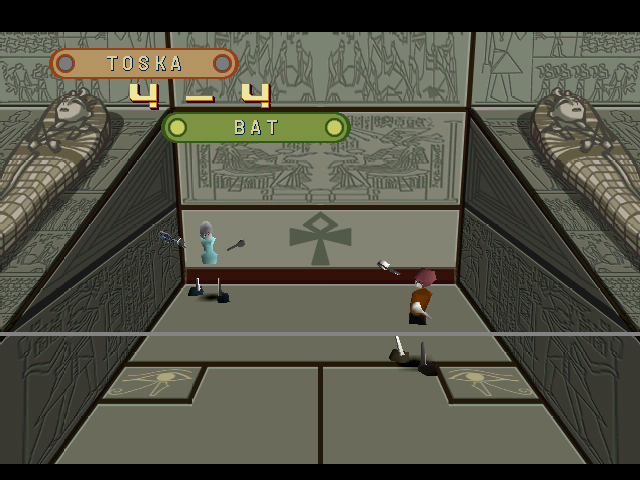
Street Racquetball is played outdoors, in a room that has four walls and no ceiling. The back wall is located on the opposite side of the Front wall behind the Back-wall-line.
Character Select Screen
•
Select a Character or VS opponent.
•
You cannot choose the same character as the opponent's in the same match.
In Challenge Mode, after choosing your 1-Player Character, 3 opponents are selected randomly. VS Characters will not be selected as the same character as the Player has selected.
Character Performance
•
Power: Speed of the ball (after you hit it)
•
Speed: Character's moving Speed
•
Skill: Way of aiming the ball to hit to the left, right, top, or bottom
Performance levels increase from C B A S. There are a total of 4 characters to choose from at the beginning of the game. The number of characters increases (up to a maximum of 8 characters) by clearing/completing the Challenge Mode.
Court Select Screen
•
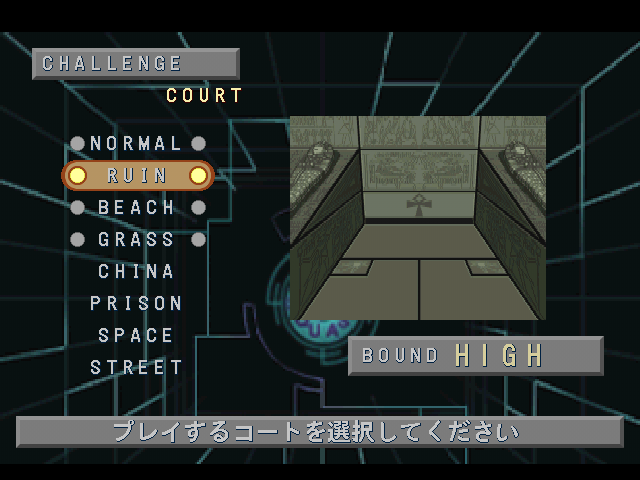
"Bounce" indicates the bouncing level of the ball. There are three levels of Bounce: Low, Middle, and High. The higher the level, the higher the ball will bounce.
Match Setting Screen
To change the rules, select the item you wish to change using the directional button, and confirm your change using the directional button.
•
DEFAULT: Change the rules for the default setting
•
CHANGE: Change the rules
•
GAME: Change the number of games in a match
•
BGM: Change the BGM On/Off during a game
•
RALLY: Display the Rally Score.
•
BGM: Turn ON/OFF the BGM during a game.
Rules in the CHALLENGE Mode are already set up and not changeable.
Rules of Street Racquetball
General Rules
In a Three games Match, the first player who wins two games wins the match. The first two games of a match are played to 15 points. If each side wins one game, a tiebreaker game is played to 11 points. In a Five games Match, the first player that wins three games wins the match.
Play stops when:
•
the ball touches the floor a second time
•
the ball goes out of the court.
The ball remains in play until it touches the floor a second time regardless of how many walls it makes contact with - including the front wall. If a player swings at the ball and misses it, the player may continue to attempt to return the ball until it touches the floor for the second time.
A server continues to serve until a player loses a rally, OR fault serve. Only the serving side scores points.
Serve
The server can select a position of serving from either right or left side of Serves Zone. When the server wins the rally, he/she gets a point. If the server loses the rally, the opponent won't get a point, but now the opponent is the server.
Always start from the Player Character (1-Player) on serving. When you have the serve, the serve position cannot be selected and the position will automatically be switched to the opposite side. (For example, Left to the Right side, and Right to the Left side.)
Pressing either the or buttons begins the match. Pressing either of these buttons causes the player to bounce the ball to the ground. As the ball bounces into the air and falls back toward the ground, the player presses either of these buttons again to initiate the first serve. Pressing a direction on the D
.png)

.png)
