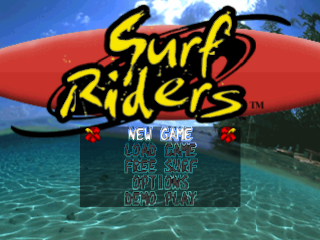
Starting the Game
New Game
Start the World Challenge Cup competition where you play all five rounds, striving to become the World Champion.
Load Saved Game
Load previously saved game files to continue your World Cup Challenge game from where you left off.
Free Play
Use this mode to hone your skills. There is no time limit in this mode allowing surfers to practice over and over again with no penalty.
Options
•
Key Configuration: Use this option to adjust key configuration on your PlayStation Controller. Use the D-Button LEFT or RIGHT to choose a desired configuration from a predefined set of three. Once the configuration desired is highlighted, press the X Button to accept the change. •
Volume Balance: Adjust SOUND FX and MUSIC volume from this menu.
•
Difficulty: Adjust difficulty setting between EASY, MEDIUM or HARD. Difficulty only applies in the circuit mode.
•
Vibration: Turn the DUALSHOCK™ vibration ON or OFF.
•
Memory Card: Load or Save game data from this menu.
The Main Screen
1.
The Speed Gauge
If this indicator empties out, the surfer will fall off his/her board and wipe out. If the speed gauge is too low while paddling, the character will wipe out when trying to stand up.
2.
Points
Displays the character's top three scores for the heat. The total of these scores becomes the point total for that heat when it is over.
3.
Time
The heat ends when this timer reaches 0:00.
World Challenge Cup Mode
In this mode you play five rounds in all, travelling the WQS circuit, aiming to become the World Champion.
Character Selection
Choose [New Game] from the Title Screen to advance to the Character Selection Screen. Press the D-PAD left or right to cycle through the available characters, then press the X Button to accept your selection.
Round Description
This screen displays the upcoming round, or beach, of the tournament. Different beaches will have widely different surfing conditions.
Board Selection
Choose the board that your character will ride in this round. Different boards have different qualities, making it important to choose the board that fits the surf conditions for the upcoming round. Refer to page 12 for more details on selecting surfboards.
Start the Round
The round begins when the player selects the character's surfboard. A round consists of three heats—qualifying, semifinal and final—in which four contestants compete.
Contestants must score either first or second place to advance to the next heat. If the player's character fails to place first or second in either the qualifying or semifinal heats, that round ends, and the player proceeds to the next round.
Results and Ranking Display
After the round is completed, points are awarded based on the contestants' performance. Points are totaled up for each round, and the season point rankings are then displayed.
Data Save (Memory Card Slot 1 ONLY)
After the round is completed, the Data Save Screen will be displayed. Select YES to save your game in its current state. (Saving requires one free block on the Memory Card.)
End of Season
The season is over when all five rounds are complete. The object of the game is to become the World Champion by getting the highest point ranking, in the overall season standings.
Free Play Mode
Choose a character and a surfboard and surf freestyle in Free Play Mode. There is no time limit, so you can master all the skills in the game from this mode.
Quick Start
First follow the on-screen prompts to select a rider, a board, and your first wave.
Stand Up and Ride
•
Press and hold the L1 or R1 Button while pressing the D-Pad to the right.
•
The L1/R1 Button will increase your speed.
•
When the speed bar at the bottom of the screen turns red:
•
Press the A Button to stand up
•
Release the L1/R1 Button
•
Keep pressing the D-Pad to the right to enter the middle of the wave.
•
To gain speed on the wave, move up and down the wave by lightly pressing the D-pad button left to right.
•
Press the X button to slow down.
High Jumps and Tricks
•
HighJungleaning point (Release Button here)
•
With your speed in the red, press and hold the button. The longer you hold the button the higher the jump.
•
Head up the wave and release the Button about a board's length below the top of the wave. If all is right you will be launched into the air. High jumps take practice so stick with it.
•
Once in the air, play with the button to pull off some tricks.
•
To land, the board's nose must be facing down or slightly forward.
•
See pages 10 thru 14 for more on maneuvers, techniques, and tricks.
Tricks of the Game
•
Jumping: The jump takes place at the top of the wave, when the player releases the Button. When timing the release of the Button, keep an eye on the light and dark portions near the top of the wave.
•
Tight Turns: Making tight turns is about the same as braking. This means that making a tight turn at the bottom of a wave cuts a character's speed, and prevents him or her from accelerating. The spray you kick up when making a tight turn affects your score; the higher the spray, the better your score.
•
Acceleration: You can get the best
.png)

.png)