Basic Rules
•
Player 1's remaining health and character name
•
Player 2's remaining health and character name
•
Remaining time in the round
•
Consecutive wins during battle
During play, the screen will be configured as shown. Depending on the game mode, the number of wins or team members will be displayed around the health meter.
A character whose remaining health reaches 0 is K.O.'d, and the winner is awarded points. The player who first obtains the points for the specified number of rounds becomes the winner. The number of rounds can be changed in the options.
If the remaining health is the same at the end of the round, or if it's a double K.O., both players are awarded points. If the final round results in a draw, it's game over. In a 2P intrusion, the intruding side becomes the winner.
The match ends when the remaining time reaches 0. At the end of the match, points are awarded to the player with the higher remaining health value. The initial remaining time is 40 seconds. The remaining time value can be changed in the options.
If you get a game over in a match against the CPU, you can challenge again by pressing the START button on the continue screen. If set in the options, you can also change characters.
Game Mode Selection
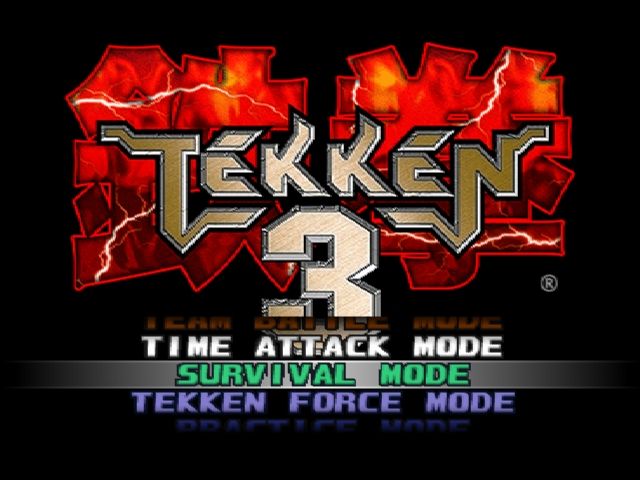
Press the START button on the title screen to go to the game mode select screen. Select a mode and confirm with the START button.
Arcade Mode
This mode is for playing against the CPU. If another player interrupts during play, a 2P battle will begin. There is no limit to the number of continues.
Character Selection Screen
You can select 1P color with the punch button and 2P color with the kick button. Battle results will also be displayed on this screen.
Team Battle Mode
Select the number of members and characters to use for a team battle. The match will be a knockout battle of one round each. In the case of a battle against the CPU, interruption battles are also possible.
The number of team members can be set from 1 to 8. The same character cannot be selected for the same team.
Versus Mode
This mode is exclusively for 2P battles. After character selection, you can change the handicap value using the left and right directional keys. After the match ends, it will switch back to the character selection screen.
Survival Mode
This mode is a competition to see how many CPUs you can defeat before your health gauge runs out. Difficulty, time limit, and number of rounds cannot be changed. Also, 2P intrusion battles are not possible.
Each match is a 1-round battle. The game is over when your health gauge runs out.
Time Attack Mode
This is the official time attack mode where you compete for the time it takes to clear the game. Various settings such as difficulty, round time, and number of rounds cannot be changed. Also, character changes during continue and 2P intrusion battles are not possible. Furthermore, you cannot pause the game.
If you rank in when you clear the game completely, the screen will switch to the name entry screen.
Practice Mode
This mode allows you to practice techniques against a defenseless character. First, select and confirm your character and the practice opponent's character using the directional keys. Various information about successful attacks will be displayed on the screen.
Pressing the START button during practice will display various menus. Pressing the START button while holding down the SELECT button will return you to the title screen.
Option Mode
This mode allows you to change various settings during gameplay. Select items with the up and down directional keys, and change content with the left and right directional keys. Press EXIT to return to the previous screen.
In Time Attack Mode and Team Battle Mode, some changes will be invalid, so please be careful.
Game Option Settings
•
DIFFICULTY LEVEL: Change the game difficulty. Can be changed in 3 stages.
•
FIGHT COUNT: Change the number of rounds during play between 1 and 4.
•
ROUND TIME: Change the round time limit. Can be changed in 6 stages.
•
CHARACTER CHANGE AT CONTINUE: Set character changes during continue.
•
GUARD DAMAGE: Set whether health slightly decreases when guarding an attack.
•
KEY CONFIGURATION: Change settings using the left and right directional keys. For free settings, press the button you want to change while pressing the left and right directional keys to change the setting.
•
VS GAME WINS SHOWN BY: Set whether to display win streaks as numbers or pictures.
•
AUTO SAVE: Set whether to automatically save various game data.
•
QUICK SELECT: Set whether to use a simplified screen for character selection.
•
BGM SELECT: Make settings for the BGM that plays during the game.
•
SPEAKER OUT: Select stereo or monaural for speaker output.
•
RECORDS: View various game data such as play results. The displayed data is what was stored in the main unit at that time.
•
MEMORY CARD: Load and save various data. If a memory card is inserted later, data cannot be read unless loaded.
•
Memory cards can only be used in the 1P side slot.
Getting Up Actions
If your character is in a downed state, they will not get up unless you operate the controller. Since the side that knocked down the opponent can pursue them, the downed side needs to quickly and accurately select and execute a getting-up action. Quick recovery can be used in combination with other .png)

.png)
 (Rev 2).png)
 (Rev 2).png)

_1.png)
_1.png)


_1.jpg)

 (En,Ja,Fr,De,Es,It).png)









.png)
.png)
_1.png)
_1.png)
.png)

_1.png)
_1.png)


_1.jpg)
