Starting the Game
1. Set up your PlayStation game console according to the instructions in its Instruction Manual. Make sure the power is OFF before inserting or removing a compact disc. 2. Insert the Xena: Warrior Princess™ disc and close the Disc Cover. 3. Insert game controllers and turn ON the PlayStation game console. After the developer logos, the opening video sequence appears. 4. If you want to bypass the video, press START.
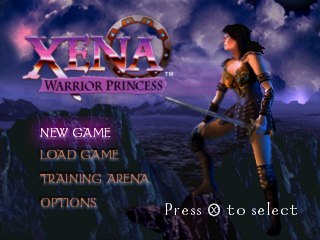
5. After the Xena: Warrior Princess intro video finishes, the Main menu appears. Main Menu
The Main Menu allows you to start a new game, enter a training session, load a saved game, or access the Options screen.
•
NEW GAME: Begin a new game.
•
LOAD GAME: Load a saved game.
•
TRAINING ARENA: Hone your fighting skills in a training session.
•
OPTIONS: Access the Options screen.
Use the D-Button to highlight an option, then press * to select.
NOTE: DEFAULT SETTINGS IN THIS MANUAL APPEAR IN BOLD TYPE.
Training Arena
The Training Arena is a place where Xena can fine-tune her jumping, kicking, and Chakram-throwing skills. Follow the instructions on each of the sign posts to complete the level. Search for hidden power-ups within the Arena.
Health Meter
The Health Meter displays Xena's physical condition. When the meter is full, Xena possesses 100% health. When the meter completely depletes, Xena is defeated. Karma Meter
The Karma Meter reflects Xena's ability to exercise restraint and defeat enemies using non-lethal fighting techniques. Each time she defeats an enemy with a kick or saves a hostage, Xena earns Karma points. When the Karma Meter completely fills up, Xena radiates a soft-golden glow and can temporarily perform double-strength attacks. Hostage Counter
Occasionally, Xena must rescue hostages. The Hostage Counter displays how many hostages Xena must free to successfully complete the level. To free a hostage, Xena must first defeat the enemy holding the hostage. Then Xena must ensure the hostage safely escapes from the danger. Each time a hostage is saved, the text "Hostage Saved" appears and the counter depletes by one. After the required amount of hostages has been freed, a key appears. Use this key to open the level exit to complete the level. If too many hostages die before Xena can save them, you must restart the level. The Chakram
The Chakram is Xena's signature weapon of choice. It is disk-shaped with razor-sharp edges and can be thrown to disable foes from a distance. To take out an enemy with the Chakram:
1. Face the enemy you want to attack, then press * + R1 to throw the Chakram.
2. Hold R1 and press the D-Button to guide the Chakram toward the enemy. After striking a target, the Chakram returns to Xena. •
If R1 is released after Xena throws the Chakram, Xena can move about and fight as the weapon flies around. •
To abort a throw and immediately return the Chakram to Xena, press *. Pause Menu
To access the Pause menu, press START during gameplay. Use the D-Button to select an option, then press * to select.
•
Resume game: Continue your adventure.
•
Restart level: Return to the level start position and start over.
•
Options: Access the Options screen.
•
Quit: End your game and return to the Main menu.
•
Total Armor Upgrades collected
•
Total Sword Upgrades collected
•
Total scrolls collected in the level Loading and Saving
Xena: Warrior Princess allows you to save a game in progress with the use of a Memory Card. In order to save game data, you must have a Memory Card in Memory Card Slot 1 and one block available for the save file. NOTE: NEVER INSERT OR REMOVE A MEMORY CARD WHEN LOADING OR SAVING FILES.
You can manually load game data using the LOAD GAME option from the Main menu.
To load game data:
1. Highlight LOAD GAME on the Main menu, then press *. The Load screen appears.
2. D-Button to highlight a file, then press * to select. The Load Level screen appears.
3. D-Button to select a level to restart your quest in, then press *.
To save game data:
1. Complete any game level. The Results screen appears.
2. On the Results screen, press *. The Save screen appears.
3. On the Save screen, D-Button to highlight a save file, then press * to select.
.png)

.png)
.png)
.png)
.png)
.png)
.png)


.png)

.png)

.png)

.png)

.png)