Braking
•
Press the L2 button to brake.
•
If you keep the button held down, the AirBlade™ will come to a complete stop so you can step off it.
•
Whilst you are standing still, you can take a look around you by pressing ↑, ↓, ⬅, ➡ etc.
•
Release the L2 button to step back on the board and get moving again.
Jumping
•
Press the ✖ button to jump.
•
To jump further, press and hold the ✖ button. This will use up energy stored in the Boost Meter.
Flipping
•
Press the ⭕ button to perform a basic ground-level flip trick.
•
You can perform different types of flip by pressing ↑, ↓, ⬅, ➡ etc. as you press the ⭕ button – see the STUNT LIST later in this manual.
Grabbing
•
You can perform grabs when in the air by pressing ↑, ↓, ⬅, ➡ etc. as you hold down the ⭕ button.
•
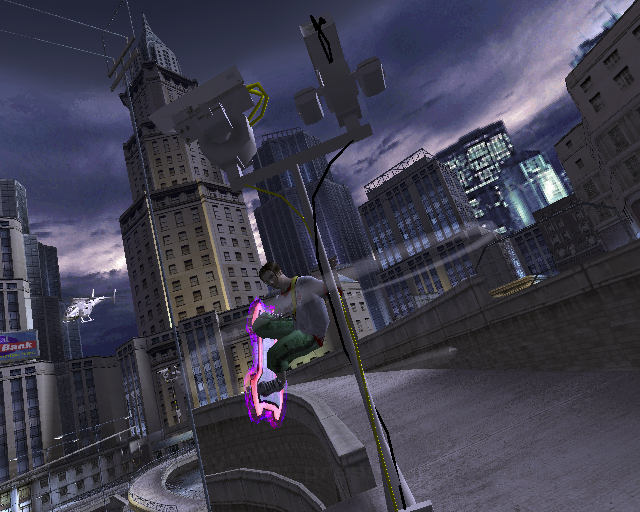
To grab onto a horizontal or vertical pole, head towards it and press and hold the ⭕ button.
•
Once you have grabbed the pole, you will start to spin round it.
•
If you spin round a pole for too long, you'll be thrown off.
•
You can switch direction whilst spinning by pressing the L1 button or the R1 button. This allows you to control the direction in which you jump off the pole.
•
To let go of a pole, release the ⭕ button.
•
You can grab onto some vehicles by pressing the ⭕ button.
•
To let go of vehicles, release the ⭕ button.
Rotating
•
Rotate while you are performing any trick, including grabs and grinds for extra points.
•
Press the L1 button or the R1 button to rotate the AirBlade™ 180°. You will be facing in the same direction, but leading with the other foot.
Controlling the AirBlade™ in Mid-Air
The tricks you perform in mid-air will be different to the ones you perform at ground level. If you jump a far distance or fall from a great height, you can also perform Big Air tricks. See the STUNT LIST for more details. Grinding
•
To grind on objects which are above the level of the AirBlade™, jump onto them by pressing the ✖ button and then quickly press the ▲ button.
•
Press the ▲ button as you head towards a suitable object to grind on it.
•
If you press ↑, ↓, ⬅, ➡ etc. as you press the ▲ button you can perform different types of grind.
•
To change the type mid-grind, press and hold the ✖ button to jump and then press ↑, ↓, ⬅, ➡ etc. and the ▲ button as you land.
•
You can control your balance whilst grinding by pressing ⬅ or ➡.
The Gamescreen
NOTE: this is the gamescreen you will see in Story Mode. It may vary slightly in other modes.
•
Story Mode objectives can be achieved in any order – you don't necessarily have to follow the arrow.
Direction Arrow
Shows the direction you should be heading in to complete your next task.
Boost Meter
This indicates how much energy is currently stored in your Boost Meter.
Time
Your remaining time.
Score
Your current overall score.
Combo Score
The combo you are currently performing and your total score for it.
PDA
In some modes, visual and audio communications will be relayed to you via your PDA. These will included briefings, control tips and updates on your progress which will scroll across the bottom of the screen.
The Boost Meter
The Boost Meter allows you to store energy produced by the AirBlade™ when tricking. You can then use this energy to perform speed boosts and increase your jump distance.
The stored energy is shown as a blue bar in the Boost Meter, which is in the top left hand corner of the screen. To use the energy for a speed boost, press and hold the R2 button. Or, to increase your jump distance, keep the button held down as you jump.
The AirBlade™ will emit a trail effect and the meter will begin to empty. Release the R2 or button to end the boost.
The amount of energy you accumulate during each surge depends on the kind of stunt you are performing. For example, small ground tricks will only increase the level of the Boost Meter slightly, but a long combo of Big Air tricks could fill it completely. It's not possible to drain and charge the Boost Meter simultaneously. So, if you are performing a trick, you can't activate a speed boost or power jump until after you've landed. If you are using the Boost Meter for extra speed or jump distance, and then perform a trick, the Boost Meter will automatically stop releasing energy.
The Energy Surge
When the AirBlade™ performs fast, dramatic manoeuvres, a surge is caused in its energy field, intensifying its glow and creating a light trail. You can use this electromagnetic effect to destroy certain objects in Story Mode.
Tricking-Through
To smash through objects, you must perform a trick at the moment of impact. If you fail to pull it off, you will bounce off the object.
Spinning-Out
To destroy some objects, such as poles, you need to grab them and spin.
Grinding
You can use the AirBlade™'s energy field to grind along the edge of
.png)


.png)





.png)
_1.jpg)


.png)