Getting Started
Set up your PlayStation®2 computer entertainment system according to its instruction manual. Ensure the MAIN POWER switch (located on the back of the console) is turned on.
Press the RESET button. When the power indicator lights up, press the OPEN button to open the disc tray.
Place the Casper Spirit Dimensions disc on the disc tray with the label side facing up. Press the OPEN button again to close the disc tray.
Attach game controllers and other peripherals as appropriate. Follow on-screen instructions and refer to this manual for information on using the software.
Main Menu
From the Main Menu, you can begin a new game, load a previously saved game, or change the game options. Use the Directional Buttons to highlight an option, then press the button to confirm.
Start Game
Casper's good friend, Wendy, sent him an urgent message requesting his help, but she didn't say what was wrong. When you select Start Game, Casper meets Wendy at his house to find out what has made his friend so upset. This is Casper's first stop in the world of Casper Spirit Dimensions!
Load Game
If you have previously saved a Casper Spirit Dimensions game onto your memory card (8MB) (for PlayStation®2), you can load it and continue on your quest! See Saving and Loading on page 14 for more information.
Options
This takes you to the Options Menu, which is detailed in the next section.
Options Menu
Here you will find all the settings that you need to tailor Casper Spirit Dimensions to your own tastes. Use the and directional buttons to highlight an option.
Use the and directional buttons to adjust sound, music, subtitles, vibration and difficulty settings. Use the button to access the Controller Configuration and Credits screens.
Controller Configuration
This screen will allow you to choose between 4 control layouts. Choose the one that is right for you with the and directional buttons. Confirm your choice with the button, or cancel and go back to the Options Menu by pressing the button. The default is Controller setup 1.
Sound
Choose Stereo or Mono with the and directional buttons. The default is Stereo.
Surround
Turn Surround sound On or Off with the and directional buttons. The default is On. Note that Surround sound only works with the Sound Option set to Stereo.
How to Play
Being a ghost has many advantages over being a normal person. You need to master all of Casper's abilities to have any chance against Kibosh and his evil minions.
Flying
As a ghost, Casper can fly in any direction using the left analog stick and the right analog stick in conjunction with one another. Use the left analog stick to point Casper in the direction you want to go, and the right analog stick to move him forward, back and side to side.
Press the right analog stick in (R3 button) and move it up and down to move Casper straight up and down in the air.
Quick Turn
You can help Casper turn faster if you hold the R1 button while moving the left analog stick.
Casper Comet
You can help Casper move quicker by holding the L2 button. This is called a Casper Comet, and it gets Casper where he's going very quickly.
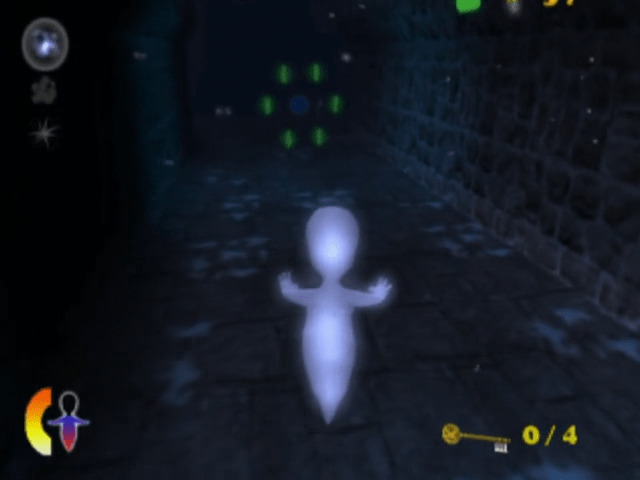
Casper can't do this forever, so you should watch the Casper Comet Meter in the lower left of the screen. The meter goes down when Casper is doing a Casper Comet, and refills when he is moving normally. If the meter is empty, Casper needs to rest a while before he tries to do another Casper Comet.
A Casper Comet makes Casper harder to hit if someone is shooting at him. The Casper Comet can also be used to blast through certain walls and rocks. It is also used to attack and counter attack certain enemies.
Using the Casper Comet can help Casper pick up Gems more easily. If you see a ring of Gems around a central Gem of another color, Comet straight through the center Gem to grab them all.
Ethereal Shield
You can help Casper avoid enemy attacks by pressing the button if Casper gets in trouble. This is Casper's Ethereal Shield, and it turns his ghostly body into a gaseous substance for a few moments.
During this time, enemy projectiles pass through him harmlessly. Also during this time, Casper is able to pass through grates or barred windows.
Every time Casper uses his Ethereal Shield, one Ghost Power Point is used up. These are the little green lights in the lower left section of the screen. We'll talk more about those in the next section, Helpful Items.
Spirit Blast
Casper can concentrate bits of ghostly particles in his hands and release them in energy balls called Spirit Blasts. He can use this power to defeat some of Kibosh's minions.
Just point Casper in the right direction and tap the R2 button to fire a regular Spirit Blast. Hold the R2 button down to charge up the Spirit Blast into a more intense attack, then release it. That's a Super Spirit Blast!
Casper can throw as many Spirit Blasts as he likes. But every time Casper uses his Super Spirit Blast, one Ghost Power Point is used up. These are the little green lights in the lower left section of the screen. We'll talk more about Ghost Power Points in the next section, Helpful Items.
There are other kinds of Blasts, too, but Casper
.png)

.png)
.png)
.png)



_1.png)

_1.png)



.png)