Console Components
PlayStation®2 Setup
Set up your PlayStation®2 computer entertainment system according to the instructions in its Instruction Manual. Make sure the MAIN POWER switch (located on the back of the console) is turned ON.
Press the RESET button. When the power indicator lights up, press the OPEN button and the disc tray will open. Place the DEVIL KINGS™ disc on the disc tray with the label side facing up. Press the OPEN button again and the disc tray will close.
Attach game controllers and other peripherals, as appropriate. Follow on-screen instructions and refer to this manual for information on using the software.
Dolby® Pro Logic® II Support
This game supports Dolby® Pro Logic® II. Connect the game console's ANALOG OUT (AUDIO) connector to the Dolby® Pro Logic® IIx, Dolby® Pro Logic® II, or Dolby® Pro Logic® decoder internal AV amp.
Turn one of the features on, and then select "Dolby® Pro Logic® II" to play the game in surround sound.
Memory Card
To save game settings and progress, insert a memory card (8MB)(for PlayStation®2) into MEMORY CARD slot 1 of your PlayStation®2 system.
You can load saved game data from the same memory card or any memory card (8MB)(for PlayStation®2) containing previously saved games.
Beginning a New Game
Title Screen
Press the START button on the title screen to bring up the Mode Select screen.
Mode Select
•
CONQUEST: Progress through a series of battles to bring all territories under your control. Achieve total conquest to unlock more playable characters.
•
FREE BATTLE: Select a character and a stage to fight in from among the characters available in Conquest mode and all stages beaten there.
•
PLAY DEMO: Tutorial movie of game play.
•
GALLERY: View character design artwork, movies, etc.
•
CHARACTERS: View original artwork, etc. for characters you have completed the Conquest mode with.
•
MOVIES: View all previously unlocked movies.
•
MUSIC: Listen to music from the game.
Options
Adjust various options in the game.
•
BUTTON CONFIGURATION: Change control layout for your DUALSHOCK®2 analog controller.
•
VIBRATION: Turn the controller vibration function on/off. Default setting is ON.
•
SOUND SETTINGS: Set sound output mode (Mono/Stereo/Dolby Pro Logic II). Default setting is Stereo.
•
BGM VOLUME: Adjust the volume of the background music in the game.
•
SFX VOLUME: Adjust the volume of the sound effects in the game.
•
VOICE VOLUME: Adjust the volume of the dialog in the game.
•
HEALTH GAUGE: Turn enemy health gauges on/off. Default setting is ON.
•
CAMERA SETTING: Change camera control type for the right analog stick. Default setting is NORMAL.
•
LOAD: Load previously saved data.
•
RESTORE DEFAULTS: Return all settings to their default.
Conquest Mode
Getting Started
1. SELECT A CHARACTER: Select the warrior you wish to play as, then select a difficulty level.
2. SELECT A STAGE: Select a territory to invade. Defeat the boss guarding that territory to conquer it and expand the reach of your control. Depending on the territories you conquer, different territories will open up.
3. PREPARE FOR BATTLE: Set Special Attacks, equip items, and prepare for battle.
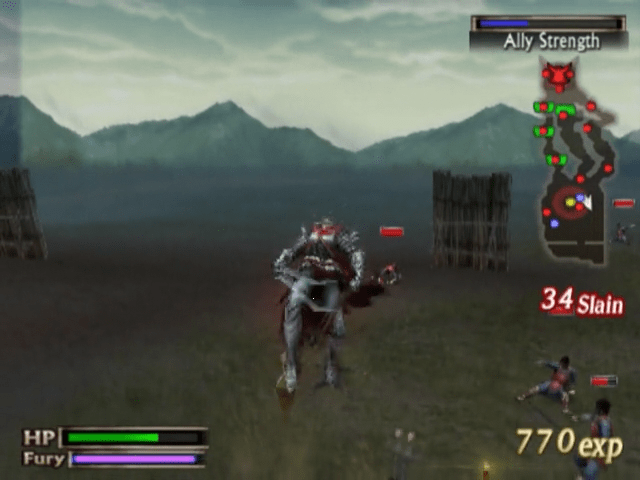
4. COMPLETE THE STAGE: Make your way through the territory, conquering enemies and defeating the boss.
5. VIEW STATS FROM THE BATTLE: View statistics on your performance in the last battle, and view loot won from the enemy. This is also where your character will level up.
6. SAVE: Save your progress.
Conquer the land and achieve total domination. Play through the game again, retaining all your weapons, items, and even the experience (level) of that character. You may also unlock more playable characters to use as you conquer levels.
Character Selection
Select the warrior you wish to play as. This will begin a new game in Conquest mode. If you have previously saved data from another Conquest campaign, load that game instead to pick up where you left off.
There are 6 characters available initially. Complete the Conquest mode to unlock more playable characters.
Difficulty Selection
Select from Easy, Normal and Hard difficulty. The higher the difficulty level is, the more likely you are to find better items and weapons.
Stage Selection
Select the territory you wish to conquer. Each stage may have specific requirements you must fulfill in order to conquer it.
By conquering a territory, it becomes part of your own territory, extending your reach and unlocking new territories to conquer. Invading territories at certain times in the game may allow for different battles. You may also encounter special battles along the way that are triggered by certain conditions.
Preparing For Battle
•
Your character's current level, health, attack and defense.
-
.png)

.png)

.png)

.png)
_1.png)
.png)


_1.png)



.png)




.png)