Getting Started
Set up your PlayStation®2 computer entertainment system according to the instructions supplied with your system. Check that the system is turned on (the on/standby indicator is green).
Insert the Indiana Jones® and the Staff of Kings™ disc in the system with the label side facing up. Attach game controllers and other peripherals as appropriate. Follow the on-screen instructions and refer to this manual for information on using the software. PlayStation®2 Components
Memory Card (8MB)(for PlayStation®2)
To save game settings and progress, insert a memory card (8MB) (for PlayStation®2) into MEMORY CARD slot 1 of your PlayStation®2 system.
You can load saved game data from the same memory card or any memory card (8MB) (for PlayStation®2) containing previously saved games.
Saving Data
For more information on saving and loading, see page 12.
Indy's Office
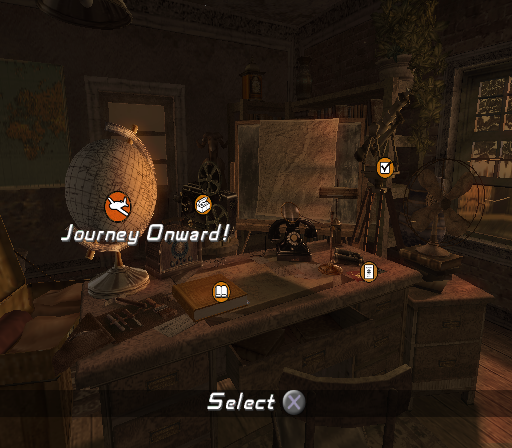
Press the START button at the Title Screen to access the Main Menu within Indy's office. Inside, there are five selectable options: Journey Onwards, Journal, Passport, Extra, and Options. JOURNEY ONWARDS
Continue your progress in the single player mode or replay completed levels to collect any remaining Fortune artifacts.
JOURNAL
Use the Journal to view collected Fortune artifacts, check on your progress in Story So Far, view collected information on the Characters you have met, and view collected Notes.
PASSPORT
Select and manage game profiles.
EXTRAS
Play bonus content. Most Extra content requires you to collect a certain number of Fortune artifacts before it can be unlocked.
OPTIONS
Adjust Game Options, Sound Options, and set Screen Calibration.
HUD
•
Indy's Health Bar: Displayed in the upper left corner of the screen. The Health Bar depletes when Indy takes damage and refills at each save checkpoint. •
Enemy Health Bar: Displayed above the heads of Indy's enemies. Action and Adventure
WALK AND RUN
Use the left analog stick to help guide Indy through his environment. Press the stick lightly to make Indy walk in a desired direction. Push the stick all the way to make Indy run. WALL HUG, LEDGES, AND SHIMMY
In some instances, the only path available to Indy is a small ledge sticking out from a wall. To help Indy cross, guide him to the edge of the wall and press the button when the Action Icon appears then use the left analog stick. If Indy does accidentally stumble off the edge of a ridge he will automatically grab the ledge. Press the left analog stick up to climb back onto the ledge, or left or right to shimmy along the ledge. Pressing down will cause Indy to drop, so be careful! In some cases, when Indy drops off a cliff edge, a recovery action will need to be performed to prevent him falling to his demise. For more information on this action see Trap and Panic Moments on pg. 9. CLIMBING UP, JUMPING DOWN, AND USING LADDERS
If a ledge can be scaled, Indy will hoist himself onto it upon approach. If the wall is too tall to easily scale, he will grab hold of the ledge. Press up on the left analog stick to finish scaling the wall. Similarly, if Indy approaches a small drop he will jump down. If the drop is larger, he will grab the ledge. Press down to drop. SHOULDER BASH
Some doors and rickety walls can be knocked down if Indy puts a little effort into it. If a door or wall can be forced it will be marked by an Action Icon. Approach the Icon then tap the button when prompted. PICKING UP OBJECTS
Indy can pick up several objects within his environment. Objects that can be picked up are marked by an Action Icon. The Action Icon will appear as a small red circle if you are too far away to use the item. When in range the action icon will change to display the type of action that you can perform with the object. Tap the button to pick up the object at this time. The icons appear red until you are in range to use it. To put the object down, tap the button again. Indy can also throw the object right away by pressing the button. USING TORCHES
When exploring darker areas Indy will often need a torch to help light the way. Torches are marked by an Action Icon. Approach the unlit torch and tap the button. Tap the button to drop the torch. Once the torch is lit, it will act like any object Indy can pick up. Additionally, the torch can burn spider webs, bug nests, and bugs. PUSH AND PULL OBJECTS
There are many large objects that Indy can push and pull to help clear his path. To push or pull an object, first approach it. When prompted, press and hold the button. Use the left analog stick to move the object then release the button to let go. USING YOUR WHIP
An adventurer's greatest asset is often a Bull Whip. Indy can use his to overcome many challenging obstacles, from swinging over ravines to scaling walls. To swing over a large gap, approach the ledge. When prompted, press the R2 button. Indy will use his whip to grab onto the item and swing across. .png)

.png)