Main Menu
If you press the START button in the title screen, you will see the bottom screen. Choose the different mode or the OPTION button.
Normal Mode
Normal game play.
Practice Mode
Choose and practice any stage.
Option
Change difficulty, access to the gallery, etc.
Pause Menu
If you press the START button during game play, you will get the Pause Menu.
Wait
If you turn it on, the movement speed will vary like in the arcade mode.
If you turn it off, the speed will not change.
Mode Title
It will return to the Game Mode Title.
Main Title
It will return to the Main Menu.
Stage Select
It will take you to the Practice Mode screen.
Resume
Resume game play.
How to Look at the Screen
•
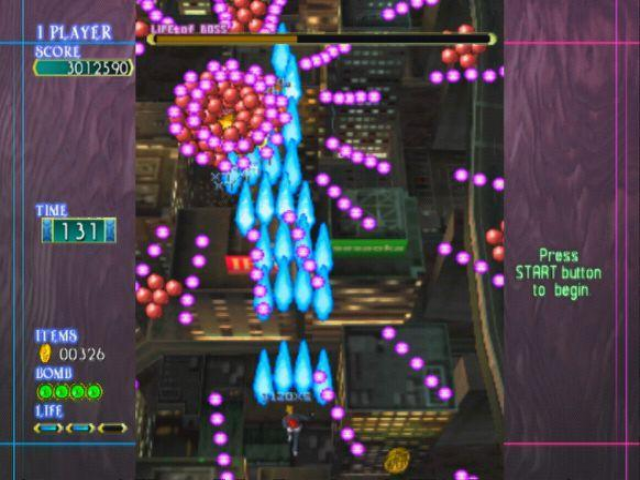
SCORE - Your current score.
•
TIME - When the time hits 0, a devil will appear. If you destroy the Boss or the middle Boss, you will gain an extra 70 seconds.
•
ITEMS - You will power up with the number of coins. If you are damaged, you lose coins.
•
BOMB - Number of bombs left. You start with 3 and can get a maximum of 5.
•
LIFE GAUGE - This is your life gauge. Each time you are hit, you lose a life. When all lives are gone, the game is over.
•
BOSS LIFE - This is the boss's life gauge. If the gauge becomes empty, you pass the stage.
Attack Specifications
Normal Attack
Hold the button or for autofire, press the button rapidly to shoot. As you pick up coins, you will level up. Each time you get hit, your level will go down one.
Mobile Light Force 2 Attack
Hold down the button to use the Mobile Light Force 2 attack. While using this attack, coins will be collected automatically, however, the character's movements will slow down.
Special Attack
If you press the button, a bomb will be dropped. You will start with 3 bombs, and up to 5 bombs can be stocked. During the Special Attack, you will not get hurt.
Practice Mode
Select a level to practice. You can only select the stage that you passed in the normal mode without any continues. Once you pass the stage, you will return back to the stage select screen. Your practice score will be recorded.
This is for 1 player mode only. You cannot have 2 players play at the same time.
2 Player (Simultaneous)
You can play 2 players at the same time. During normal game play, press the START button on the player 2 controller to join the game. Select the character with the directional button and push any button to join in.
Option
•
EXIT - Return to the main menu
•
DIFFICULTY - Set the difficulty level
•
WAIT - Regular mode ON/OFF
•
AUTO SAVE - Turn the auto save feature ON/OFF
•
SYSTEM LOAD - Load the system file
•
SYSTEM SAVE - Save the system file
•
KEY ASSIGN - You can assign the shot, bomb, and auto buttons
•
BGM VOLUME - Adjust the background music
•
SE VOLUME - Adjust the sound effect volume
•
BGM TEST - Listen to the background music
•
PICTURE - Adjust the screen quality
•
GALLERY - Character gallery
Gallery
Choose "gallery" in the option menu to see the character's picture and basic information. Many different situations will add pictures to the gallery. Select Exit to return to the option screen.
Select the picture you want to enlarge. Choose or button to go back to the GALLERY menu.
.png)

.png)