GAME FLOW
STAGE NAME DISPLAY
OPERATION BRIEFING
CAMP SCREEN
BATTLEFIELD MAP
OPERATION MAP
IN-MAP EVENT
OPERATION COMPLETED
Shooting Tra
Mission Completed
UNIT FORMATION
FORMATION ROOM
Here you can adjust the AFW and soldier formations (groups) to fit different strategies. Try forming a unit keeping in mind what type of soldiers would be most effective when combined with a certain AFW.
Pressing the button in the unit formation screen displays basic data for each unit. Red areas on the graph indicate VS soldier attack levels, while blue areas show VS AFW attack levels.
CAMP SCREEN
INFORMATION ROOM
OPERATION ROOM
Current operation information can be consulted. You can also learn about areas of caution and combat techniques for the operation.
FORMATION ROOM
Organize soldiers in each unit.
INFORMATION ROOM
Detailed information and assistance can be accessed.
RECORD ROOM
Select to save the game.
SORTIE
Enter the current operation by closing the Camp Screen.
UNIT INFO
View information on currently organized units.
SOLDIER INFO
View information on the soldiers.
MEMOIRS
View inner-chapter events.
COMBAT MANUAL
View a variety of information: Characters, AFW, Soldiers, Maximum Attacks, Soldier Skills and Battlefield.
PILOTING SKILLS AND AFW BATTLE ABILITIES
Each AFW performs differently, even from other AFWs of the same type. The difference will become greater as each pilot learns various piloting skills.
MAXIMUM ATTACK
Special abilities possessed by each pilot.
LEVEL
The pilot's level. Levels are gained as experience points are gained through combat, improving various piloting skills.
COMMAND ABILITY
These grades reflect the skill in commanding the various types of soldiers.
STANDARD ABILITY (AFW)
Individual AFW performance capacity. Pilots customize their own machine, so even AFWs of the same type perform differently.
BATTLE ABILITY
Each AFW's VS AFW and VS Soldier combat ability level at each distance rating. It is most effective to fight at the distance with the highest numbers.
UNIT FORMATION AND ABILITY
Each pilot has strong and weak abilities; some may be skilled at firing, while others are first-rate commanders. Ability ratings increase by gaining combat experience. A unit's Battle Ability (areas displayed on the graph in dark green) also changes depending on the soldier formations.
OPERATION ABILITY
The operation ability of the unit commanded by each pilot. The pilot's AFW standard ability rating and the ability level of the various soldiers (squads) are displayed together.
BATTLE ABILITY
The Battle Ability of each pilot and their AFW. The VS AFW and VS Soldier ability rating may change depending on the ground soldiers, and the load ability may change depending on the ability of soldiers riding in the AFW.
SQUAD SELECTION
Each soldier type may have several squads, and even squads comprised of identical troops may possess small differences, such as available skills.
SOLDIER TYPE AND ABILITY
You can view the abilities of the different types of soldiers here. The various soldiers are divided into different roles, and are assigned to a number of squads. When forming units, focus on the appropriate type of AFW for each soldier. Differences in skills may result in weaknesses during battle.
ROLE
Soldier types classified by their specialization. The numbers reflect the current number of squads.
STANDARD ABILITY
The standard ability of soldiers assigned to each squad.
BATTLE ABILITY
The Battle Ability depending on the distance to the enemy AFW unit.
SKILLS
A display of the type of skills each squad possesses and the point when these are activated.
OPERATION START
When combat is initiated, the "Victory Condition" and "Loss Condition" are displayed and battle begins.
UNIT MOVEMENT
MOVEMENT PROCEDURE
•
The unit can be moved when its turn to move arises. This is called being "in turn".
•
When the cursor is placed on the unit in turn and selected, the movement range (blue squares) and attack range (yellow squares) are displayed. The unit cannot move into the attack range areas.
•
Setting the cursor to the square you would like to move to and pressing the Button opens the Action Menu.
ACTION MENU
ATTACK
This can only be selected when there are enemy units that can be attacked.
STATS
Relays unit information.
RECOVERY
This can only be selected when the AFW or soldiers have suffered damage.
OK
Move and end turn.
STANDBY
Standby at present location.
"OK" and "Standby" are not displayed at the same time.
UNIT ATTACK
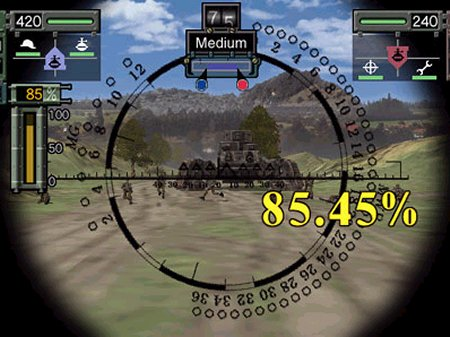
Choosing "Attack" from the Action Menu displays the unit's attack range, and a targeting cursor appears on enemy units within firing range. After selecting a target, combat is initiated with the enemy unit targeted with the cursor.
OPENING A BATTLE DISTANCE
Opening battle distance is determined by the distance between your unit and the enemy unit.
•
Attack from an adjacent square: Short Range
•
Attack from a diagonally adjacent square: Medium Range
•
Attack from 2 or more squares away: Long Range
HINT
Choosing "Attack" from the Action Menu displays the unit's attack range, and a targeting cursor appears
.png)

.png)



.png)

.png)

.png)






_1.png)