MAIN MENU
The Main Menu is the first screen you see after you press the START button from the title screen. From here you have four main choices.
•
Exhibition: Pits two wrestlers head-to-head in a winner-takes-all showdown.
•
Story Mode: Follows the personal story of your selected wrestler.
•
Options: Changes the game settings.
•
Gallery: Allows you to get up close and personal with the Rumble Rose ladies.
EXHIBITION MODE
Exhibition Mode allows for a quick match. There are three types of matches in Exhibition Mode: NORMAL, MAD MUD MATCH, and TITLE MATCH.
To select a match type in Exhibition Mode:
1. Press the ↑/ directional buttons to highlight a match type.
2. Press the button to confirm your selection or press the button to cancel and return to the previous screen.
Normal Match
This is ring wrestling, pure and simple. After selecting this match type, you must decide on your player setup.
•
1 PLAYER: You versus the computer.
•
2 PLAYERS: A multiplayer, head-to-head mode.
•
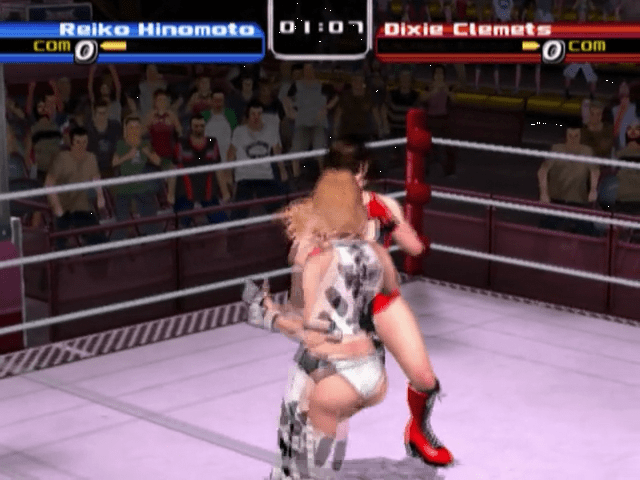
COM BATTLE: A view-only mode with two computer players versus each other.
On the next menu, after selecting the match type:
1. Select 1 PLAYER, 2 PLAYERS, or COM BATTLE.
2. Press the button to confirm your selection or press the button to cancel and return to the previous screen.
You can choose one character for yourself, or two characters in a COM BATTLE match.
Not all characters can be selected at first. The alter egos of the 10 original characters are additional characters that must be unlocked.
Identical characters may be used for battle in the Normal Match Mode and the Mad Mud Match Mode, but not in Title Matches. However, the identical character cannot wear the same costume.
To select a character:
1. Press the ↑/ or directional buttons to highlight a character.
2. Press the button to confirm your selection or press the button to cancel and return to the previous screen.
3. Press the ↑/ directional buttons to select your wrestler's costume if multiple costumes are available.
4. Press the button to confirm your selection or press the button to cancel and return to the previous screen.
A special character can be unlocked for exhibition matches by completing Story Mode with all of the original characters. Her alter ego can be unlocked by completing Story Mode with all of the alter ego characters.
Once both characters are selected and suited up, you must select the stage where they'll strut their stuff. There are five stages in all: the Standard Arena, Stadium Arena, Coliseum, Mad Mud Match Beach Stage, and a hidden stage.
To select a stage:
1. Press the ↑/ directional buttons to highlight a stage.
2. Press the button to confirm your selection or press the button to cancel and return to the previous screen.
After the stage is selected, you can establish a VOW SYSTEM or head straight to the match.
1. Press the ↑/ directional buttons to highlight PLAY or VOW SYSTEM.
2. Press the button to confirm your selection or press the button to cancel and return to the previous screen.
After selecting PLAY, there are no more excuses—no turning back. Just get ready for some serious one-on-one action! Mad Mud Match
The setup for a Mud Match is almost identical to that for a Normal Match with two exceptions. First, there is no stage selection option. All Mud matches take place in a special beachside ring.
Secondly, because it's beachside, the costume selection for each girl is limited to swimsuits.
Title Match
You must have a Title eligible wrestler in order to enter a Title Match and compete for the Rose of Roses championship belt. To become Title eligible, a wrestler must increase their Face/Heel status by a certain percentage.
The setup for a Title Match is similar to the other match types except you do not select the number of players. Instead, you select your role in the match, and then it's you versus the computer.
•
Challenge the Champion: You go after the current Rose of Roses Champion as the Challenger.
•
Defend the Championship Belt: You play as the Champion and defend the Rose of Roses belt.
In either role, you do not select the Champion. She is selected by default (the opening Champion is Evil Rose). You only select her costume whether you are playing as her or against her. There is also no option to select the Vow System in this match type.
STORY MODE
In Story Mode, you get to know each girl more intimately by following her life story as it progresses on the Rumble Roses tour. The ultimate goal is to defeat Lady-X in the championship match.
Select a character at the beginning of this mode, but choose carefully. You'll be spending a lot of time with her as she enters the ring to take on every opponent and fulfill her lifelong ambition.
To get started in Story Mode:
1. Press the ↑/or/ directional buttons to highlight a character.
2. Press the button to confirm your selection or press the button to cancel and return to the previous screen.
3. Press the ↑/ directional buttons to select your wrestler's costume.
4. Press the button to confirm your selection or press the button to cancel and return to the previous screen.
Press the START button for a rematch in case you lose.
•
Unlocked alter ego characters cannot be played in Story Mode until the original character's story has been completed.
•
Story Mode cannot be saved while
.png)

.png)


.png)
.png)
.png)


.png)
.png)
.png)