Setting Up Your PlayStation 2
Set up your PlayStation 2 computer entertainment system according to its Instruction Manual. Ensure the MAIN POWER switch (on the back of the console) is turned on. Press the RESET button. When the power indicator lights up, press the open button to open the disc tray. Place the CAPCOM VS. SNK 2 disc on the disc tray with the label side facing up. Press the open button again to close the disc tray.
Attach game controllers and other peripherals as appropriate. Follow on-screen instructions and refer to this manual for information on using the software.
Memory Cards
To save game settings and progress, insert a Memory Card (8MB) (for PlayStation 2) into MEMORY CARD slot 1 of your PlayStation 2. You can load saved game data from the same card, or from any memory card containing previously saved CAPCOM VS. SNK 2 games. At least 110Kb of free space must be available on the memory card to save game data. If less than 110Kb of free space exists, erase some older data before saving.
Do not remove the memory card or turn off the power on the PlayStation 2 while data is being saved or loaded. Your game data may be lost if you do. For more information, see "Save/Load" on page 11.
Starting a Game
When you turn ON the PlayStation 2 computer entertainment system with the CAPCOM VS. SNK 2 disc inserted, you may see a notice that a Memory Card (8MB) (for PlayStation 2), formatted to save your games, is not inserted. Turn OFF the system, insert a blank memory card (or one with previously saved CAPCOM VS. SNK 2 games), and then turn the power ON. If you do not want to save your game, the software allows you to play without inserting a memory card. Press the START button to continue. This game requires 110Kb or more of free space on a memory card in order to save games.
•
In the Title screen, press the START button to display the Mode Select menu. (See "Game Modes" beginning on page 8 for descriptions.)
•
Press the directional buttons or left analog stick to choose a game mode, and press the START or X button to accept.
•
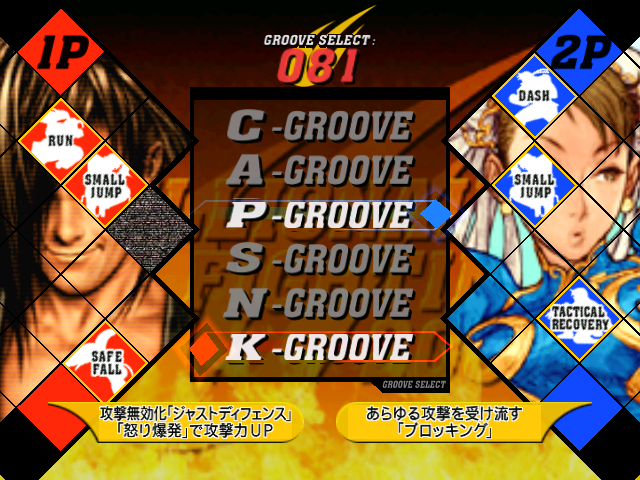
Choose your team's Groove. (See "Grooves" beginning on page 12 for information.)
•
Choose your character(s) and press any button except the L1, L2 or SELECT button after each choice. The color of the fighter depends on the button you press.
•
When starting a Ratio Match, assign Ratio Points to your characters so that the total is always 4. (See "Game System" on page 7 for an explanation of Ratio Points.)
Basic Moves
Normal Moves
Press a punch or kick button. The move varies depending on the character's posture when you press the button.
Special Moves
By combining directional button/left analog stick moves and button presses, you can perform various Special Moves. The moves listed below are common to all characters. (Use the COMMAND LIST option in Training Mode to see a list of your character's individual Special Moves.)
Block & Guard Crash
Block an opponent's attack by pressing the directional button/left analog stick away from the opponent. Use Upper Block or Lower Block depending on the opponent's attack.
Each time your character blocks, the Guard Crash Gauge drains a bit. If your character keeps blocking the opponent's attacks, eventually the gauge will empty and your character's block will be broken (a Guard Crash). When this is about to happen, the blocking effect turns red and the character's Vitality Gauge frame starts to blink. After a Guard Crash, your character will be unable to block for awhile until the gauge recovers.
Super Jump
Press to jump higher than a normal jump.
Dash
Press ➡ or to move faster than a normal walk.
Throw/Grab
When near an opponent, press or + HP or HK to throw the opponent. Some characters do a grab move instead of a throw.
Throw Escape
The moment an opponent grabs your character, press or + HP or HK to escape.
Emergency Dodge
Press LP + LK simultaneously for a quick dodge. Your character will perform either a backlash or parry, depending on the Groove (see pages 12-15.) Emergency Dodge is not available in some Grooves.
Dizziness Recovery
If the opponent's attacks cause your character to become dizzy, press any punch and kick buttons rapidly to recover quickly.
Taunt
Press the SELECT button to mock your opponent.
How to Play
Game Rules
Match Play
An elimination match lasts until one team completely drains the vitality of all fighters on the other team. The match is played in rounds. Any fighter who has won a round recovers vitality for the next round. The more time remaining at the end of a round, the more the fighter's vitality recovers.
Winning and Losing
If a character's vitality runs out, the character is knocked out (K.O.'ed). If time runs out, the round will be decided and the team with more total vitality wins the round. The team that defeats all fighters on the opposing team wins the match.
Draw Game
A draw game occurs when both teams run out of vitality at the same time (double K.O.).
Game System
Groove System
"Grooves" are the six fighting styles — C, S, A, N,
.png)


.png)
.png)
.png)

.png)

_1.png)


.png)

.png)
.png)
.png)
_1.png)
.png)
_1.png)
_1.png)