GETTING STARTED
Set up your PlayStation®2 computer entertainment system according to the instructions in its Instruction Manual. Make sure the MAIN POWER switch (located on the back of the console) is turned ON.
Press the RESET button. When the power indicator lights up, press the OPEN button and the disc tray will open. Place the SONIC RIDERS™ disc on the disc tray with the label side facing up. Press the OPEN button again and the disc tray will close.
Attach game controllers and other peripherals, as appropriate. Follow on-screen instructions and refer to this manual for information on using the software.
Memory Card (8MB) (for PlayStation®2)
To save game settings and progress, insert a memory card (8MB)(for PlayStation®2) into MEMORY CARD slot 1 of your PlayStation®2 system. You can load saved game data from the same memory card or any memory card (8MB)(for PlayStation®2) containing previously saved games.
WARNING: This title uses an autosave feature as the only method of saving your Game Data. Insertion of a memory card (8MB) (for PlayStation®2) after boot up may result in data being overwritten.
STARTING THE GAME
Press the START button at the Title screen to access the Main Menu. The first time of each start-up, you will be prompted to load or create a Game Data. See "Managing Game Data" for details.
From the Main Menu, select from the following:
•
GAME START: Open the Mode Select menu, and choose a game to play. See p.10 for details on Game Modes.
•
EXTRA: Play unlocked movies and audio clips, or browse the Gear Gallery and Records.
•
OPTIONS: Change a variety of game settings.
EXTRA
View or listen to things you've unlocked here.
THEATER
Select a movie from the list and press the button to play. Press the or START button during playback to stop and return to the menu.
AUDIO ROOM
Select a music category from the left panel and a track from the right panel to play. Use the onscreen controls like a regular music player. Press the button to pause, and again to return to the menu.
GEAR GALLERY
Use the left analog stick or directional buttons and the button to browse the Extreme Gear you have obtained. Use the L1 and R1 buttons to change the page.
RECORDS
Use the left analog stick or directional buttons and the button to browse the race and lap records for each track. Use the L1 and R1 buttons to move through the game modes.
OPTIONS
Make changes to the following settings:
•
Audio Setting: Set sound output to Dolby Digital Pro Logic II, Dolby Pro Logic II, Stereo or Monaural.
•
Vibration Setting: Set the vibration function ON/OFF.
•
Language Setting: Set the language settings for speech and subtitles.
•
Game Data: Choose which Game Data to use.
MANAGING GAME DATA
The Game Data screen in Options and at start-up allows you to create, load and delete Game Data on a memory card (8MB) (for PlayStation®2). Select a Game Data from those available, and details of your current progress will be displayed on the right side of the screen.
Press the button to enter, then select Start to load, or Delete to erase the Game Data from the memory card (8MB) (for PlayStation®2). If there is no Game Data on the memory card (8MB) (for PlayStation®2), or you wish to create a new Game Data, select NEW GAME and then press the START button.
HOW TO ENJOY DOLBY SURROUND SOUND
This game also contains Dolby® Digital surround sound during select movie scenes. Connect your PlayStation®2 to a sound system with Dolby Digital surround sound using a digital optical cable. Your sound system will automatically detect Dolby Digital and Dolby Pro Logic® II during gameplay. If it does not, please refer to your sound system's instruction manual.
Select Dolby Digital Pro Logic II from the Audio Setting menu to play Dolby Digital movie scenes and Dolby Pro Logic II during the game. Select Dolby Pro Logic II to play both game and the movie scenes in Dolby Pro Logic II.
DOLBY DIGITAL PRO LOGIC II Dolby, Pro Logic, and the double-D symbol are trademarks of Dolby Laboratories.
GAME MODES
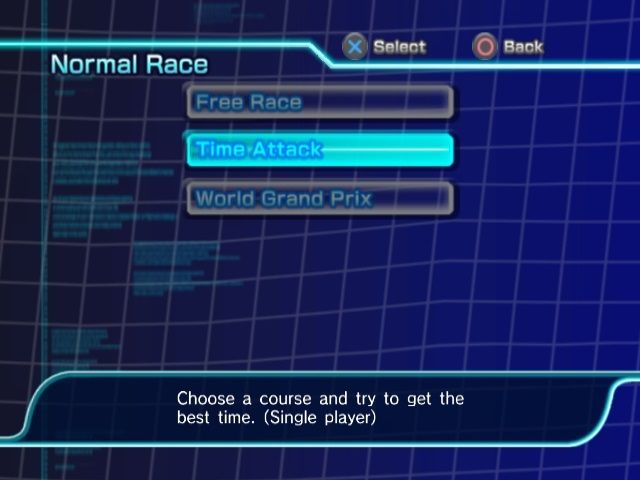
SONIC RIDERS™ features a wide variety of gameplay modes as detailed below. Use the left analog stick or directional buttons to select a game mode from the menu and press the button to continue.
NORMAL RACE
Compete in one of the following race styles:
•
FREE RACE (1P-4P): Compete against other players and CPU characters on a selected track.
•
TIME ATTACK (1P only): Select a track and race against the clock.
•
WORLD GRAND PRIX (1P-2P): Compete on 5 race tracks to become the overall champion.
STORY MODE (1P)
Enter races based on the storyline.
MISSION MODE (1P)
Clear given Missions one after another. This mode will be unlocked after certain conditions have been met.
TAG MODE (1P-4P)
Team up with another player and share a single Air Tank (p.15) as you compete against another team on
.png)

.png)
.png)
.png)
