GETTING READY
1. Make sure the GAME BOY® power switch is OFF.
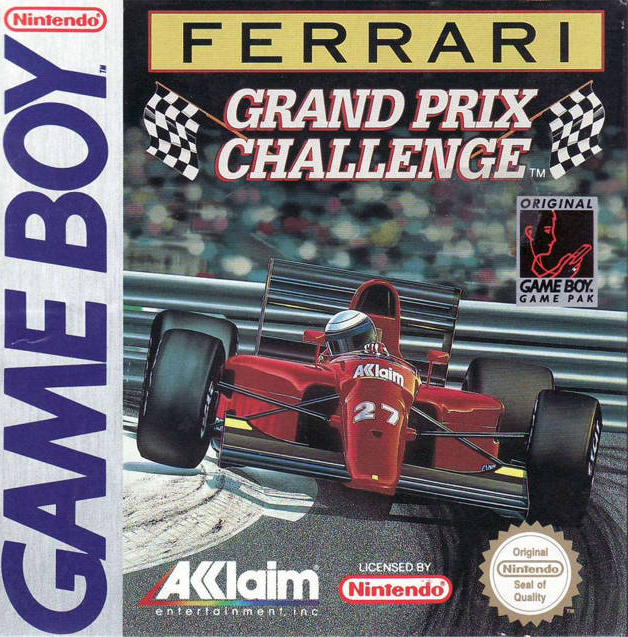
2. Insert the FERRARI GRAND PRIX CHALLENGE™ Game Pak as described in your Nintendo® GAME BOY® instruction manual.
3. Turn the power switch ON.
You will see the FERRARI GRAND PRIX CHALLENGE title screen. To proceed to the Practice or Qualify selection screen, press the START BUTTON at any time.
Note
FERRARI GRAND PRIX CHALLENGE is a one player game only.
You can opt either to practice on any of 16 Grand Prix tracks or to go immediately to the first. If you have a password, you can go to the next qualifying lap of the Grand Prix World Championship series.
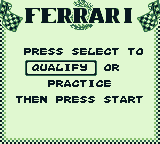
PRACTICE OR QUALIFY SELECTION SCREEN
To choose to practice or qualify, press the SELECT BUTTON until your choice appears on the screen and then press the START BUTTON.
Note
The practice and qualify modes are explained in detail in their own sections.
PRACTICE
Winning demands knowing both the lay-out of each track you race on and how to handle your car. Practice gives you that knowledge.
Transmission Type
Once you have chosen to practice, you must then select your transmission type. Use the SELECT BUTTON to select the transmission you want and then press the START BUTTON.
Note
Transmission performance and operation is covered under TRANSMISSIONS...4 ON THE FLOOR, page 14.
Number of Practice Laps
To select the number of practice laps you want to drive, use the LEFT and RIGHT CONTROL PAD ARROWS. Press the START BUTTON when you have made your selection.
Course Selection
•
Grand Prix - Nationality of Grand Prix
•
Lap Record - Qualifying lap time required to take pole position
•
Qualify Time - Time to beat to qualify for race
To scroll through the Grand Prix circuits, press the LEFT AND RIGHT CONTROL PAD ARROWS. Press the START BUTTON when you have made your selection.
Practice Race
The practice race gives you the same conditions as a Grand Prix World Championship race, but with 4 advantages:
•
No position limit - the race will NOT be terminated no matter what your position is.
•
You have chosen the # of laps.
•
You have chosen the course.
•
Your performance in no way affects your championship standings. You are free to practice maneuvers, general handling, and even pit stops.
Hit the A BUTTON to rev your engine. Watch the starting lights and when they turn green, burn some rubber and take off.
QUALIFY
This is it, the goal for which you have been practicing: the International Grand Prix World Championship. It's you against 24 cars, 8 teams, and 16 of the fastest, most grueling race courses in the world. It's a long season; winners come and go. Consistency is the key...but no guts, no glory!
Options Screen
Once you have selected QUALIFY, you will see the OPTIONS screen.
•
To choose YES or NO - Press the SELECT BUTTON.
•
To move between options - Press the UP or DOWN CONTROL PAD ARROWS.
Note
To use the SAVED GAME option, you must have raced at least one Grand Prix in QUALIFY mode and noted its password. For information about SAVED GAMES see PASSWORD on page 18.
When you have selected your options, press the START BUTTON.
Transmission Type
Once you have chosen your options, select your transmission type. Use the SELECT BUTTON to select the transmission you want and then press the START BUTTON.
Note
Transmission performance and operation is covered under TRANSMISSIONS...4 ON THE FLOOR, page 14.
Name & Country Screen
In order to chart your starting line position, finishing position, and place in the championship standings, you can enter your name here on the left hand side of the screen and the abbreviation for the country you wish to represent on the right hand side.
To move the flashing cursor, use the CONTROL PAD ARROWS. To write in a letter, press the A BUTTON. To erase a letter, press the B BUTTON. When you are done, press the START BUTTON.
For each race of the International Grand Prix circuit, you must first run a qualifying lap in order to determine your position on the starting line - the lower your time, the better your position. The time given here is the fastest time recorded so far by your competitors. Beating it will put you in pole position.
Note
If you do not beat the qualifying time for that track, you will not be allowed to race that track. You will see the winners of that race and you will advance to the next country.
Qualifying Lap
With no other cars on the track, nothing can slow you down but your own ability. Take it to the edge. The importance of a good starting position cannot be overestimated.
The driving controls and dashboard information operate the same as when racing as shown on pages 11 & 13. The Starting Line
After the qualifying lap, you will see the layout of the starting grid. To go straight to the race, press the START BUTTON.
TRANSMISSIONS. ON THE FLOOR
Whether practicing or racing, you have a choice of either an automatic or manual transmission. Automatic
Best suited to beginners, as it leaves you free to negotiate turns without having to worry about gear shifting or watching the speedometer and rev counter.
4 Speed Manual
Once you are comfortable with Formula 1 handling, increase your control and your top speed by moving up to a
.png)

.png)


_1.png)