Objective
After each race, you can view your performance against Rowdy and other drivers on the Final Positions and Season Standings screens.
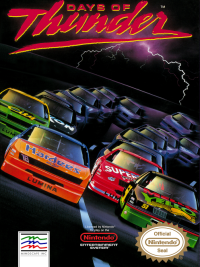
The season features races at five distinct tracks, beginning at Daytona. Each track offers unique lengths and shapes to test your driving skills. You must qualify before each race to determine your starting position. As a rookie, winning the Season requires mastering driving tactics like slipstreaming and pipelining. Beyond driving skill, a fast pit crew is essential for a competitive edge. Monitoring fuel, tires, and mechanical condition, and planning pit stops, will be crucial as you navigate the track. On Your Mark, Get Set, GO!
To start play, follow these steps:
•
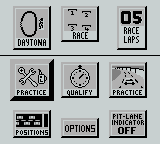
Press ◄ ► to select an option below; use A or B to change the track or laps and to Enter Race or Begin Season.
•
Enter Race (first select one track below)
•
Begin Season (drive all tracks)
•
Daytona (or Phoenix, Atlanta, Michigan, Miami)
•
Race Laps (1, 2, 3, 5, 10, 15, 20, 40)
•
Note: When beginning a Season, the first race is always Daytona.
•
Press ◄ ► to select an option, then press A or B to start:
•
Positions (doesn't display until after a race)
•
Pit-Lane Indicator OFF (or ON)
•
Options (go back to previous screen)
Pit Stops
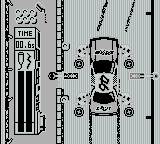
Pit stops are critical for racing success. You need to make as few pit stops as possible and execute them quickly. During a pit stop, you automatically refuel and can change up to four tires. Only perform necessary actions, as every second counts. Practice Pit
Gain experience with the Practice Pit. Use your arrow keys to insert the jack and make the flashing mechanics change tires and refuel.
Pit-Lane Indicator
Pit stops are easier if you know when the pit is approaching. Before a race, turn on the Pit-Lane Indicator. During the race, a flashing arrow will appear in the upper left of your screen to signal the upcoming pit.
Pit Controls
Use the following controls during pit stops:
•
+++ Moves the flashing mechanic to change that tire.
•
Start or Select Select a mechanic or the car (the selection flashes).
•
A or B-Zoom out of the pit and back onto the track when mechanics are clear of the car.
Qualifying
Cars start races in ten rows of two, based on qualification times. You run qualifying laps alone on the track. Your best single lap time is compared to other drivers to determine starting positions. The best position is the pole on the front row, inside track. The worst qualifying time starts on the outside track, last row.
To qualify:
•
At the Options screen, use arrows to select Qualify and press any key.
•
At the Qualifying Session screen, press any key.
•
Use ← and → to steer; press Select to change the information in the lower right window; press A to speed up and B to slow down.
•
The track overview shows where your stock car is during qualifying laps.
•
When your qualifying laps end, the Qualifying Positions screen appears.
•
Press ← and → to find C. Trickle and your qualifying position.
•
Press Select to go to the Options screen.
Practicing
•
At the Options screen, use arrows to select Practice.
•
Press any key to start the practice.
•
Use ← and → to steer; press Select to change the information in the lower right window; press A to speed up and B to slow down.
•
The track overview shows where your stock car is during practice laps.
•
Press Select to go to the Options screen.
Racing
•
At the Options screen, press ↓ ↑ → ← to select Race.
•
The track overview shows where your stock car is compared to the other two top cars during races. Your car is shown as a small square.
•
After a race, press any key to see your score on the Final Positions screen.
•
Then press any key to see your score on the Season Standings screen.
•
Press Select to go to the Options screen.
.png)

.png)


_1.png)

_1.png)
