Game Selection
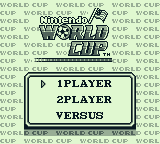
Move the cursor to the desired number of players for tournament play or select versus play for a 1P vs. 1P match. Then press the START Button.
Tournament Mode
1P (1 Player vs the Computer)
Compete against the World's best in the Nintendo World Cup Tournament. If you defeat all 12 teams in the Tournament, the Nintendo World Cup trophy is yours! 2P (2 Players vs the Computer)
Team up with a friend and challenge for the Nintendo World Cup trophy! Versus Mode
Versus (1 Player vs 1 Player)
Set up your own dream matches on various playing surfaces from around the world in this exciting match game.
Note: You cannot select either of the 2 player games (2P or the Versus game) unless there is a game pak inserted into each Game Boy unit and the Game Link™ cable is securely connected to both Game Boy units.
Passwords
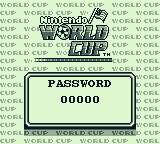
In the Tournament matches, you will be given a password at the end of every game. Write this number down for future reference.
Once you have a password, you can begin a match starting from the last game you have won.
•
To enter a password, press up or down to select a number.
•
Then press left or right to select the number's position.
•
Then press the Start Button.
Team and Player Selection
Team Selection
Each team has its own unique characteristics. Some teams are very fast, some are excellent at defense, while others are good passers. Try to find the team that has the best overall skills, or pick an underdog team and see how far you can go!
In the 1P (Player) or 2P Tournament games, you or your teammate will select a country to represent. In the 2P (Player) Versus game, each player will select a country to represent.
Player Position
Just like the team selection, each player has his own unique set of characteristics. Since you only control one player and the computer controls the rest of your team, experiment with different players to find the athlete with the best overall skills.
•
To change the player's position, move the cursor to "YES" and select with the A Button.
•
Assign a player to all 6 positions using the cursor and A Button.
•
The player with the roman numeral I is the player you control (the Roman numeral II will appear next to the second player's name in multiple player games).
Planning Your Game Strategy
Planning your strategy is very important to winning each game. In order to make it to the Nintendo World Cup finals, you must learn different techniques and make adjustments to your opponent's game plans. •
To plan your offensive strategy, move the cursor to the option you want and select with the A Button.
•
Repeat this step once more to complete your game strategy and to begin play.
Your Offensive Strategy?
Do you want your teammates to pass you the ball or do you want them to dribble the ball up the field? If you choose to have them dribble the ball up the field, you can ask them to pass you the ball by pressing the A Button.
Should Your Teammates Shoot?
Sometimes it's helpful to get the little extra scoring punch from your teammates. You decide if they should shoot the ball frequently, only sometimes, or not at all.
Not every team is the same. Plan your strategy carefully for each team and make any necessary adjustments during halftime. Defeating all the teams and capturing the Nintendo World Cup Trophy will depend on how you prepare for each match! Choosing Your Playing Surface
In the Versus match after each player has selected a team, use the cursor to select the type of playing surface you want to play your match on. Then press the A Button to select that field.
Grass
Play on the perfectly manicured grass of the world's top stadiums.
Bumpy
Watch out for the rocks on this play field! If you run into a rock, you may have to sit for a few seconds to regain your senses.
Sand
The deep sand of this play field will cause the ball to roll very slowly. Watch out! Your passes will not travel as far once they land.
Ice
On this slippery playing surface, if you get tackled you might slide off the playing field.
By using the + Control pad in conjunction with the A and B Buttons, you can control the offensive and defensive moves of your player and your teammates.
Offense
Dribbling
When you have the ball, you can control your dribble by moving the + Control Pad in any direction.
Passing
If you want to pass the ball to a teammate, press the A Button and the computer will automatically pass the ball to your nearest teammate. If a teammate has the ball and you would like them to pass the ball to you, press the A Button.
Shooting
By pressing the B Button and any direction on the + Control Pad simultaneously, you can shoot the ball to that
.png)

.png)


_1.png)


.png)

.png)


.png)



.png)



.png)