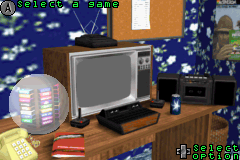
WELCOME TO YOUR BEDROOM!
Here you've got everything you could ever want to amuse yourself - a state of the art entertainment center. Press the + Control Pad Left/Right to select the Cartridge Rack, Credits List, TV, Records List, or the Boom Box, then press the A Button to activate your selection.
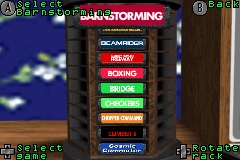
Cartridge Rack
This is where the games are stored. Let the fun begin!
Press the + Control Pad Left/Right to rotate the Cartridge Rack. Each side contains a wide variety of games. Once you've selected a row of games, press the + Control Pad Up/Down to select a cartridge, then press the A Button to select a game.
Once a game is selected, you will be presented with an image of the cartridge. Press the + Control Pad Left/Right to switch between the cartridge, original box art, or the game manual. With the cartridge or manual selected, you can use the + Control Pad Up/Down to scroll through.
If the manual is selected you can use the L Button to Page Up and R Button to Page Down. If you just want to begin, simply press the A Button to go to the TV and start playing!
TV
This is where you finally get to play those classic games! Now that you have selected your game, and it is displayed on the TV, press the A Button to load the game, and then press SELECT to begin playing!
Note: At any time during the game, press START to pause the game. In the pause menu there are other options you might want to check out!
•
View the switch settings for the level of difficulty.
•
Press the L Button to view the high score for the game, as well as the requirements needed to earn a patch.
•
Press SELECT to view the Help Menu.
2-Player Linking Instructions
If you have selected a two player game, a message will appear at the bottom of the screen indicating that you will need to plug in a Game Boy® Advance Game Link® Cable.
1. Please make sure the Power Switch on the second game system is OFF.
2. Connect a Game Boy® Advance Game Link® Cable into the External Connector (EXT) on each of the game systems. Check to see that the Player One end is connected to the first Game Boy® Advance (the cable ends are different on each side). Make sure the second Game Boy® Advance does NOT have a Game Pak inserted.
3. Turn on the power to the second Game Boy® Advance and PLAY!
Note: Once power is turned on to the second game system, a message will notify you that data is being transferred. Once this is done, the screen will display "Player 2 Ready". Note that the second player will NOT be able to see the game screen on the second Game Boy® Advance system, so they will have to look at the first player's screen to see the action.
Records List
Exclusive to the Game Boy® Advance, this is where you can save your high scores for each game! Also included, are the patches that you earn by playing various games. Not all games have a patch available.
If there is a patch available for the game, it will be denoted with a box in the "Patch" column. Some games have more than one patch. Use the A Button to view the high scores, and then use the +Control Pad Right to view the patch. If you have not unlocked the patch you will get a message explaining that is has not been unlocked yet - so get back to playing and unlock that patch!
The Boom Box
Rock On! This is where you can change the options, including music and volume. Use the +Control Pad Up/Down to scroll through the six different settings in this menu, they include:
•
Brightness - This controls the brightness of the screen. Use the +Control Pad Left/Right to adjust the brightness.
•
Game Volume - This controls the volume of each game. Use the +Control Pad Left/Right to adjust the volume.
•
SFX Volume - This controls the volume of the sound effects. Use the +Control Pad Left/Right to adjust the volume.
•
Music Volume - This controls the volume of the music. Use the +Control Pad Left/Right to adjust the volume.
•
Music Track - This changes the music track that is played. There are four different tracks, plus a random setting. Use the +Control Pad Left/Right to switch between the tracks.
•
Erase all saved data - Be careful with this one, if you choose this it will erase everything - you will lose all your scores and everything will be set back to default!
GAME LIST
Favorites for the Atari® 2600


.png)

.png)
.png)
