Setting Up
Set up your Sega Saturn system by following the instructions in the Sega Saturn Instruction Manual. Plug in Control Pad 1. For 2-player games, plug in Control Pad 2 also. Highway 2000 is for one or two players. Place the Highway 2000 disc, label side up, in the well of the CD tray and close the door.
Turn on the TV or monitor and the Sega Saturn. The Sega Saturn logo will appear on screen. If nothing appears, turn the system off and make sure it is set up correctly before turning it on again. If you wish to stop a game in progress, or the game ends, press the Reset Button on the Sega Saturn console to display the on-screen Control panel. Your Sega Saturn compact disc contains a security code that allows the disc to be read. Be sure to keep the disc clean and handle it carefully. If your Sega Saturn system has trouble reading the disc, remove the disc and wipe it carefully, starting from the center of the disc and wiping straight out toward the edge. Tournament
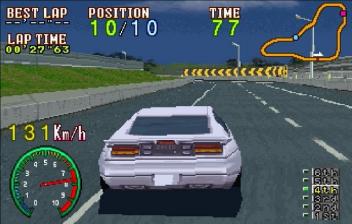
When you're ready to race, you can take your machine onto the road for the ultimate highway racing circuit. The race begins on the Splash Road Highway. If you finish in the top three, you'll move on to more glory and more challenging courses. Your car starts at the back of the pack. This is your opportunity to show your competitors that you mean business. If you know the track, you could be on your way to victory.
If you finish in one of the top three positions, you'll move on to the next course. If you don't, you'll stay where you are.
Time Trials
Before you race, you should get to know the tracks. You can cycle through the five highway courses by pressing left and right on the D-Pad.
Before you race for real, you should spend some time on every course. Then, you can join the race with a strong strategy and course knowledge.
Practice makes a good driver into a highway champion. With every time trial lap, you will improve as a world class racer. To select a course, navigate to the course list and press A or B button.
Battle
The Battle Mode allows for you to take on a friend in a no-holds-barred race to the finish. The action is shown in a split screen with Player One at the top of the screen and Player Two at the bottom. The object is to cross the finish line before your opponent. If you drive smart and tough, you'll win.
Options
The Option Mode allows you to customize the game to the way that you want to play. This is where you can adjust the level of difficulty, choose from the three different controller configurations, change the audio and take a listen to the various sounds of the game. After you set up, you can hit the road running.
The options available include:
•
Level: The three levels of difficulty affect the allotted time for each lap and toughness of your competitors. You should start easy, then move on.
•
Control: This option allows you to select from the three different control types for both players. Choose what feels right for you.
•
Audio: If your entertainment system is equipped with stereo, you can take advantage of this super sound option.
•
Mission: This option allows you to play the game with one or two racers.
•
Sound Test: Take a listen to the background music, sound effects and voice samples before you hit the road.