SET-UP
GAME BOY
•
Turn OFF the power switch on your Nintendo® Game Boy® Advance. Never insert or remove a Game Pak when the power is on.
•
Insert the Game Pak of Crazy Taxi: Catch a Ride! into the slot on the Game Boy® Advance. To lock the Game Pak in place, press firmly.
•
Turn ON the POWER switch. The credit screens will appear (if you don't see them, begin again at step 1).
•
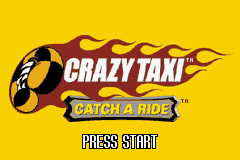
When the title screen appears, press START to proceed to the Main Menu.
"ALRIGHT, LET'S GET IT ON!" - AXEL
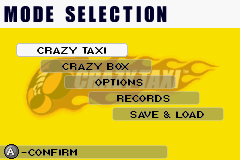
You set to play some Crazy Taxi? Well hold on buddy - we've got a few things to settle first. Use the Control Pad to cruise up and down the menu and the A Button to make a selection at any time. Of course, you can also use the B Button to return to the previous menu.
MODE SELECTION
CRAZY TAXI MENU
You want to drive the road? You need to set the rules! The options are:
•
Normal Rules - Pick up and deliver fares before the timer reaches zero. With each successful fare, more time is added to the timer.
•
3 minutes - Pick up and deliver as many fares as you can within 3 minutes.
•
5 minutes - Pick up and deliver as many fares as you can within 5 minutes.
•
10 minutes - Pick up and deliver as many fares as you can within 10 minutes.
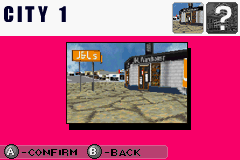
City Selection - Once you've set the rules, select your City. Starting out, you can only select one city, but get an awesome or crazy rating in any mode of play and the second city unlocks.
Cabbie Selection - Last thing you have to do is select a cabbie. Are you going to play as Axel? B.D. Joe? Gena? Or maybe bad ol' Gus? Choose your driver and then it's time to play! For more information on the cabbies, see page 12.
CRAZY BOX MENU
Want to brush up on the essential cabbie skills? Choose Crazy Box from the menu to play nine different mini-games and learn the tricks of the cabbie trade.
First, you'll need to register your name. Then, choose your cabbie. After that, it's off to the driving course! Select your mini-game and you're set to go. Small tip for you first time cabbies - if you move onto one of the mini-games and press SELECT, you get rules and advice for that game.
For more information on Crazy Box games, see the CRAZY BOX section on page 22.
OPTIONS MENU
If you want to muck around with the rules of the game, you've come to the right place. Your options are:
•
Time - Adjusts the amount of time you get at the start of a “Normal Rules” game.
•
Difficulty - Adjusts how much time the passenger gives you to drop them off.
•
Traffic - Adjusts the amount of traffic on the city streets.
•
Sound - Adjusts the sound effects volume, the music volume, or plays the sound files in the game.
•
Control - Choose between one of three control combinations. For more info on the controls, see GAME CONTROLS on page 9.
A DAY IN THE LIFE
"ALRIGHT! LET'S GO MAKE SOME CRAZY MONEY!"
You've got the car. You've got the cabbie - let's drive!
Customers appear with a $ over their head. The color of that $ (red, orange, yellow, yellow-green, and green) indicates the difficulty level of the fare. A red $ would be a short distance fare; a green one would be a long one. Remember, the longer the fare, the more cash you make.
If your fare is delivered on time, you get your basic payment. You can earn more money by getting your passenger to his or her destination early and doing tricks. Do a bunch of tricks and combos for even more cash! But if you let time run out, you've got trouble - the fare jumps out of the taxi and runs off without paying.
Pay attention to the on-screen information to help you get your fare to his or her destination.
•
Destination - The minute you pick up a customer, a picture of where you need to go will appear on the screen. This will vanish in a couple of seconds to make room for the following tools.
•
Timer (upper left corner) - Tells you how much time you've got left in the game.
•
Passenger timer (middle of the screen, outside the cab) - Tells you how much time you have to drop the current fare off.
•
Drop Zone - When you get close to the fare's destination, come to a complete stop within that flashing red drop zone to successfully drop off the fare. To find the zone, look for the green bouncing arrow pointing directly to the stop.
PAUSE MENU
If START is pressed during the game, the Pause Menu will appear. Choose from the following selections on this menu:
•
Restart: Restart the current city or Crazy Box challenge
•
Quit: Quit out to the main menu
**1

 (En,Fr,De,Es,It).png)


.png)
.png)
.png)
.png)

.png)

 (En,Fr,De).png)
 (En,Fr,De,Es,It).png)


