STARTING UP: HOW TO USE YOUR SEGA SATURN SYSTEM
This CD-ROM can only be used with the Saturn System. Do not attempt to play this CD-ROM on any other CD player, as doing so may damage the headphones and speakers. Set up your Sega Saturn system by following the instructions in your Sega Saturn System Instruction Manual. Plug in Control Pad 1. For 2-player games, plug in Control Pad 2 also. Place the Sega Saturn CD-ROM, label side up, in the well of the CD tray and close the lid. Press the Power Button to load the game. The game starts after the Sega Saturn logo screen. If nothing appears, turn the system OFF and make sure it is set up correctly. If you wish to stop a game in progress or the game ends and you want to restart, press the Reset Button on the Sega Saturn console to return to the Game's Title Screen. If you wish to return to the Control Panel, press Buttons A, B, C and Start simultaneously at any time. If you turn on the power without inserting a CD, the Audio CD Control Panel appears. If you wish to play a game, place the Sega Saturn CD in the unit, press the D-Button to move the cursor to the top left button on the Control Panel, and press Start. The opening screens of a Game will appear. IMPORTANT: Your Sega Saturn CD-ROM contains a security code that allows the disc to be read. Be sure to keep the disc clean and handle it carefully. If your Sega Saturn system has trouble reading the disc, remove the disc and wipe it carefully, starting from the centre of the disc and wiping straight out towards the edge. GETTING DOWN TO BUSINESS
A game intro follows the Sega logo. Watch it, or press Start at any time during the intro to move to the Title screen. Press Start again to enter the Mode Select screen. In the Mode Select screen, select Arcade Mode or Options. When using a Control Pad, highlight modes by pressing the D-Button UP or DOWN to highlight, and Button A, C or Start to enter.
When using a Stunner, pull the trigger to highlight modes and press Start to enter.
ARCADE MODE
Arcade Mode begins with the Stage Select screen. Aim at the stage you want to start the game from and fire your weapon to select. You can choose to begin the game at any of the three stage levels - Beginner, Medium or Expert. You have ten seconds to select a stage. If the timer runs out, the Beginner stage is automatically selected. YOUR GUN
A gun is a cop's best friend, and it's good to know your friends. Your standard-issue weapon is a six-round service revolver. Using it is simple - just take aim and fire.
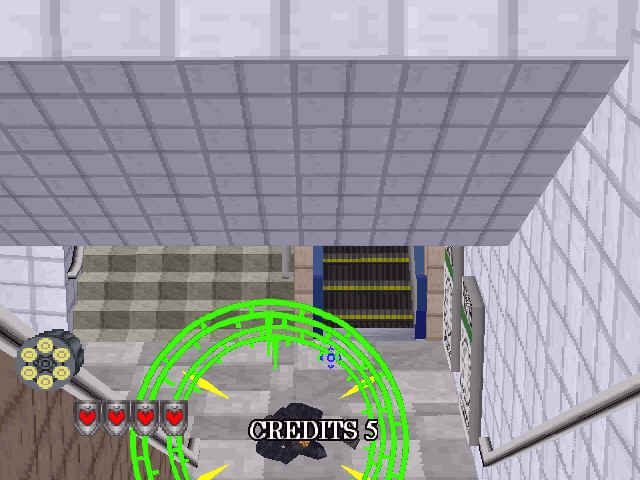
You'll need a sharp eye and steady hand to make these shots, because the bad guys don't just stand around waiting for you to shoot them; they fight back with everything they've got. You lose a Life Marker each time one of their shots hits you. And to further complicate things, there are defenseless civilians running around the crime scene. Be careful not to shoot civilians - you lose a Life Marker if you do.
Damaging public and private property is not encouraged by the higher-ups back at the precinct. But extreme situations call for extreme measures, so don't be afraid to blast the occasional oil drum, cash machine or potted fern if it gets in your line of fire. Some objects in the background blow up when you shoot them, some may fall off the walls onto unwary criminals, and others may contain Power-Up items to boost your firepower and increase survivability.
POWER-UPS
There are various Power-Up items hidden throughout each stage. Shoot a Power-Up to acquire it. The Power-Up automatically becomes the active weapon for your character. Some Power-Up weapons can be re-loaded, others have only one clip. Power-Up weapons are lost when you lose a Life Marker.
RANKING
At various points during gameplay, a Ranking screen appears, assessing your performance in the current game. The Ranking screen shows data for:
•
Score: Your total point score for the current game
•
Gangsters: The number of gangsters you have neutralized
•
Civilians: The number of times you hit a civilian
•
Shots: The total number of rounds fired
•
Hits: The number of bullets that found their marks
•
Accuracy: The percentage of shots that hit
GAME OVER/CONTINUE
The game ends when you lose your last Life Marker. If you have Continues remaining, you have the option of continuing the game from the same point where you lost the final Life Marker. Press Start before the countdown timer reaches zero to continue.
NOTE: See the "Continue" section of "Options" on page 17 for information on how to set the number of Continues per game.
If you choose not to continue, or you run out of Continues, the GAME OVER message appears on-screen, followed by the final Ranking screen. This Ranking screen assigns you a rank based on your overall performance in several categories:
•
Score: Your total score for the game
•
Gangs Arrested: The total number of crooks you sent up the river
.png)

.png)
.png)
