WELCOME TO DOOM!
DOOM is a lightning-fast adventure where you are the toughest space trooper to ever avoid sucking vacuum. Your mission is to fight, shoot, and puzzle your way through a hellish, monster-infested holocaust. You must survive to tell the tale by reaching the other end. Gameplay is simple but seriously challenging. This is an action-filled blast-athon, not a cumbersome adventure game. Success requires both wits and a quick finger on the trigger. GETTING STARTED
Press Start at any time to access the Main Menu. Use the D-Pad to move the skull icon up or down, then press Left or Right to modify the selection.
When the demo is playing, press Start to display the Main Menu. To access the menu during a game, press Start to pause, then press A to go to the Options Menu. Move the skull icon to the Main Menu option and press A. Pressing Start while the Main Menu is displayed will start a new game.
MAIN MENU
You can play either Ultimate DOOM or DOOM II. Pressing the D-Pad Left or Right toggles between the two games.
Difficulty
You can choose from four difficulty levels:
If you are new to DOOM, start with an easier level to give yourself a fighting chance. You will have plenty of time for the rough stuff later.
OPTIONS
From the options menu, you can perform the following tasks:
•
Music Volume: Use the arrow keys to change the background music volume.
•
Sound Volume: Use the arrow keys to change the sound effects volume.
•
Password: When you finish a level, you are given a password. Write it down! Enter the password to start at the next level. Highlight the number or letter, then press B (or C or X) to add it, or A to delete. Press Start to begin when entered correctly.
•
Configuration: Use the D-Pad to highlight a button you want to change, then press the new button. For example, move the highlight to "Strafe Left" and press X to redefine it. Be careful, as different actions can be assigned to the same button. To return to default settings, move the cursor to "Default" and press Start.
•
Main Menu: Takes you back to the Main Menu.
PLAYING DOOM
MOVING
At first, you might find yourself bumping into walls while demons attack you. Once you master the movement, everything else follows. Hold down X to Run.
USING DOORS, SWITCHES, AND ELEVATORS
To open most doors and operate switches, stand directly in front of them and press B.
PICKING UP STUFF
To pick up an object, just walk over it. You are smart and will know if you need to take it.
COMPLETING A REGION
At the end of each area, there is an exit chamber. Enter the chamber and press the switch inside to exit and head onward. When you finish an area, an Achievement Screen tallies your performance, including hidden regions located, kill ratio, treasure percentage, completion time, and par time.
THE RULE OF CONSTANT RESURRECTION
If you die, you restart the level from the beginning with only a pistol and some bullets. You have no life limit; you can keep restarting as often as you are killed. The entire level is restarted from scratch, and monsters you killed before have returned.
AMMO AND WEAPONS
Different weapons use different types of ammo. When you run out, DOOM automatically loads the correct weapon. You have a maximum limit on the amount of ammo you can carry, listed on the right side of your status bar. Picking up a weapon you already possess also gives you ammo.
•
Small Ammo: Clip, Shells, Rocket, Cell
•
Large Ammo: Ammo Box, Box of Shells, Rocket Case, Bulk Cell
Weapon Types:
HEALTH AND ARMOR
Even for a tough trooper, DOOM can be deadly. Whenever you are injured, the screen will flash red and your health will decrease. Keep an eye on your health or you'll end up face down.
Two types of body armor can be found: Security Armor and Combat Armor. Both reduce damage but deteriorate with use and eventually are destroyed.
If you are wearing armor, you only pick up a replacement suit if it provides more protection than what you are currently wearing.
STATUS BAR DETAILS
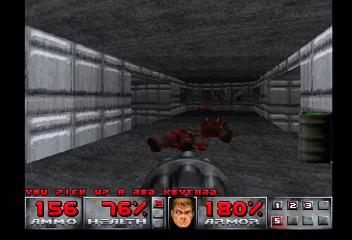
The status bar indicates your inventory, current weapon, health, and energy/ammo for the currently used weapon.
•
1. Primary Ammunition: Indicates the number of shots remaining in your current weapon.
•
2. Health: Starts at 100%. At 0%, it is time to quit.
•
3. Weapons: Numbered slots show the type of weapon used and those in your possession.
•
4. Your Face: This portrait indicates the direction from which damage came. As you take damage, your face looks like raw hamburger.
•
5. Armor: Helps while it lasts. When it is gone, you may too.
•
6. Key Cards: Shows any keys you possess. There are three colors: yellow, red, and blue.
•
7. Ammo: Shows how much of each type you are carrying and the maximum limit.
MESSAGES AND AUTOMAP