Getting Started
Insert the Defender of the Crown™ Game Pak in your Game Boy® Advance and turn the power ON.
•
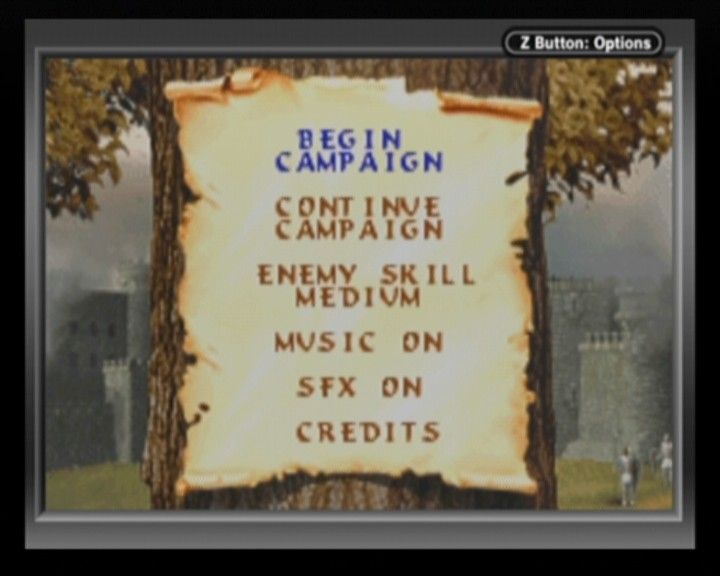
Begin Campaign: Starts a new game. This will save over any previous game in progress.
•
Continue Campaign: Loads a previously saved game.
•
Enemy Skill: Sets aggressiveness and skill of foes to EASY, MEDIUM, or HARD.
•
Music: Setting to OFF turns off music for the remainder of the game.
•
SFX: Setting to OFF turns off sound effects.
•
Credits: Allows you to view the credits for Defender of the Crown.
To access the OPTIONS menu for sound adjustments, press START while the map of England is displayed. Music and SFX can be turned back on from this menu.
Begin Your Campaign
After beginning a new game, choose your character on the character selection screen. Press the Control Pad Left or Right to bring up one of the four Saxon lords. Press the A Button to select your character.
Each of the four lords has different strong and weak points. Be sure to consider your choice of character carefully and pick one that suits your own playing style.
Lord Skills
•
Leadership: Measures a lord's skill in battle. A high rating may turn the tide even when outnumbered.
•
Jousting: Determines effectiveness on tournament grounds. A high rating makes controlling the lance easier and hitting opponents more likely.
•
Swordplay: Measures skill with a blade. A high rating means dealing more damage and receiving less during sword battles.
Your goal is to claim the throne of England by conquering all three Norman castles in the south. Although you and your fellow Saxons share a common enemy, they may turn on you as the war rages on.
Choose actions by pressing the Control Pad to highlight options on the game menus. Each turn takes one month of time. At the beginning of each turn, you receive income based on the lands you currently occupy.
Pressing START from the main map brings up the OPTIONS menu. Here you can set various options such as sound and QUIT the current game.
Saving
Defender of the Crown features an auto-save function. The game is saved at the beginning of each month, after every lord has taken his action.
Do NOT turn off your Game Boy® Advance while the game is being saved, even though the process takes very little time.
Reading the Map
The map of England is divided into 18 territories, each with its own income level and number of vassals. When a lord conquers a territory, that income is added to his monthly total and vassals can be recruited.
Each territory offers a different strategic advantage. Use the READ MAP command to select a territory for a report on its income, vassals, and current owner. If owned by a lord, the report shows their skill in battle, swordfighting, and joust.
Each lord's domain is represented by a different color. To get a better view of the England map, press and hold either the L Button or R Button to make the main menu disappear.
Building Your Army
To purchase troops for your army, select BUY HOME ARMY from the main menu. Press the Control Pad Up or Down to select the troop type from SOLDIERS, KNIGHTS, CATAPULTS, or CASTLES.
Troop Types
•
Soldiers: The backbone of any army. They lack high attack power and fall quickly but are cheap and effective in large numbers.
•
Knights: Elite armored units. They are more costly but take more damage and can overpower weaker soldiers.
•
Catapults: Massive siege engines that are slow but immensely damaging. They are a must for attacking castles.
•
Castles: Use these to fortify captured lands. You must have at least one free territory to purchase a castle.
Press the Control Pad Right to add troops for the listed cost. Press Control Pad Left to sell back any troops just purchased. Pressing R or L Button transfers troops in groups of ten.
Select CONTINUE to complete your purchase. Press B to cancel. Any new troops are added to your home army and your turn ends. Purchasing a castle does not cost a turn, but you must choose the location from your available territories. Only one castle can be placed in each territory.
Conquest
Your campaign army is represented on the map by your character's banner. Select MOVE CAMPAIGN to capture hostile or undefended territories, or to move through friendly ones. You may enlist the help of Robin Hood before attacking by choosing VISIT ROBIN.
After selecting MOVE CAMPAIGN, highlight the territory you wish to move to with the Control Pad and press A. You can only move freely through territories you already own. Moving through another lord's land requires permission or conquest by force.
As your army grows, fortify your lands by leaving troops to guard them. Use the TRANSFER FORCES command to move troops into a territory you currently own, adding a layer of defense. If a castle is manned, it provides a formidable barrier.
Troops can also bolster your home castle. Once at your home territory, you can TRANSFER men into and out of your castle, including previously purchased troops.
Transfer forces into your campaign army by selecting a troop type and pressing Control Pad Right. Press Left to transfer forces out of the campaign army into the occupied territory. R or L Button transfers troops in groups of ten.
Battles
Siege warfare involves using payloads to weaken enemy defenses before battle.
•
Boulders: The only payload


_2.png)
.png)
.png)




 (En,Fr,De,Es).png)

.png)
