Starting the Game
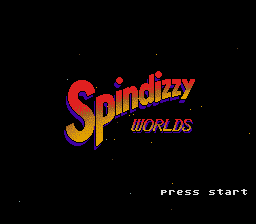
Insert your game pak before turning on your Super Nintendo Entertainment System. The opening sequence will begin, followed by the appearance of the title screen. Pushing the START button during the opening sequence brings up the title screen.
Title Screen
Pushing the START button again will bring up the game menu. If you do not press any buttons, a self-running demo will commence. At this point, jewels, aliens & hazards, switches & buttons, warps and actual gameplay are introduced and demonstrated.
Pushing START from the self-running demo brings you back to the game menu. If no buttons are pressed during the self-running demo, the opening sequence will begin again.
Game Menu Options
Pressing the START button during the title sequence will produce the following menu of options:
Press the "A" button to make a selection.
Continue This Game
Each time you play, Spindizzy Worlds automatically remembers how many planets you have successfully completed (or whether you started!). When the game is terminated in the middle of game play, or when the game is over, you can start the game from the same planet as many times as you want. However, if you have not started the game yet, it works the same way as "START NEW GAME."
Start New Game
Press the "A" button to start a new game. Once this selection is made, you can choose either "EASYDIZZY" or "SPINDIZZY"; this may be done by holding left or right on the Control Pad and then pressing the "A" button. One cluster is easier than the other. Try and guess which one.
After choosing a cluster, you can select from two difficulty levels (beginner or advanced) in the same manner. GERALD is less susceptible to damage in beginner mode.
Check Performance
Shows the current game state. This will show how many Worlds you have completed so far and how much time you spent finishing them. However, if you start the game with a password, the time taken to complete previous worlds will be "unknown."
Wind Back World
This selection lets you go back and replay the last planet you completed. Thanks to your Time-Space Resonator, you can go back in time to try for a better fuel rating, or take in that scenic vista just one more time. It may be repeated as often as needed 'backing up' one world each time.
When just starting out, selecting "WIND BACK WORLD" is the same as selecting "START NEW GAME." Also, if a password is used to get to a certain world, you can't go back to the planet that precedes it.
Selecting a World
After choosing whether to play the easy or hard cluster, the Planet Select Screen will appear. Each sphere is a living world, capable of sustaining life as we've never known it. Completed worlds will be removed from your cluster map, allowing access to deeper, more dangerous worlds.
You can rotate the cluster with the Control Pad. The name of the nearest world will be shown at the top of the screen. Press the "A" button to land on it. Accessible worlds can be played in any order.
WaterWorks and Planet Navigation
After selecting the game level, the Planet Select screen will appear. Rotate the planets with the Control Pad and move the planet you want to play into the foreground. Press the "A" button and the game will start (some worlds cannot be explored until the outermost planets have been secured).
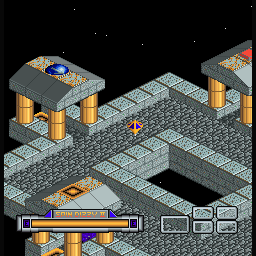
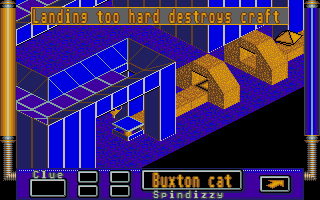
Each world contains up to 15 levels. The screen will show only about 1/10th of a level at a time; the rest of the level scrolls into view as you approach the screen edges.
You can move from level to level by moving into warps. Some warps will only appear after all the jewels on a level are collected or after a certain switch is used. Along the way, other tasks may need to be accomplished.
Methods to the Madness
The object of the game is to complete all of the planets in each cluster by collecting jewels and solving puzzles as you explore; all of the planets have several levels apiece. Maintaining your energy supply is of critical importance in this game. By collecting jewels, it can be replenished.
If GERALD is destroyed in the course of the journey, your standard equipment Time-Space Resonator will automatically return you to the point in time-space before it happened. Since time travel requires a great deal of energy, it depletes your fuel supply.
•
Avoid contact with aliens (Aliens deplete your energy on contact)
•
Falling off loses fuel (You will lose energy if you fall into an abyss)
GERALD Controls and Movement
GERALD has inertia, so the longer you push, the faster it will move. Use the "A" or "Y" buttons for an extra boost. While going up slopes you may need a boost to make progress.
Most surfaces will slow GERALD down by friction (some more than others). You can slow or stop by pushing the Control Pad in the opposite direction of GERALD's motion, or you may use the brakes to stop at once. The "B" or "X" buttons apply the brakes.
GERALD's movement generally follows the laws of physics as it jumps off ramps, falls, climbs slopes, etc. Experiment.
Viewpoints and Radar
While playing, you may find GERALD is hidden behind some scenery. It is possible to select 4 different viewpoints. Use the "R" or "L"
.png)

.png)

.png)

.png)
_1.png)


_1.png)


 (Translated En).png)

