Tecmo Super Baseball
With Tecmo® Super Baseball™, you have the power to recreate all of the games of the 1993 season. Whether you simply manage the teams or actually control the major leaguers, the season is yours to relive. All of the major league players who shaped the pennant race are here alongside each city's most valuable players. We show you their strengths and weaknesses based on their 1993 statistics so you can decide which twenty-five players make up each team.
Power-off Memory Function
This game pak is equipped with a back-up battery to save the results of games played over the course of a season.
To protect the saved data, never turn the power switch on and off rapidly. Doing this may cause data or scores saved by the battery back-up to be changed or lost.
Preseason Game Mode
To play a preseason game, begin by choosing Preseason Game, select Team Control, and finally choose the home and visiting teams from among all 28 teams or the two Super-Star teams. Data from preseason games is not saved by the backup memory.
If you choose Preseason from the menu, the Team Control window will appear with the ✚ Control Pad indicator next to the word Control. Press the Ⓐ Button to adjust the difficulty level of the game by moving the ✚ Control Pad:
•
Easy: The easiest play level.
•
Medium: The standard play level.
•
Expert: The most difficult level to play (Seasonal Play is always played at this level).
Once you have selected your game mode, the Team Selection Screen will appear. Choose your team from this screen, or cancel your selection by pressing the Ⓑ button. Repeat this process to select the opposing team to begin the game.
Regular Season Play Mode
Each team will play the games listed in the schedule. You can choose to play a Regular, Reduced, or Short season when you reset the Season Schedule.
The top teams in each division, as well as one wild card team with the best win-loss record, will be paired up in the playoffs to see who will advance to the World Championships. Player statistics and Team records are retained in the cartridge memory throughout the entire season.
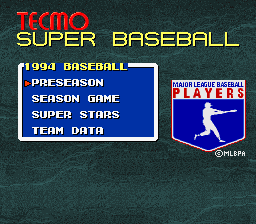
To begin, choose Season Game from the Main Menu to bring up the Regular Season window. Check the Schedule and set the Team Control before using Game Start to begin your season.
Super-Star Game Mode
The Super-Star game is a match-up between the best players in baseball. The starting line-ups of each Super-Star team can be changed by entering the Team Data.
Choose Super-Stars from the Main Menu to bring up the Super-Stars Window. From here you can choose either Play Game or Draft. You can draft players from either the A League or N League. When you are ready to begin, choose Play Game and pick the game mode.
Team Data Options
When you want to look up a team or player's data, or to alter the batting or pitching line-up, choose the team from the list and press the Ⓐ Button. Once you are on a team's data screen, you can select from the following items:
Batter Stats
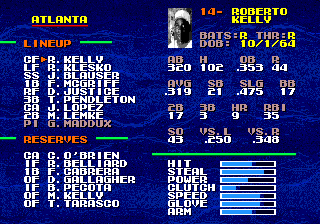
Select Batting Stats if you want to cycle through the lineup and examine each hitter's statistics or abilities. Use the ✚ Control Pad to select Batter Stats and press the Ⓐ Button. Use the ✚ Control Pad to select a player marked with the ➔ symbol, and press the Ⓐ Button to see their statistics:
•
AB: At Bats (Number of times a player batted)
•
H: Hits (Number of hits a player has)
•
OB: On Base Percentage (The frequency in which a player reaches base)
•
R: Runs (The number of Runs a player has scored)
•
vsL: Batting average against Left handed pitchers
•
vsR: Batting average against Right handed pitchers
•
2B: Doubles (The number of doubles a player has hit)
•
3B: Triples (The number of Triples a player has hit)
•
HR: Home Runs (The number of Home Runs a player has hit)
•
RBI: Runs Batted In (The number of Runs a player has Batted In to score)
•
SO: Strike Outs (Number of times the batter has struck out)
•
SB: Stolen Bases (Number of bases a player has stolen)
•
SLG: Slugging Percentage (Indicator of a player's ability to get extra-base hits)
•
BB: Base on Balls (Number of walks a player has received)
Batter Ability Indicators
•
Hit: The ability to make contact with the ball.
•
Steal: The ability to successfully steal a base.
•
Power: How hard a player hits the ball.
•
Clutch: How well the player hits when the pressure is on.
•
Speed: How fast of a base runner a player is.
•
Glove: How well the player fields their position.
•
Arm: How strong of a throwing arm a player has.
Pitcher Stats
Select Pitcher Stats to cycle through the rotation or bullpen. Use the ✚ Control Pad to select Pitcher Stats and press the Ⓐ Button. Use the ✚ Control Pad to select either a starter, reliever, or closer, and press the Ⓐ Button to see
.png)

.png)
 (Beta).png)
 (Beta).png)
