Quick Controls
•
Move Cursor: Control Pad up/down/left/right
•
Confirm Deletion: Press Y
•
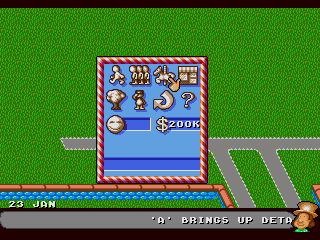
Open/Close Park: Hold Select and Press Y in the icons menu, or Press Y when either the hand or question mark icon is on the main gates
•
Change Game Speed: When in icons menu, hold down L and press Y to toggle between speed options (1-4)
•
Music On/Off: When in icons menu, hold Down R and press Y to toggle between options
The Aim of the Game
The aim of Theme Park is global domination. You must open a park on every one of the available sites around the world, and in the process establish yourself as planet Earth's premier Theme Park operator.
Once a year you're given the option to sell your current park providing you will have enough capital to purchase another. You need to decide whether or not it's worth accepting the money on offer, or continue to build on the park's success and hopefully get an even higher asking price in twelve months time.
There's a maximum size to which you can grow your park, with no more than 200 visitors allowed in at any one time and a ceiling on the number of rides which the park can hold. Once you've achieved this limit it's well worth considering selling up.
As the park fills up with people and facilities, the game slows down so that you can more easily keep an eye on all the activity.
The money made from the sale of each park is then used to finance the purchase of another site, with enough cash left over to develop the next park. Only when you've turned all the dots on the World Map to pink have you succeeded in your aim.
Success in the Theme Park business requires an awesome eye for detail. You need to fine tune every ride, shop and side-show for maximum profit margin. Don't forget to check on your finances regularly at the Bank Screen and listen to the Park Advisor's advice throughout the game.
Setting Up the Game
From the Title screen you arrive at the Main Menu. To select a Main Menu option, use the Control Pad up/down to move the arrow cursor and then press the Y, B, A or X button.
The Main Menu options are:
•
Return to Park: Pressing Y, B, A or X returns you to the Theme Park you just left (available only if a Park has previously been opened).
•
Setup New Theme Park: Press Y, B, A or X for the Enter Name screen.
•
Language Select: Press Y, B, A or X to choose between English, French and German.
•
See Credits: Find out the names of those responsible for Theme Park. Press Y, B, A or X to scroll through the pages.
Enter Name Screen
You must enter your name before you can choose a location for your park.
To enter your name, press X to enter the default name or use the Control Pad to move the cursor arrow around the letters grid and press Y to select a letter. You can repeat the process until the entire name has been entered. Press B to delete incorrect letters, and press X to enter the moniker you've decided suits your character. You will now proceed to the code screen.
Code Screen
This screen allows you to restore a previous game of Theme Park. Whenever you sell a park you are given a password.
If you select Yes by using the Left and Right or L and R buttons and press Y, B, A or X at the Enter Code option, a screen similar to the Enter Name screen will appear. Input your code as you did with your name to resume your game.
When putting in your password, make sure that you use the same name as you did in the previous game, otherwise your password will not work.
Difficulty Level
If you do not put in a code, the game will ask you which difficulty level you would like to play. The options are:
•
Easy: Starts you off in the game with 200,000.
•
Medium: Starts you off in the game with 150,000.
•
Hard: Starts you off in the game with 100,000.
Where in the World?
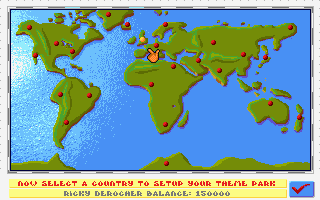
At the World Map screen you decide where in the world to locate your Theme Park. All the available sites are marked in blue, red dots mark locations you currently can't afford, and pink dots show where you've already established a successful park. If this is your first game, the only available location is the United Kingdom.
Use either Left/Right or L/R to highlight a location with the cursor and then press Y to display the Site Details. To remove the Site Details and look at another site, press Y again. When you find a site you're happy with and can afford, press X or Start to buy the land and transport to the Park Screen.
Site Details include:
•
Cost: How big a bite of your bank balance this location will take.
•
Difficulty: Easy, Medium, Hard, Very Hard or FIENDISH!, based on population access, economic stability, and climate.
•
Local Population: The number of potential customers in the early stages.
•
Medium Population: The number of potential customers attracted as your park grows to medium size.
 (En,Fr,De).png)

 (En,Fr,De).png)