Who is Umi-hara Kawase
'Umi-hara Kawase' is the name of the girl who appears in this game (family name Umi-hara, given name Kawase) and is the character that you control.
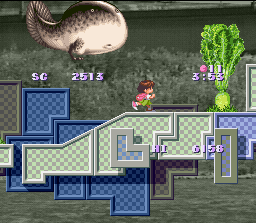
Umi-hara Kawase advances through pathless roads while being obstructed by fish. The only thing you can rely on is a special rope, like rubber, that extends and shrinks with a lure attached to the end.
This rope is a very useful item. You can throw it at fish to catch them, but it is also helpful for climbing walls and jumping across gaps. Please master the free and easy use of this rope so Umi-hara Kawase can safely advance through harsh fields.
The original meaning of 'Umi-hara Kawase' is a cooking term meaning 'fish from the sea have fat on their bellies, fish from rivers have fat on their backs.' In this game, many fatty sea and river fish appear as enemy characters, along with shells and crabs. Once you are comfortable with the gameplay, please take time to appreciate these seafood creatures that are deeply rooted in Japanese culture.
Game Start
Starting the Game
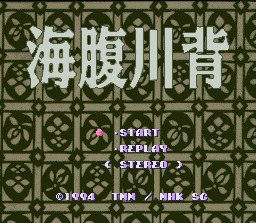
When you turn on the power, the title screen will be displayed. Select 'START' with the + button to play the game. If you want to see a replay, select 'REPLAY' and press the A button.
Sound Output Settings
On the title screen, you can toggle the sound setting by aligning the cursor with 'Sound Toggle' and pressing the A button.
How to Play
Utilize a special rope, like rubber with a lure attached, that stretches and shrinks to advance through the field. Entering a door within the field results in a field clear.
Field Composition
There isn't always just one door per field; in fields with two or more doors, the next field you advance to changes depending on which door you enter.
There are approximately 50 fields in total. A normal clear takes about 25 fields, while using high-tech moves to take shortcuts can reduce it to about 15 fields. There are also a few fields along the way where boss characters appear.
Game Clear Conditions
If your goal is just to clear the game, you don't need to clear every field. Clearing a field set as the final field will lead to the ending. Depending on the combination of fields you've progressed through, there are several types of final fields with different difficulty levels. There are also fields you can't see just by simply clearing the game.
The true fun of this game lies in, after clearing the game once, aiming to clear every field as well as every final field. You can also master techniques to find routes for short-time strategies. You should find your own way of enjoying it.
How to Replay
After you save your data, if you get a Game Over and return to the title screen, select 'REPLAY'. The replay menu screen displays 'さいせいする' (Regenerate); when you select this, the data saved in SRAM will be displayed. Please select the data you wish to see and replay it.
SRAM Screen Options
•
Capacity: The capacity that can be saved to SRAM at that time.
•
Return: Returns to the replay mode menu screen.
•
Display Switch: When you align the cursor and press the A button, you can switch the display after the save data name between 'SIZE' (capacity of that data) and 'FIELD' (number of fields for that data).
•
Data List: Data saved to SRAM.
•
Data Info: The amount of saved data, or the number of fields for that data.
•
Status: The stage type and the status at the time of saving (same as the buffer screen).
When a replay is finished, the menu screen is displayed as is, on the screen where it ended. If there is other data you want to see, select 'さいせいする' (Regenerate) as is. If you select 'もどる' (Return), you will return to the title screen.
How to Change File Name
1. On the 'Replay Mode Menu Screen', select 'なまえをかえる' (Change Name) and display the SRAM screen.
2. When you select the file you want to change, the file name screen is displayed.
File Deletion
1. On the 'Replay Mode menu screen', select 'Delete File' to display the SRAM screen.
2. When you select the data you wish to delete, a confirmation message appears. If this is correct, please press the 'START' button.
3. After the 'Deleted' message, press the A button to return to the SRAM screen. If there is more data you want to delete, select that data and repeat the same procedure once again.
Lure Throwing Action Technique Lecture
Your technique is directly linked to the movements of Umi Haragaki-san!
•
Throw the Lure: Hold down the A button and the rope will extend. When you release the A button, the lure will retract. If you extend the rope to its maximum length but it does not hit an enemy or a wall, the lure will automatically retract.
Precautions
1. When the buffer capacity is full, data is erased in order from the oldest data. Please be aware that pressing the reset button will erase everything.
2. Even if data is temporarily saved in the buffer, if you do not save to SRAM, the temporary save data will be lost when the power is turned off. If you are satisfied with
.png)

.png)
.png)





.png)



.png)
_1.png)
_1.png)



.png)