Object of the Game
The game begins on your mother ship, the TCS Tiger's Claw. Onboard, you move from room to room to learn about your comrades-in-arms and your combat mission.
Once you know your flight mission, you're off to fight the Kilrathi. If you fail, the dreaded Kilrathi will prevail as overlords on all human worlds. So get out there and kick some tail!
Starting the Game
•
Put Wing Commander in your Super Nintendo Entertainment System® (Super NES). •
At the title screen, press Start.
•
Press arrows to select Start or Continue, then press the Start button again.
Note: If you select Continue, the passwords for higher missions are linked to your handle. You must continue to use that handle for the password to work.
Onboard the Tiger's Claw
Onboard the Tiger's Claw, you move from room to room, talking to people and learning about your flight mission. There are three interactive areas: the Officer's Club, the Barracks, and the Briefing Room.
In the Officer's Club
Here's where you can relax, meet the crew, and brush up on your basic flying skills.
Use the control pad to move the onscreen pointer to a character or object, then press A. Each character likes to tell you about him/herself. Of course, people brag, so the Pilot Chalkboard displays each pilot's record.
If you need training, select the Trainsim, which lets you simulate a fight with any type of enemy ship. To enter the Barracks, select the right door.
Barracks
In the Barracks select the left door to return to the Officer's Club or the right door to go to the Mission Hangar. Select the lockers to view your medals, ribbons, and rank.
Briefing Room
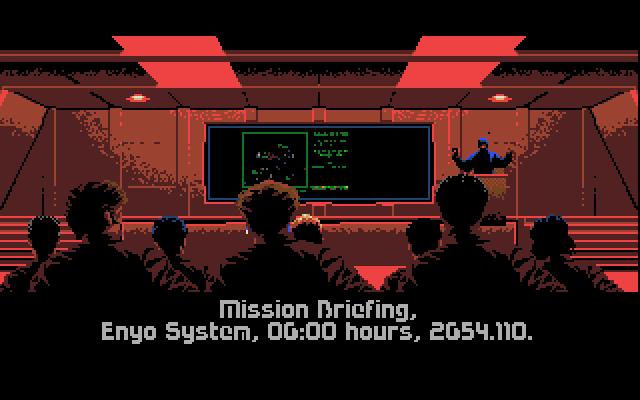
Mission briefings take place here. You learn where you're supposed to fly and what you're supposed to do. See Flight Missions.
Mission Briefing, Enyo System, 06:00 hours, 2654.110.
Flying Your Ship
After leaving the briefing room, you get into your first fighter ship. To get a feel for your ship's controls, try these steps:
•
Get familiar with your cockpit, including:
•
Left VDU (Video Display Unit) - weapons and ship status
•
Armor and Shield Indicators (next to Left VDU) - shields regenerate; armor doesn't!
•
Radar Display (middle) - a white diamond is your Nav beacon destination.
•
Fuel Gauge (to right of radar) - don't let this run out!
•
Right VDU - press Select+Right to see the right VDU functions and select Navigation.
•
Press X to see the Navigation Map. You can press X again to select any destination. Press Start to resume play.
•
Press the control pad arrows to get a feel for the ship. Manuever until the white diamond (Nav beacon destination) is in the middle of the radar.
•
Press Select+Y to put your ship on autopilot (as long as no asteroids or enemies are in the way) or you can continue to fly manually.
For more details about each fighter's controls, see In the Cockpit.
Fighting Your First Battle
When you come out of Autopilot, red ships appear on the radar. Those are enemy fighters! To fight the enemy, try these steps:
•
Press control pad arrows until you center the red dots in the radar.
•
Press Y to ignite your afterburners and bring enemy ships within range.
•
Press Select+Right to select Communications in your Right VDU. The cursor should be pointing to Spirit, your Wingman.
•
Press X to open a channel to Spirit. Press X again to tell her to Break and Attack. (You can also press Select+X to select another message or person, if available.)
•
Pick an enemy ship and fly toward it.
•
Press Y to use your afterburner and try to maneuver behind or beside the enemy ship.
•
Press B to open fire. (Press A to fire a missile. This works best when enemy shields are down.)
•
After destroying all enemies on radar, press Select+Left to select and monitor Damage systems in your Left VDU.
•
Continue toward your current Nav point. If you hit an asteroid field, dodge rocks coming at you. If meet more enemies, repeat the steps above. After you visit all three Nav points, your destination changes to The Tiger's Claw.
•
When you get close to your mother ship, press Select+Right to engage Communications, then press Select+X again to select The Tiger's Claw. Press X to open a channel. The cursor should be on Request Landing; press X again to send the message.
•
Fly toward The Tiger's Claw; landing is automatic when you are in range.
For more details, see Weapons and Basic Tactics.
Landing
When landing, approach the front of the Tiger's Claw and use the Communications system to signal, Request Landing.
If you have traveled to any Nav point, achieved a mission objective, or destroyed at least one enemy ship, you will be cleared for landing. If your ship is heavily damaged, you will be granted emergency landing clearance, unless active enemy vessels are in the same area. In that case, you cannot land until the enemy is destroyed or routed.
Landing takes you back to the hangar, where you can see your ship's damage, if
.png)

 (Rev 1).png)



 (Disc 3).png)




_1.png)
.png)
.png)
_1.png)
_1.png)

.png)
 (En).png)
.png)




_1.png)