Getting Started
Insert your "Boxing Legends of the Ring" game pak into your Super Nintendo Entertainment System and turn the power on. After the Electro Brain Corp. logo, the opening sequence will reveal the eight middleweight legends. Press the Start button during this sequence to access the menu screen. Menu Navigation
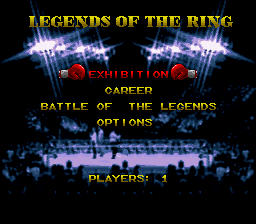
To make a selection on the menu screen, move the Control Pad in the direction of the mode you wish to play and press Start.
The available modes of play are:
Exhibition Mode
Exhibition fights are practice matches where boxers do not try as hard and stats do not count.
After selecting Exhibition, choose the number of players by moving the Control Pad left or right:
•
0 Players: Spectator mode. Use this option to watch the computer and study the other boxers.
•
1 Player: Allows you to fight against a computer opponent of your choice.
•
2 Players: Allows you to fight against a second player.
Selecting Your Boxer
After choosing the number of players, press Start. You can then select a boxer or load a previously created boxer:
•
Press the Control Pad left or right to cycle through the available boxers.
•
To use a previously created boxer, enter a password obtained from Career mode.
•
Press Start when your desired boxer's frame is flashing to finalize your selection.
Viewing Opponent Stats
If you are fighting a computer opponent, press the B button on their selection screen to view their attributes. Press the B button again to exit this view.
The viewable attributes are:
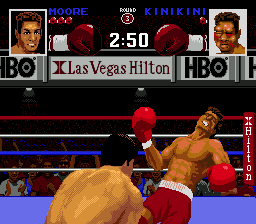
*Note: Kinikini ("The KO Kid") is an example of a top-ranked contender with feared power but a suspect chin.*
Career Mode
In Career mode, you custom design your own boxer and attempt to climb the ranks to achieve Legendary status.
Selecting Career mode advances you to a menu with two options:
Creating a Boxer
Select "Create Boxer" and press Start to begin customization:
•
Enter Name: Press the Control Pad up or down to cycle through letters. Press left or right to move to another square or to cycle through the three available lines of letters. Press Start when finished. If no name is entered, a default name is assigned.
•
Select Background: Choose one of three backgrounds, which determine your starting punch power, stamina, and chin. Press the Control Pad in any direction to cycle through them, then press Start.
Career Backgrounds
•
Street: A hard fighter from the neighborhood. This background is for those who want to back up everything they say.
•
Military: Toughened up by government training, dawn calisthenics, and long hikes. This background is ideal if you want a chin like granite.
•
Olympic: A well-rounded fighter with fully developed boxing talent and honed skills.
Allocating Attribute Beads
After choosing a background, you are given 10 strength beads to distribute among your core traits: Punch Power, Stamina, and Chin.
•
Move the Control Pad up or down to cycle through the three traits.
•
Press the A button to add a bead.
•
Press the B button to remove a bead.
•
Press the Control Pad to the right when finished.
*Note: You will earn more beads as you progress. You receive two beads for a win and one bead for a loss. Beads are allocated between matches in Training mode.*
Customizing Appearance and Punches
•
Skin Tone: Cycle through four unique skin tones by pressing the A button, then press Start.
•
Punch Strength: On the Create Boxer screen, move the Control Pad up or down to select a punch, and use the A and B buttons to allocate beads. You must allocate beads to the following seven punches: Left Jab, Left Hook Body, Left Hook Head, Left Uppercut, Right Cross Body, Right Cross Head, and Right Uppercut.
•
Super Punches: Move the cursor to the super punch icon. Press the X button to view the punches. You start with one super punch and can choose from three options by pressing the B button.
*Note: In both the "Create Boxer" and "Training" screens, all available beads must be fully allocated to advance to the next screen.*
Career Progression and Passwords
Your created boxer begins ranked #10 in "Ring Magazine".
•
Opponent Stats: On the rankings screen, move the cursor to an opponent's name and press the B button to view their characteristics. Press B again to escape.
•
Passwords: You receive a password on the "Ring Magazine" ratings screen after every fight.
•
Resuming a Career: To resume, select "Password" from the Career menu, press Start, and enter your password. Press B to escape the password screen, or press Start to submit it. If correct, you will be sent to the rankings screen.
•
Rematches: Defeated fighters will occasionally challenge you to a rematch, which you are obligated to honor. Press Start to begin your next fight.
Battle of the Legends Mode
This mode is a single-elimination tournament for up to eight players. To enter your custom Career boxer, you must first complete Career mode to receive a "Legends Password."
•
Select "Battle of the Legends" from the main menu and press Start.
•
Select the number of players (up to eight).
•
If players have Legends Passwords, enter them using the same
.png)

.png)
.png)
.png)





.png)
.png)







_1.png)
.png)
