Extra Time and Penalties
If a match is a draw after 90 minutes and Extra Time is enabled, teams play for an additional 30 minutes, swapping halves midway through. The team with more goals at the end of Extra Time wins.
If the game remains tied after Extra Time, or if no Extra Time is permitted after a 90-minute draw, the winner is decided by a Penalty Shoot Out.
Penalty Shoot Out Rules
A Penalty Shoot Out consists of teams taking alternating penalty kicks from the penalty spot in the middle of the large box. Teams take turns until each has taken five kicks.
If the score remains tied after five kicks each, the shootout enters Sudden Death. In Sudden Death, teams take one kick each per round until one team scores and the other misses, declaring the scoring team the winner.
Match Play and Restarts
Matches begin with a kickoff from the center spot. Play continues uninterrupted until one of five events occurs:
•
Throw-In: The ball goes over the side touch-line. A member of the team that did not touch it last throws it back into play from that spot.
•
Corner Kick: The ball goes over the end touch-line behind a goal and was last touched by the defending team. The attacking team kicks the ball back into play from the nearest corner quarter circle.
•
Goal Kick: The ball goes over the end touch-line and was last touched by the attacking team. A defending player places the ball in the forward corner of the six-yard box nearest to where it crossed and kicks it back into play.
•
Foul: A player accidentally kicks an opponent instead of the ball. Play stops and the fouled team receives a Free Kick from the spot of the foul. If the defending team commits a foul inside their own penalty box, the attacking team is awarded a Penalty Kick.
•
Goal: A team scores. The ball is returned to the center spot, and the team that conceded the goal restarts play with a kickoff.
Substitutions
Teams can swap an active player with a bench player during any of the five play stoppages. Each team is permitted a maximum of two substitutions per game.
Offside Rule
There is no offside rule in this game.
Goalkeeper Controls
Goalkeepers are controlled by the computer at all times, except when they hold the ball in their hands or are taking a goal kick. In those situations, the player controls them only to kick the ball back into play.
The Bench and Manager
The bench can be accessed when the ball is out of play, before a free kick, or before a half begins. Press the LEFT or RIGHT buttons on the controller to open the bench menu.
Use the directional pad to move the arrow up and down to select substitutes or the manager, then press Button Y or Button A to confirm.
The Manager, wearing the brown coat, is used to change team formations. Select him, use the Control Pad to choose a new formation from his menu, and press Button Y or Button A to confirm.
The Menus and Options
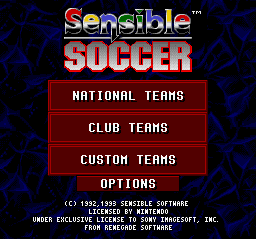
The main menu is divided into National Teams, Club Teams, Custom Teams, and Options. Highlight your choice using the Control Pad and press any button except SELECT to enter.
The Options menu includes the following settings:
•
Reset Battery RAM: Erases all saved game data.
•
Game Length: Sets match times to 3, 5, 7, or 10 minutes.
•
Menu Music: Toggles the menu background music On/Off.
•
In-Game Music: Toggles the match background music On/Off.
Seasonal Weather
Field conditions can be set directly using Field Type, which offers a choice of icy, wet, soft, muddy, normal, dry, hard, or random fields.
Alternatively, Seasonal Weather simulates real-world weather patterns based on the chosen month. For example, a match in July has a high chance of a dry field and a low chance of mud.
In Leagues and Cups, the selected month marks the start of the season. Leagues run over an eight-month period, while Cup rounds last one month per round.
Difficulty Levels
The game features three difficulty settings that alter gameplay and controls:
•
Beginner: Easier computer opponents. All players have easy ball dribbling, keeping the ball close during quick turns. Pressing the special SHOOT button near the goal automatically shoots.
•
Normal: Standard computer difficulty. Easy dribbling is active for all players, but only designated STAR players can use the special SHOOT button.
•
Expert: Hardest computer difficulty. Only STAR players have easy dribbling and the ability to use the special SHOOT button.
For non-star players on Normal and Expert, the SHOOT button functions as a standard kick.
Language Settings
Players can set the game language to English, German, French, or Italian.
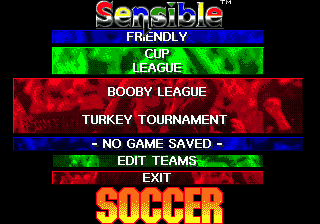
Friendly Matches
A Friendly is a single match played between two players, a player and the computer, or two computer teams.
To set up a match, select the field conditions or season, then choose the teams. Select a team once to turn it red (computer) and twice to turn it blue (player). Confirm with OK and select Play Match.
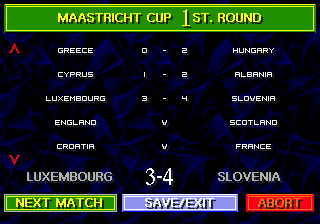
Cup Competitions
The Cup is a knockout tournament for 2 to 32 teams. Winners advance and losers are immediately eliminated until two teams remain for the Cup Final.
Players can configure weather, team count, rounds, and whether to use extra time or penalties. If extra time and penalties are disabled, tied matches are decided by a single-leg replay
 (En,Fr,De,It).png)

 (En,Fr,De,It).png)




.png)
.png)





 (En,Fr,De,It).png)