Quickstart
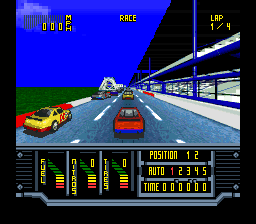
This game is defaulted to one player Season mode. To bypass specific menu selections and the Speedshop, push START 4 times and you'll be at the start line. When you see the green light Push Y to accelerate and use the Control Pad to steer.
•
Push START button 4 times, then at GREEN LIGHT push Y to start.
Main Menu Options
When you see the Main Menu, scroll up / down with the control pad and push START to choose:
•
SEASON (See page 13 & 14)
•
SINGLE RACE (See page 11)
•
CUSTOM TRACK (See page 7)
Password Screen
If you select PASSWORD, you'll go to the PASSWORD SCREEN. If you have just finished a season race, you'll be given a password.
•
Push control pad up/down to scroll through 32 available characters.
Custom Track
This feature allows you to create your own custom track from bits, bends and straightaway modules. Note: This feature is only available on KYLE PETTY's NO FEAR® RACING. •
Scroll down to "Custom Track" on the Main Menu and push START to enter.
•
Toggle between the construction part and the help menu by pushing SELECT.
•
Push the control pad in the direction you want to go to build. If you change direction, the software will put in a turn.
•
Reverse motion to remove the track segment previously laid down, or push Y to undo.
•
Push R to zoom out and see the silhouette of your track.
•
Push the A button and the control pad at the same time to get an animated view of your racecourse.
•
Note: The only restriction is that the track you build must loop back to the starting point.
Track Pieces & Tools
Options Screen
When you select OPTIONS from the Main Menu, you will go to the Options Screen.
•
Push control pad up/down to highlight options.
•
Push A to toggle selections.
•
Modifiable settings: 1 or 2-player; Novice, Veteran or Pro difficulty; Announcer (ON/OFF); Music (ON/OFF).
Race the Season
The SEASON is comprised of 28 consecutive races all 'round the Kyle Petty No Fear® Racing™ Circuit. If you selected SEASON at the Main Menu, you will be shown a screen that previews the track layout of the next race, the number of laps, the weather conditions, and the name of the track. •
Press R to zoom in on the course diagram (the view will scroll automatically).
•
Push START to go to the KYLE'S QUOTES SCREEN.
•
Push START again to exit Kyle's Quotes and proceed to the SPEEDSHOP screen, and then on to the race.
Season Track List
Push control pad up/down to view each course, then push START to pick:
Speed Shop Selections
Before each race you will visit the Speed Shop to upgrade your vehicle. In Season Mode you start with $10K and must use your winnings to purchase higher performance items. For single races only, you get $10,000 per race.
•
Push the control pad left or right to view different car parts.
•
Push the A button to purchase.
•
Push the B button to sell back.
•
Push START when you are finished customizing.
Vehicle Upgrades & Costs
•
Chassis (FREE): Pick a door NUMBER and the attached chassis is yours plus accompanying car COLOR.
•
Configuration (NO CHARGE): Customize controls by scrolling up/down with the pad and pushing the appropriate button to change. Default controls: A (BRAKE), B (NITRO), X (CRUISE), Y (GAS), L (SHIFT DOWN), R (SHIFT UP).
•
Tire Changes ($2,000 each): Consumable tires.
•
Nitros ($1,500 each): Consumable nitro boosts.
•
Suspension ($5,000 each): Upgrades improve handling.
•
Fuel System ($10,000 each): Upgrade your system from adequate to super efficient.
•
Engine ($15,000 each): Start with a standard 350 in³ small block. Upgrades available up to 510 cubic inches.
•
Tranny ($8,000 each): Choose between a 5-speed manual or a smooth automatic. Press SELECT to toggle Manual / Auto.
•
Crew Chief ($10,000 each): Clearer audio and less time in the pits. Press SELECT to toggle Male / Female.
Pit Stop Timeline
•
:01 After coming to a stop, the Jackman and other crew members go over the wall. All work must be done within the pit area.
•
:02 Jackman and two Tire Changers proceed to the right side to change the rubber. A refreshment bottle is handed to the Driver.
•
:03 A Tire Carrier places
.png)

.png)
.png)
.png)

.png)
.png)


.png)


.png)
 (En,Fr,De,Es,Nl) (Proto).png)
.png)
 (En).png)

.png)