How to Start
•
1. Make sure the Super Nintendo Entertainment System (Super NES) power switch is off. •
2. Insert the Cannondale Cup Game Pak into the Super NES as described in the Super NES instruction manual.
•
3. Turn the power switch on. The ASC logo and credit screens will display and then the game selection screen will appear.
•
4. If you are a first-time user, use the Control Pad to arrow to a name you wish to replace with your name, then press Select.
The Cannondale Cup Challenge
The objective of Cannondale Cup is to complete all four competition stages. To complete the first three stages, you need to either score a minimum number of points or complete a certain number of laps.
For the fourth and final stage, you need to finish first in a 30-lap minimum race. The Cannondale scoreboard shown on the player selection screen updates the points or laps you need to score or complete before you can advance to the next stage.
Selecting a Name
•
Press the B button to add/change/edit your name.
•
Repeat pressing Up or Down on the Control Pad to scroll through the alphabet to select the desired letter.
•
Press Right or Left on the Control Pad to add/change additional letters.
•
When you have entered your name, press the B button.
This screen also displays your progress towards qualifying for the next stage. You can only ride on the tracks of the stage(s) you have qualified for.
Selecting a Rider and Stage
•
Select a Rider: Select a Cannondale Super Rider by pressing the Control Pad directionals to move the red box to the desired Cannondale rider and then press Select.
•
Select a Stage: Use the Control Pad to arrow Up or Down to select one of the four different stages. You can only ride in the stage(s) that you have qualified for. Press any key to advance to the next screen.
Selecting a Track and Laps
The four racing levels are:
•
Regional Circuit: 3 Tracks
•
Championship Circuit: 3 Tracks
•
Select a Track: If you have selected to race on the Regional or Championship circuits, use the Control Pad to arrow Left or Right to select one of the three tracks.
•
Select Laps: Use the Control Pad to arrow Down to select the number of laps you want to ride. Press any key to advance to the next screen.
Selecting a Bike and Options
•
Select a Bike: Each Cannondale bike will have different attributes that will make it more or less desirable than other bikes with respect to the chosen track. Hints for Cannondale bike selection are provided as bike pros and cons. Use the Control Pad to arrow Up or Down to the desired bike and then press Select.
•
Options: The options menu allows you to change options for your game play. To change an option, use the Control Pad to arrow the selection box Up or Down to the item you wish to change and then arrow Left or Right to change the option.
Skill Level Configurations
You will have the option to choose from three skill levels: Amateur, Pro and Champion. These skill levels have the following default option configurations:
Note: For Amateur and Pro some default option settings can be changed.
Gameplay Options
•
Wipe Outs: When the Wipe Outs option is On, your rider will crash when he rides into certain objects. Conversely, when the Wipe Outs option is Off, your rider will not crash regardless of what he or she rides into.
•
Punching: When Punching is On, other riders are allowed to strike your rider. When this option is Off, other riders cannot punch you, but you will be able to punch other riders.
•
Steering: Three types of steering are available.
•
Touring: The game steers for you
•
Sport: You steer the bike with some help from the game
•
Racing: You steer with no assistance
How to Play the Game
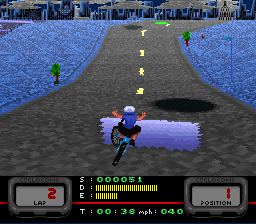
After selecting your rider, bike, options and skill level, use the controls to guide your Cannondale rider around the track. Seven other riders will appear on each track with your rider.
These riders will punch/attempt to punch your rider as you race unless the punching option is switched off on the options menu. Punch back to slow down other riders and avoid getting punched.
Two Player Game
Connect a Super Nintendo controller to the right controller port to allow a second player to do the punching and grabbing of the rider with the L and R buttons. Player #1 can steer and pedal while Player #2 can punch the other rider and catch or throw objects! Sound and Setting Bonus
•
Sound: Match the sound of the game to the sound of your TV. Press the L or R on the Control Pad to change the sound from Stereo to Mono or vice versa.
•
Setting Bonus: Your setting bonus is determined from the selection of your skill level, wipe outs, punching and steering. The more difficult the game settings, the higher the bonus. The bonus multiplier is only used when you finish in the top three on any race.
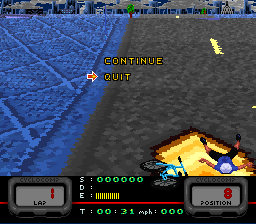
Starting and Pausing
•
To Start: Press the Start
.png)

.png)

.png)
.png)
