Starting the Game
•
Turn off your Super NES by sliding the POWER bar away from the Game Pak slot. Plug one game controller into your system for one-player racing action, or plug in a second controller for two-player competition. •
Insert the ESPN SPEEDWORLD Game Pak, label facing front, in the system slot.
•
Turn on the system by sliding the POWER bar toward the Game Pak slot. The Sony Imagesoft logo appears, followed by ESPN SPEEDWORLD graphics and the opening main selection screen. After about half a minute without any input, the Demo Mode will appear, followed by the game credits. You may press any button at any time to go to the main selection screen.
Setting Up Options
The main selection screen offers two boxes of set-up choices (OPTIONS and CONTROLS) and a RACE box. Highlight your choice using the Control Pad and press any button to select it. Make sure your options and controls are set up before highlighting RACE and pressing START.
Under the OPTIONS menu, use the Control Pad to adjust the following settings:
•
Difficulty Level: Choose between ROOKIE, PRO, or VETERAN. ROOKIE is recommended for learning the ropes. PRO increases the challenge, while VETERAN offers hard-driving, cutthroat racing competition. •
Sound: Turn SOUND ON or OFF.
•
Music: Turn MUSIC ON or OFF.
•
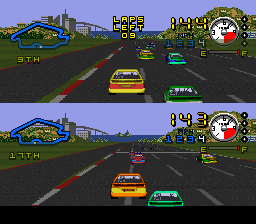
Game Mode: Select SINGLE RACE for one-player competition, HEAD TO HEAD for two-player split-screen action, or PRACTICE to try out tracks and car setups without competition. Select SEASON to begin or resume a full racing season. To change an option, press the Control Pad up and down to highlight it, then press left and right to change it. Press any button to return to the main selection screen when finished.
Selecting Tracks and Race Parameters
On the main selection screen, highlight RACE and press START to select a track and set up your race parameters. In Season mode, the sign-in screen will appear before the track screen.
To select one of 15 tracks, use the Control Pad Up and Down Buttons to cycle through the available tracks three by three. Use the Control Pad Left and Right Buttons to cycle through each of the three tracks identified at the bottom of each screen.
As you highlight a track, a digitized photo appears along with key information, including its length and whether it is a road course or has banked turns (measured in degrees). Press START to confirm your choice and proceed to the parameter setup.
To set up race parameters, use the Control Pad Left and Right to cycle through the three boxes at the bottom of the screen. Press the B Button to cycle through the choices in each highlighted box:
•
PIT STOPS: Turn ON or OFF to control whether tires wear out and fuel gets consumed.
•
NUMBER OF LAPS: Choose 10, 20, 30, 40, or 50 laps.
•
DAMAGE: Turn ON or OFF. When ON, collisions affect your car's performance, making it slower and less responsive. In Season mode, you must pay to repair damage using your race winnings.
Once the parameters are set, press START to go to the car setup screen.
Car Setup
On the CAR SETUP screen, use the Control Pad Up and Down Buttons to cycle through the two sets of three setup boxes at the bottom of the screen. Use Left and Right to cycle through the boxes, and press the B Button to change the options:
•
TIRES: Choose SOFT, HARD, or MEDIUM. Softer tires allow for better steering but wear out faster.
•
GEAR BOX: Choose automatic or manual transmission. Manual transmission offers LOW, MED, and HIGH options. LOW gives the best acceleration and worst top speed; MEDIUM gives medium acceleration and top speed; HIGH gives the worst acceleration and best top speed.
•
SPOILER: Set the spoiler to 30, 45, or 60 degrees. Higher angles increase traction by pushing down the rear end, but lower your top speed and gas mileage.
•
SUSPENSION: Choose TIGHT, NORMAL, or LOOSE. Tight makes steering more sensitive, normal gives an average feel, and loose makes steering less sensitive.
•
PAINT: Cycle through several available color schemes for your car.
•
BODY TYPE: Select your preferred body style.
In Season Mode, the following additional upgrade options are available:
•
ENGINE: A better engine gives higher top speed and gas mileage.
•
BODY: A better body improves handling and gas mileage.
•
PIT: Makes your pit crew faster.
On the Track
Jerry Punch welcomes you to the track. When you are ready to head to the asphalt, press START.
•
QUALIFY or RACE: Choose to qualify to determine your starting position, or go straight to the race. If you do not qualify, you will start 24th in the field.
•
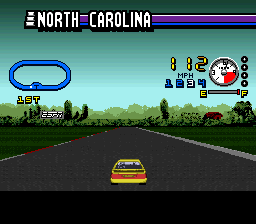
WATCH THOSE GAUGES!: Monitor the gauges in the upper right corner. Below your speed is your current gear. The fuel gauge shows when you need to refuel, and the tire gauge on the far right (ranging from four tires to one-half tire) indicates when a blow-out is imminent.
•
FLYING START: Every race begins with a single pace lap. You cannot control your speed or gear box during this start, though you can steer slightly. A green flag signals the end of the flying start.
•
DRAFTING AND SLINGSHOT PASSING: Pull directly behind any car traveling within 10 mph of your speed to draft. This increases the speed of both
.png)

.png)

.png)
 (Beta).png)



.png)





_1.jpg)




.png)
