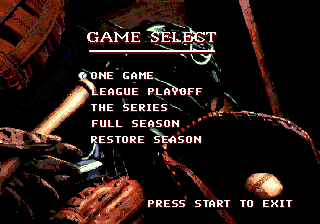
Game Select
One Game
League Playoff
The Series
Full Season
Restore Season
Press START to continue.
There are four Game Modes: One Game, League Playoff, The Series, and Full Season.
•
To select a Game Mode, press the Control Pad UP/DOWN and press START.
One Game
One Game is a single game between two teams. It is not part of a regular season or playoff series. One Game play can be between any two teams, regardless of what league or division they are in. A team can even play against itself.
One Game Options
•
Home Team: Press the Control Pad LEFT/RIGHT to scroll through teams.
•
Visiting Team: Press the Control Pad LEFT/RIGHT to scroll through teams.
•
Designated Hitter: Replaces your pitcher in the batting order with another batter. Press the Control Pad LEFT/RIGHT to turn Designated Hitter on/off.
Playoff Team Selection
There are four teams in League Playoffs: The A League Eastern and Western Division champions (shown on your screen as A East and A West), and the N League Eastern and Western Division champions (N East and N West). When you choose League Playoff, four teams are chosen at random as divisional champions.
•
1. If you want to proceed into the playoffs with the randomly chosen teams, press START.
•
2. If you want to select different teams for the playoffs, press the Control Pad UP/DOWN to highlight a division.
•
3. Press the Control Pad LEFT/RIGHT to scroll through the other teams in the division. Change any other divisional champions in this same manner.
•
4. When you have chosen the divisional champions you want, press START.
•
5. To leave the team selection screen without starting a playoff series, press X.
Starting A Playoff Game
•
1. Press the Control Pad LEFT/RIGHT to highlight the playoff game you want to play.
•
2. Press B to mark (or select) that game. If you want to play the other playoff game that day as well, highlight it and press B again to mark it.
•
3. Press START to start playing the playoff games you have marked.
The Series
The Series is the best-of-seven-game championship playoffs between the A and N league champions in MLBPA Baseball. When you choose The Series, one team from each league is chosen at random as league champion.
•
To leave The Series screen without playing a Series game, press X.
•
Series Team Selection: Follow the team selection procedures for Playoff Team selection.
Full Season
Full Season sets up a complete MLBPA Baseball season. You can either play out the full season game by game or in sections (a day at a time, a week at a time, etc.). League Playoffs follow the conclusion of a Full Season, and the Series follows the League Playoffs.
•
To leave the Full Season screen without playing a full season, press X.
Play A Single Game In A Full Season
•
1. Press the Control Pad UP/DOWN/LEFT/RIGHT to highlight the game you want to play.
•
2. Press B to mark (or select) the game. A baseball appears in the box by the marked game.
•
3. Press START to begin playing the marked game.
Play Multiple Games In A Full Season
•
Follow the instructions for Playing A Single Game In A Full Season above, but mark all the games you want to play on a particular game day.
Play To Date
•
1. Press the Left or Right Button, to highlight the date at the top of the screen. A selector box appears around the current date on the season calendar in the upper section of the screen.
•
2. Press the Control Pad UP/DOWN/LEFT/RIGHT to change the date.
•
3. To play the season to the new date, press Y. To see the new league standings, press A. To leave the calendar and return to the game selection portion of the screen, press the Left or Right Button.
•
4. To play selected game(s), press START. If you want to return to the Game Select screen, press X. (Note: If you press X, you must restart the season or use a password to restore a season.)
League Standings
•
At the Play To Date screen, press A to see the current League Standings.
•
Press B or press the Control Pad UP/DOWN to see standings for the other league.
•
To leave the League Standings screen, press START.
Getting A Password
•
1. At the Play To Date screen, press A to bring up the League Standings.
•
2. Press A to get a Password. Copy down passwords carefully. You cannot restore a season without a correct password.
If a team wins its division at the end of a Full Season, it advances to the League Playoffs.
Restore Season
Restore Season resumes a partially completed season or playoff at any point. To resume a season to a certain date, you must have a password you received during previous play.
•
1. Press the Control Pad UP/DOWN/LEFT/RIGHT to highlight a letter.
•
2. Press B to select a letter; press A to erase a letter. To erase more than one letter, press A repeatedly.
•
3. Press START to enter a password. If the password is valid, the season is restored. If the password is invalid, you return to the Game Options screen.
•
4. To leave the Restore Season
.png)


.png)
