Racers, Start Your Game!
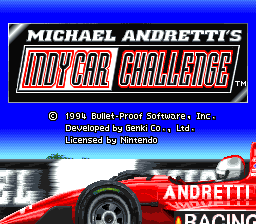
Michael Andretti's Indy Car Challenge is a racing game for one or two players. Insert the Game Pak into your Super NES and turn on the power. The title screen will appear. When you're ready to play, press the Start Button to move on to the selection screen. Selection Screen
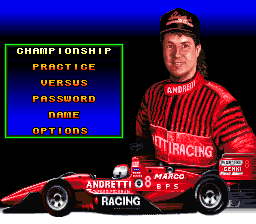
There are a few decisions to make before you can start racing. The selection screen allows you to choose from three modes of play, enter a password, enter your name, or adjust options. Name Entry
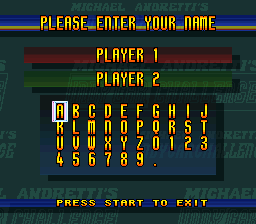
This selection allows you to enter your name so that it will appear in the list of drivers during the announcements of qualifying positions and race results.
•
Move the cursor using the Control Pad.
•
Press the A Button to select each letter.
•
Press the B Button to back up.
•
Press the Start Button to go back to the selection screen when the task is complete.
*Note: If you want your name to appear in the same way as the other drivers' names, enter your first initial and your last name.*
Modes of Play
There are three ways to play Michael Andretti's Indy Car Challenge. You can join the championship circuit, practice on any of the 16 circuit courses, or challenge a friend to a two-player simultaneous race on any of the circuit courses. *Note: Before attempting to compete in the championship circuit, be sure to develop your driving skills in the practice mode.* Championship Mode
The one-player championship circuit follows a 16 race season which leads to the ultimate racing challenge. If you accumulate more points than your computer-controlled opponents over the season, you'll earn the chance to test your racing abilities in an all-out competition with Michael Andretti. The circuit begins in Australia, then moves to North America, and concludes in Monterey. After every race, you'll earn a password. Jot the password down and use it to re-enter the circuit at that point during another playing session.
Michael Andretti offers advice about every course before the racing begins. Make sure to take note of his advice and to look over the course map before you start. When you move on to the next screen, you'll have the option to adjust the tire pressure, downforce, and gear ratio of your vehicle. Qualification Round
Every championship race begins with a two lap qualification round. This allows you to get acquainted with the course and to earn a good starting position.
At the end of the round, your time will be compared to the qualification times of the computer-controlled cars. A good time will get you closer to the front of the pack for the main event. The best time will earn you the pole position. If you exit out of the qualification round, you will be assigned the last starting position.
Championship Points
When the race is over, you'll see the race results and series rankings. You'll earn circuit points depending on your achievements in the race.
The point breakdown is as follows:
You'll also receive a point if you earned pole position and another point if you were the top lap leader. If you have the highest point total among the racers on the circuit after the 16th race in Monterey, you'll be able to challenge Michael Andretti to a final race. Practice Mode
In Practice Mode, you can choose to speed through any of the 16 courses on the championship circuit. Practice will ready you for your attempt to earn the championship circuit title.
•
Press left and right on the Control Pad to move the cursor to various races on the circuit map.
•
Press the Start Button to begin a practice run on the selected course.
Versus Mode
The two-player simultaneous Versus Mode is a split screen race on any of the 16 championship circuit courses. Select a course using the Control Pad to move the cursor, then press the Start Button to move on.
Each player can choose from five different vehicle setups in the Versus Mode. Some settings are geared for higher speeds and acceleration, while others emphasize better control and handling through the curves. Make your decision based on the layout of the selected course.
•
Scroll through the various setups by pressing Left and Right on the Control Pad.
•
Press the Start Button when you're ready to race.
Car Adjustments
Before all practice, qualifying, and championship races, you are allowed to make adjustments to three characteristics of your vehicle. You can choose between Default and Custom settings.
•
Tire Pressure: High tire pressure gives you less grip on the road, but increases your top speed and acceleration rate. Low pressure gives you more balance and control, but less overall speed.
•
Downforce: High downforce increases your grip on the track, but decreases your top speed and acceleration rate. Low downforce is good for speed and acceleration, but offers less control.
•
Gear Ratio: A high gear ratio offers a high top speed at a slower acceleration rate. A low
.png)

.png)
.png)
.png)

.png)
.png)


.png)


.png)
 (En,Fr,De,Es,Nl) (Proto).png)
.png)