Starting the Game
Insert your "Tony Meola's Sidekicks Soccer"™ game pak into your Super Nintendo Entertainment System. Make sure the power is on. After the title screen appears, a demonstration mode of a soccer game will begin. If you are ready to begin, press the Start-button. The screen before you now is the Game Selection screen. This screen allows you to decide whether you want to play in the Exhibition, Season or Tournament modes of play. Passwords for continuing play may be entered here as well.
How to Play
If you have chosen the Exhibition or Season mode, you will enter the Player Selection screen. If you are in the Tournament mode, you will see the Title Selection screen.
You will now select either head-to-head, player vs. computer, or computer vs. computer play. Note the flashing ring around the box. When you have decided which mode you want to play, use the control pad to move the ring to the desired mode and press the A-button.
You will now enter the Level Selection screen. Note: if you wish to return to a previous menu screen, press the B-button.
This screen allows you to decide whether you want to play World or City competition. Both the World and City modes have 32 teams to select from, but World Competition is the most challenging. When you have made your decision, press the A-button.
You will now enter the Regional Selection screen and select from four regions ranging from Eastern and Western U.S. to European City Clubs.
World/City Mode
You will now decide on the city you wish to control. Use the control pad to scroll your selections up or down. Once you have decided, press the A-button. You must now do the same for either your human or computer opponent.
In the World Mode you will select the country your player will represent. As with the City Club Mode, you must use the control pad to scroll through the countries and press the A-button when you decide. Once the cities or countries of the teams have been decided, you move to the Match Parameters Screen.
Match Parameters Screen
This screen allows you to decide upon the Match length, speed and difficulty. Using the control pad, move the flashing ring to the parameter you wish to change.
On the bottom level is your speed selection. This feature determines how fast the ball and the players move on the field, the turtle being the slowest and the cheetah, the fastest mode of play.
Above the speed selection is the match-length selection represented by an hour-glass with a number on it. The numbers are the minutes that each match will last.
Above the match-length selection icon is the difficulty selection icon. This mode, represented by varying sizes (and strengths) of legs, allows you to handicap either yourself or your opponent by weakening the strength, skill and speed of either team. Once you have made all your decisions, press the A-button to enter the Coaching Screen.
Coaching Mode
The Coaching Screen allows you to decide the types of corner and direct kicks a player will use, your field formation, as well as the starting line-up. You may enter the Coaching Screen and change any of these at any time during play by pressing the Select button.
Corner Kicks
Corner kicks are given when a team kicks the ball behind its own goal line. There are three types of corner kicks:
•
The near-post corner will shoot the ball toward the near corner of the goal.
•
The far-post corner will shoot the ball harder, toward the far corner.
•
The short corner will shoot the ball toward a team-mate in front of the goal.
Direct Kicks
Direct kicks are penalty kicks given for fouls (such as tripping). There are three types of direct kicks to choose from:
•
The banana kick lobs the ball in a curving arc over your opponents.
•
The loft lobs the ball directly over your opponents.
•
The pass directs the ball toward a team mate.
Team Formation
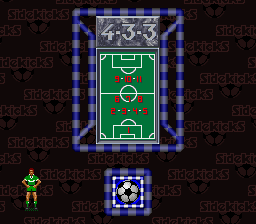
This mode of the Coaching Screen allows you to determine the layout of the players on the field.
The first number represents the number of defenders in your formation, the second the number of midfielders, and the third, the attackers (you always have one goalie). For example, the 3-5-2 formation would give you a field formation with three defenders, five midfielders and two attackers.
Each formation has its advantages. The 4-4-2 gives the player a crack defense in critical scoring situations, while the 4-3-3 is a juggernaut offense.
Team Players
This mode presents a roster of all 16 players on your team, their position (defender, midfielder, goalie or attacker, indicated by a D, M, A, or G), as well as a list of which players are on the field (those listed in the top box) and which players are on the bench (those listed in the bottom box).
Each player has his own personal strength, speed and skill ratings. To check the ability of each of your players, move the flashing ring left with the control pad. Note the icons that appear in the top right corner.
The top icon represents the player's speed, the middle icon his strength, and the bottom icon represents his skill.
•
Speed: Rated at turtle, horse, and cheetah speed. Turtle speed is the slowest. Although turtle speed is the slowest and cheetah speed is the highest, some players in the turtle speed are worse than others and some in the cheetah speed are better. This applies to strength and skill as
.png)


 (Beta 3) [b].png)
