Starting the Game
Set up your GAME BOY® ADVANCE according to the Nintendo instruction manual. Ensure the power is OFF before inserting or removing the Game Pak.
Insert the LEGO® Racers 2 Game Pak into the console. Turn on the GAME BOY® ADVANCE; the GREEN light on the right-hand side of the screen will light up to indicate power.
Quick Start
To get racing immediately, select your language using the Control Pad and press the A Button. Press the A Button again to skip the introduction screens. Using the Control Pad, select Single Player and press the A Button. Press the A Button again to select Arcade Game. You can change the number of laps using the Control Pad.
Choose your opponents using the Control Pad and the A Button, then press START. Use the Control Pad to choose a world and then a track, and press the A Button to begin.
Menus and Controls
To use any menus in the game, utilize the following button functions:
Language Selection
Choose the game language by pressing the Control Pad left and right to move through the flags. Press the A Button to select your preferred language.
Main Menu
The Main Menu presents four options:
The Story Game, Single Player, and Multiplayer sections are covered in detail later in this manual.
Options Menu
The Options menu offers four choices:
•
Music: Toggle music On or Off using the A Button.
•
Sound Effects: Toggle sound effects On or Off using the A Button.
•
Save options: Clear Story Mode progress or Clear Hi-Scores (fastest lap times). Use with caution, as these actions are irreversible.
Saving the Game
The game saves automatically after each race, after building a LEGO® character, and after achieving a high score.
Multiplayer Games
Arcade, Battle, Capture the Flag, and Construction games support Multiplayer mode using GAME BOY® ADVANCE GAME LINK® Cables. Insert the cables before switching the power on.
Players can choose to be the Master (host) or a Slave (another racer). Master Connection
If you are the Master, have other players connect to your console and switch their power ON. Select Multiplayer from the Main Menu and choose a game.
You will be taken to the Connections Screen. The display updates as each player joins. Once all players are connected, press START to continue. You can then change settings and start the game.
Slave Connection
If you are a Slave, connect the cable to your console and switch the power ON. Choose the same game as the Master and select Multiplayer.
You will be taken to the Connections Screen, where you will be assigned a racer number. Wait for the Master to begin the game. Character Builder
Build your own LEGO driver by selecting Build Character from the Main Menu.
Choose a head using Left and Right on the Control Pad to cycle through options. Press the A Button to select one.
Press Down on the Control Pad to change the chest, and Down again to change the legs. If you press Down again until the row of question marks lights up, you can create a random minifigure.
When happy with your character, press START to view the Driver's License. Choose a name using Up and Down to change letters, and Right (or the A Button) to move forward. Press Left to move back. Press START to confirm.
Racing Controls
Pause the game and access the Options Menu by pressing START during a race. The menu offers:
•
Resume: Continue the race from where it was paused.
•
Restart Race: Restart the current race (not available during the Mars Bonus Game).
•
Sound Options: Toggle Music or Sound Effects using the A Button.
Power Sliding
Power-sliding helps you navigate tight corners quickly. As you approach a turn, ease off the Accelerator, press the R Button, and steer into the turn.
Let the car center itself as you exit the turn, then accelerate to continue.
Power-Ups
There are seven Power-ups in LEGO® Racers 2, each with a unique effect. Pick them up by driving over them; the console assigns a Power-up automatically. You cannot pick up a new Power-up while carrying one. Press the L Button to use your current Power-up.
The available Power-ups include:
•
A disk that fires straight ahead, bouncing off walls and objects until it hits a car or loses power. •
A spinning ball shield that damages opponents if they bump into you. You can pick up additional Power-ups while this is active. •
A heat-seeking missile that homes in on the nearest car ahead of you.
Map Markers
Map markers are color-coded to indicate their function:
•
Red Conversation/Race Markers: Lead to LEGO® characters for conversation or to race starts. Press the A Button to advance conversations.
•
Green Exit: Returns you to the previous map.
•
Yellow Boss Races: Appear only after winning the first four races on each world.
•
Blue Bonus Game: Appears only after collecting a Bonus Game gateway during a race.
On map screens, press START to pause and open the Options Menu with three choices:
•
Resume: Continue from where the game was paused.
•
Restart Race: Restart the current race.
•
Exit: Return to the Main Menu.
Bonus Games
Bonus Games are unlocked by

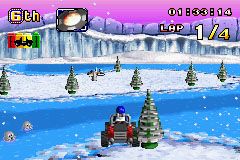
 (En,Fr,De,Es,It,Nl,Sv,Da).png)
 (Beta).png)



_1.png)



.png)

_1.png)
.png)


 (En,Fr,De).png)
 (En,Fr,De,Es,It,Nl,Sv,Da).png)

 (En,Fr,De,Es,It).png)
