Getting Started
Insert the Game Pak into your Game Boy® Advance system and turn the power ON.
WARNING: Inserting the Game Pak when the Game Boy® Advance is already on might result in damage to the Game Pak.
Language Selection
The first time you play Shrek™ Swamp Kart Speedway, the language selection screen will appear. Use the Control Pad to select your language and press the A Button to confirm. You can change the language setting in the Options menu later, if you like. Main Menu
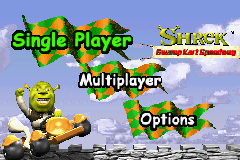
After the introductory screens have played, you will be taken to the Main Menu. From here you can begin a Single Player or Multiplayer game, or access the Options menu.
Options
Shrek™ Swamp Kart Speedway provides the following options: Difficulty
The Difficulty level determines the position in which your racer must finish to advance in Single Player: 1st, 2nd, or 3rd. Some features may only be available at certain Difficulty levels. All of your files are saved under each Difficulty level separately. For example, to access your previous Easy games, set Difficulty to Easy before proceeding to the Single Player menu. Language
You can use this function to access the Language Selection Menu if you need to change the language setting. Select a language with the Control Pad, and confirm by pressing the A Button.
Reset Game
WARNING: This function will set the Game Pak back to its original settings. Progress in the current game will be lost. Any unlocked secrets will become “relocked.”
Single Player
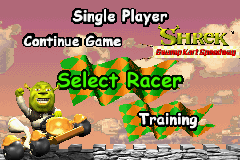
In the Single Player menu, you can start a new game, continue your previous game, or access training to compete against the clock.
Select Racer
Run Shrek™ Swamp Kart Speedway with the racer of your choice. If you have raced previously with a selected racer on the currently selected Difficulty level, their unlocked tracks will be remembered. Each track is 3 laps. Win or place in the first track to open the 2nd and 3rd tracks. Win or place in these tracks to open the Boss Track. Defeat the boss to open the next Fairlyland. Defeat Lord Farquaad in the final race to win the game!
Continue Game
All of your racers' progress is saved separately under each Difficulty level. Select Continue Game to go straight to the last game you were working on at that Difficulty setting.
Training
Select Training to refine your racing skills on the track of your choice. You may select any unlocked racer and any track. Multiplayer
See page 22 for information about connecting Game Boy® Advance systems. After checking all cable connections, each player should use the Control Pad to choose Multiplayer on the Main Menu. Player 1 will select the mode. There are three Multiplayer modes:
Multiplayer Race
In Multiplayer Race mode, 2 to 4 players race against one another. Any tracks available in Single Player mode are available in Multiplayer Race mode. The rules are the same as in Single Player race mode.
Knight's Tournament
In Knight's Tournament mode, 2 to 4 players engage in vehicular combat on any of 4 unique tracks. Damage points are delivered by attacking the other player with pumpkins. In Knight's Tournament, the goal is simply to hit the other players as often as possible in a 2 minute time limit.
If a player is shot, the person who shot them is credited with a "KO" while the hit player is given a "Wreck." At the expiration of the 2 minutes, time is up and is followed by the score screen. The score is based on all "KO's" being worth 1 point and "wrecks" scores being worth -1.
Parfait Getaway
In Parfait Getaway mode, 2 to 4 players compete to see who can hold on to the Parfait the longest. The racer who holds the Parfait for 2 minutes wins. This time can be reduced by 15 seconds by completing a lap while holding the Parfait. Picking up the Parfait is as simple as driving over it when it is on the road. When you pick up the Parfait, and as long as you possess it, you will not be given any other Power-Ups or special abilities. However, you can still drive over the items to temporarily take them off the map so other players cannot collect them. While you have the Parfait your timer counts down, starting at 2:00:00. As long as you still possess the Parfait your timer will continue to count-down, but once you lose it, your timer will stop at whatever number it was on when the Parfait was lost. If you pick up the Parfait again, the timer resumes from the point it was stopped at.
If you are ever hit or spin out you lose the Parfait and cannot pick it back up for 3 seconds.
Once a player has held onto the Parfait for 2 minutes, the game ends. Hitting a button takes them to the score screen where all 4 players are shown how much time they had left to hold the Parfait before they would have won.
Gameplay
The information in this section applies to all Single Player and Multiplayer modes except where noted.
Selecting A Racer
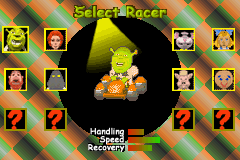
In a Single Player New Game, Single Player Training, or any Multiplayer mode, your first stop is the Select Racer menu. Use the Control Pad to highlight the racer of your choice, and press the A Button to confirm. Highlight each with the Control Pad to 

 (En,Fr,De,Es,It,Nl).png)
 (En,Fr,De,Es,It,Nl).png)
.png)
